
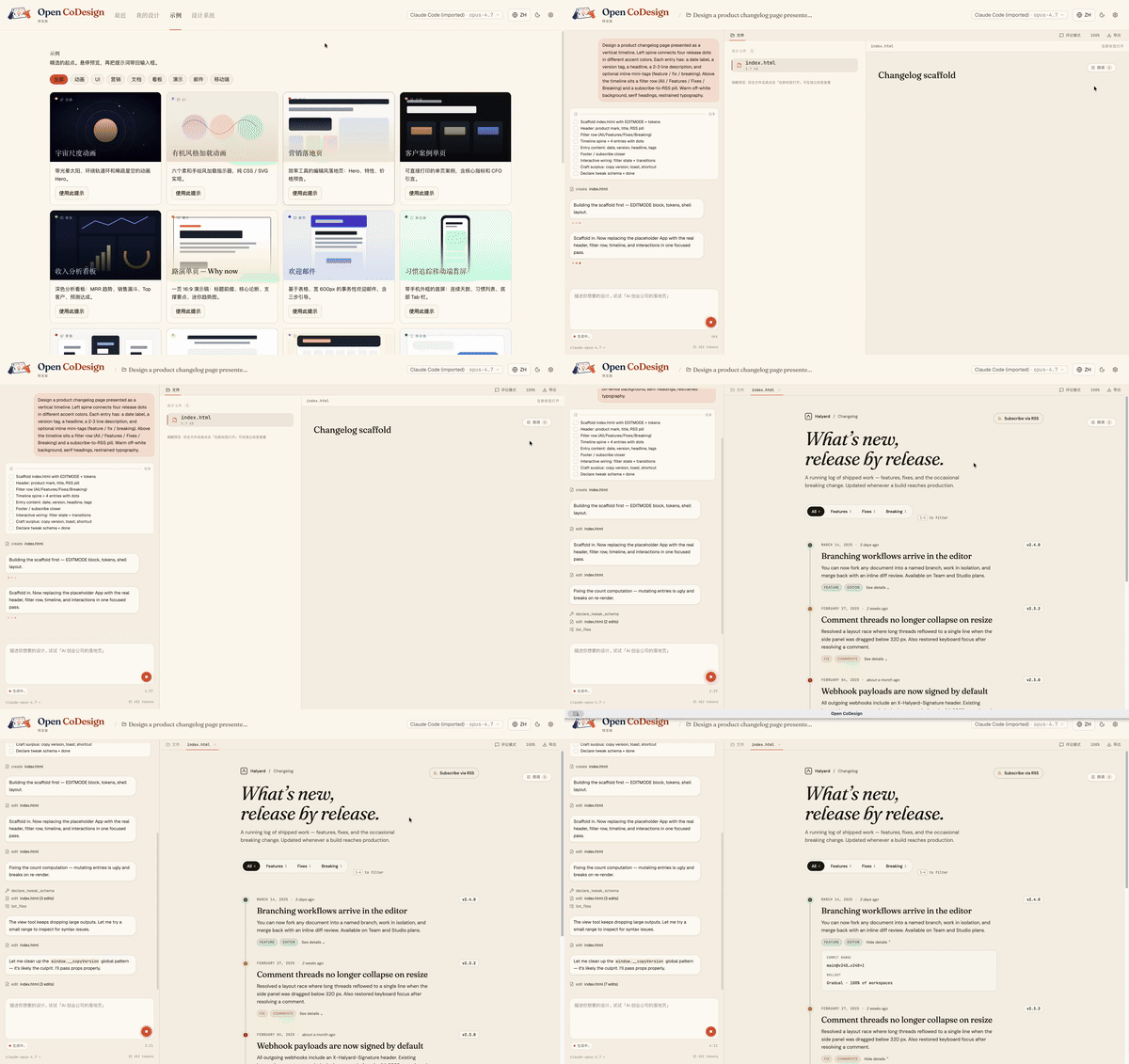
Turn a prompt into a polished prototype, slide deck, or marketing asset, locally, with the model you already use. Open CoDesign is the open-source Claude Design alternative — built for people who want the speed of AI-native design tools without subscription lock-in, cloud-only workflows, or being forced onto a single provider. An MIT-licensed desktop app, local-first from day one, with BYOK for any model (Claude, GPT, Gemini, DeepSeek, Kimi, GLM, Ollama, or any OpenAI-compatible endpoint) plus direct ChatGPT From a blank prompt to a finished artifact, the agent plans, writes, self-checks, and ships something with hover states, tabs, and empty states already wired up:
Open CoDesign
简体中文: README.zh-CN.md
Your prompts. Your model. Your laptop.
Turn prompts into polished artifacts — locally, openly, and with whichever model you already pay for.
Website · Quickstart · What's new · Changelog · Discussions · Docs · Contributing · Security
Open-source alternative to: Claude Design · v0 by Vercel · Lovable · Bolt.new · Figma AI







claude-code · claude-design-alternative · v0-alternative · bolt-alternative · lovable-alternative · figma-alternative · ai-design · design-to-code · prompt-to-design · ai-prototyping · desktop-design-tool · byok · local-first · multi-model · electron
What's new
- v0.2.0 (2026-05-09) — Agentic Design: workspace-backed sessions · permissioned local tools · Files panel upgrades · provider diagnostics · security hardening ·
DESIGN.mddesign systems - v0.1.4 (2026-04-23) — AI image generation · ChatGPT Plus/Codex subscription support · CLIProxyAPI one-click import · API config hardening
- v0.1.3 (2026-04-21) — Gemini
models/prefix fix · OpenAI-compatible relay "instructions required" fix · third-party relay SSE-truncation hint - v0.1.2 (2026-04-21) — Release pipeline · Homebrew / winget / Scoop packaging manifests
Full release history → · Changelog →
What it is
Turn a prompt into a polished prototype, slide deck, or marketing asset, locally, with the model you already use.
Open CoDesign is the open-source Claude Design alternative — built for people who want the speed of AI-native design tools without subscription lock-in, cloud-only workflows, or being forced onto a single provider. An MIT-licensed desktop app, local-first from day one, with BYOK for any model (Claude, GPT, Gemini, DeepSeek, Kimi, GLM, Ollama, or any OpenAI-compatible endpoint) plus direct ChatGPT Plus / Pro / Team subscription sign-in for Codex models. One-click import of existing Claude Code or Codex provider configs, or one-click ChatGPT sign-in, gets you running in under 90 seconds.
See it generate
From a blank prompt to a finished artifact, the agent plans, writes, self-checks, and ships something with hover states, tabs, and empty states already wired up:
Why people star it
- Runs on your laptop — no mandatory cloud workspace
- Works with your model — Claude, GPT, Gemini, Ollama, OpenRouter, and more
- Exports real files — HTML, PDF, PPTX, ZIP, Markdown
- Shows its work — live agent activity, visible tool calls, interruptible generation
Why Open CoDesign?
Open source, desktop-native, and built for people who do not want their design workflow locked to one model or one cloud.
| Open CoDesign | Claude Design | v0 by Vercel | Lovable | |
|---|---|---|---|---|
| Open source | ✅ MIT | ❌ Closed | ❌ Closed | ❌ Closed |
| Desktop native | ✅ Electron | ❌ Web only | ❌ Web only | ❌ Web only |
| Bring your own key | ✅ Any provider | ❌ Anthropic only | ❌ Vercel only | ⚠️ Limited |
| Local / offline | ✅ Fully local app | ❌ Cloud | ❌ Cloud | ❌ Cloud |
| Models | ✅ 20+ (Claude, GPT, Gemini, Ollama…) | Claude only | GPT-4o | Multi-LLM |
| Version history | ✅ Local sessions + workspace files | ❌ | ❌ | ❌ |
| Data privacy | ✅ On-device app state | ❌ Cloud-processed | ❌ Cloud | ❌ Cloud |
| Editable export | ✅ HTML, PDF, PPTX, ZIP, Markdown | ⚠️ Limited | ⚠️ Limited | ⚠️ Limited |
| Price | ✅ Free app, provider/subscription cost only | 💳 Subscription | 💳 Subscription | 💳 Subscription |
Highlights
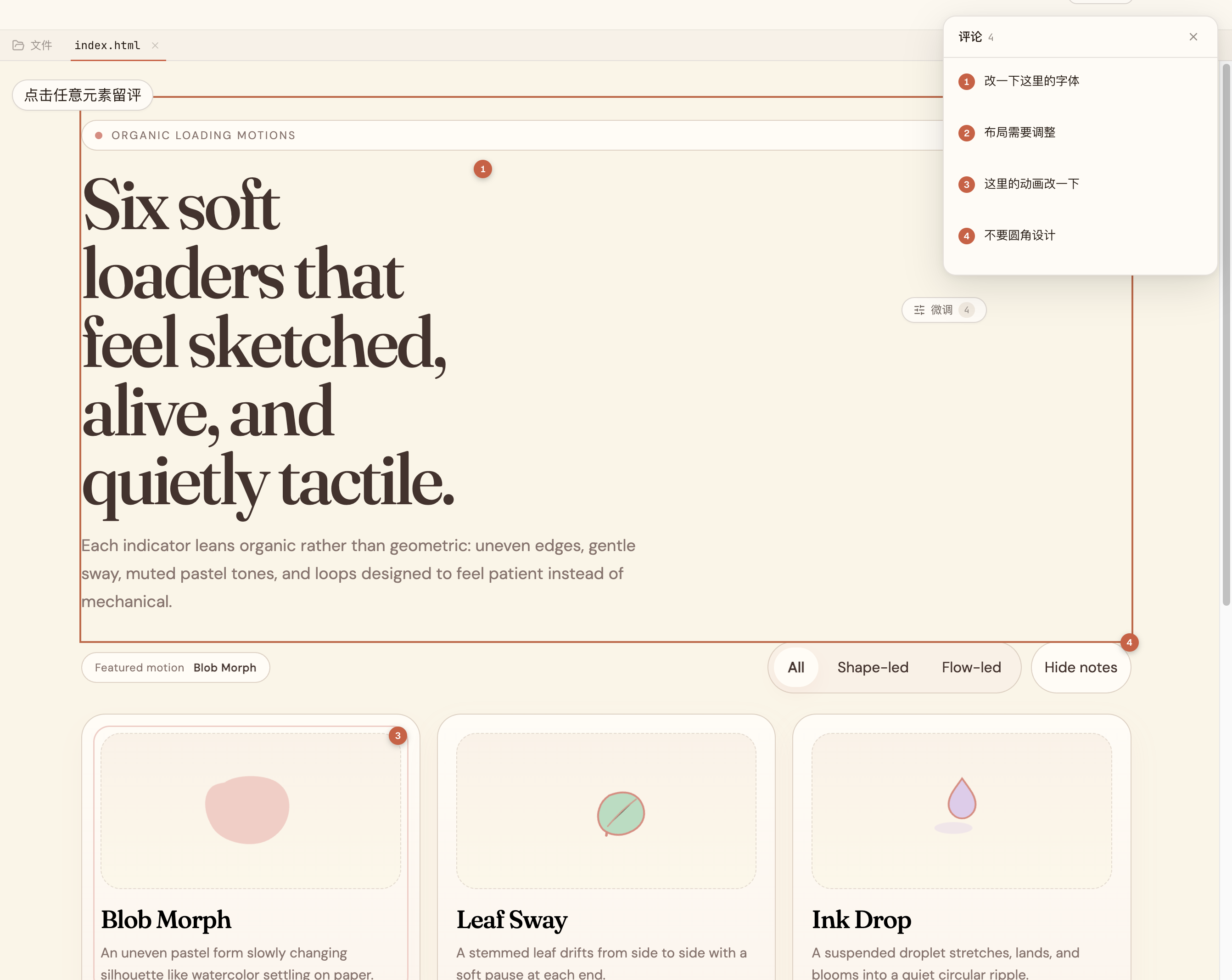
Comment, don’t retype. |
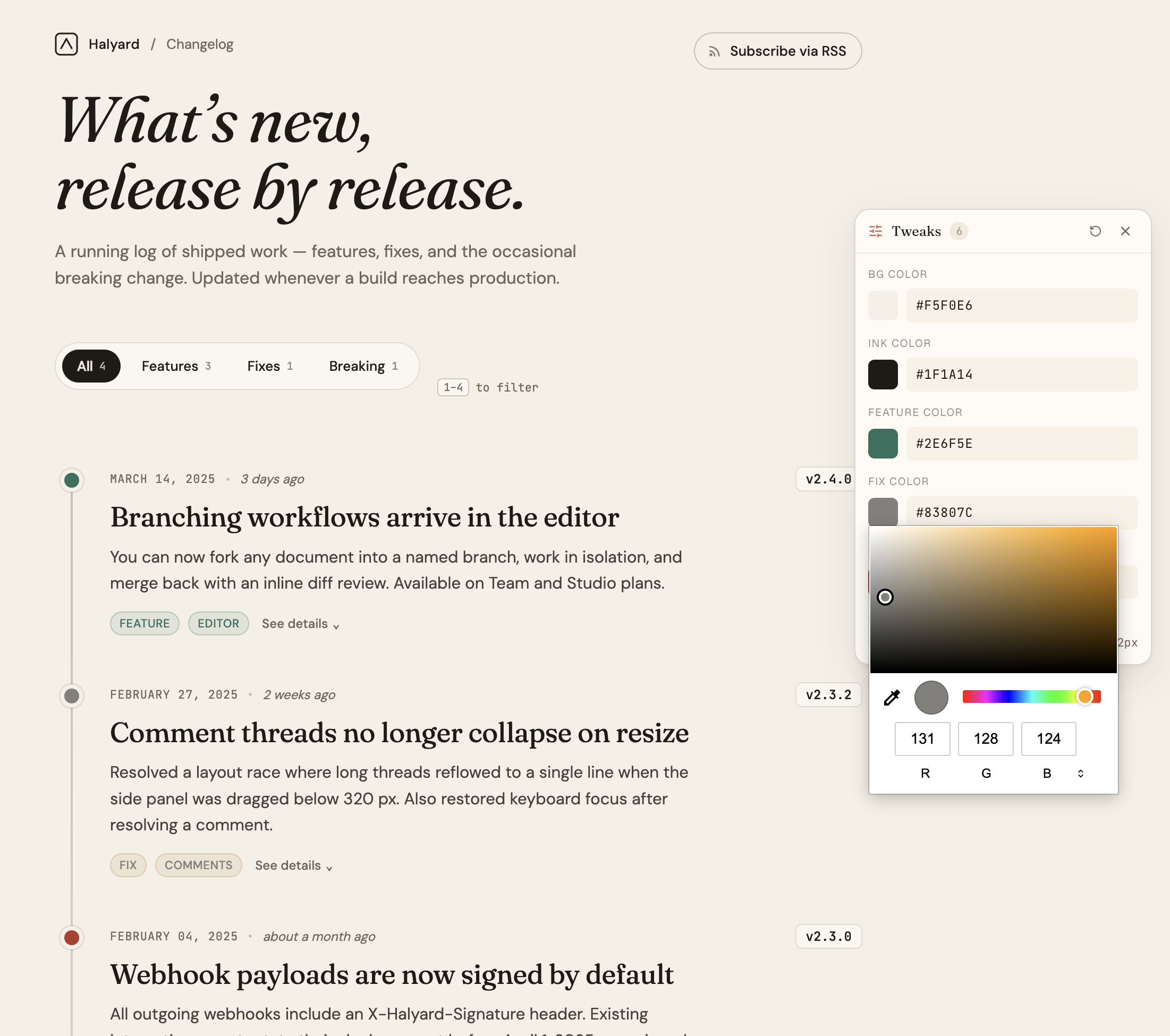
AI-tuned sliders. |
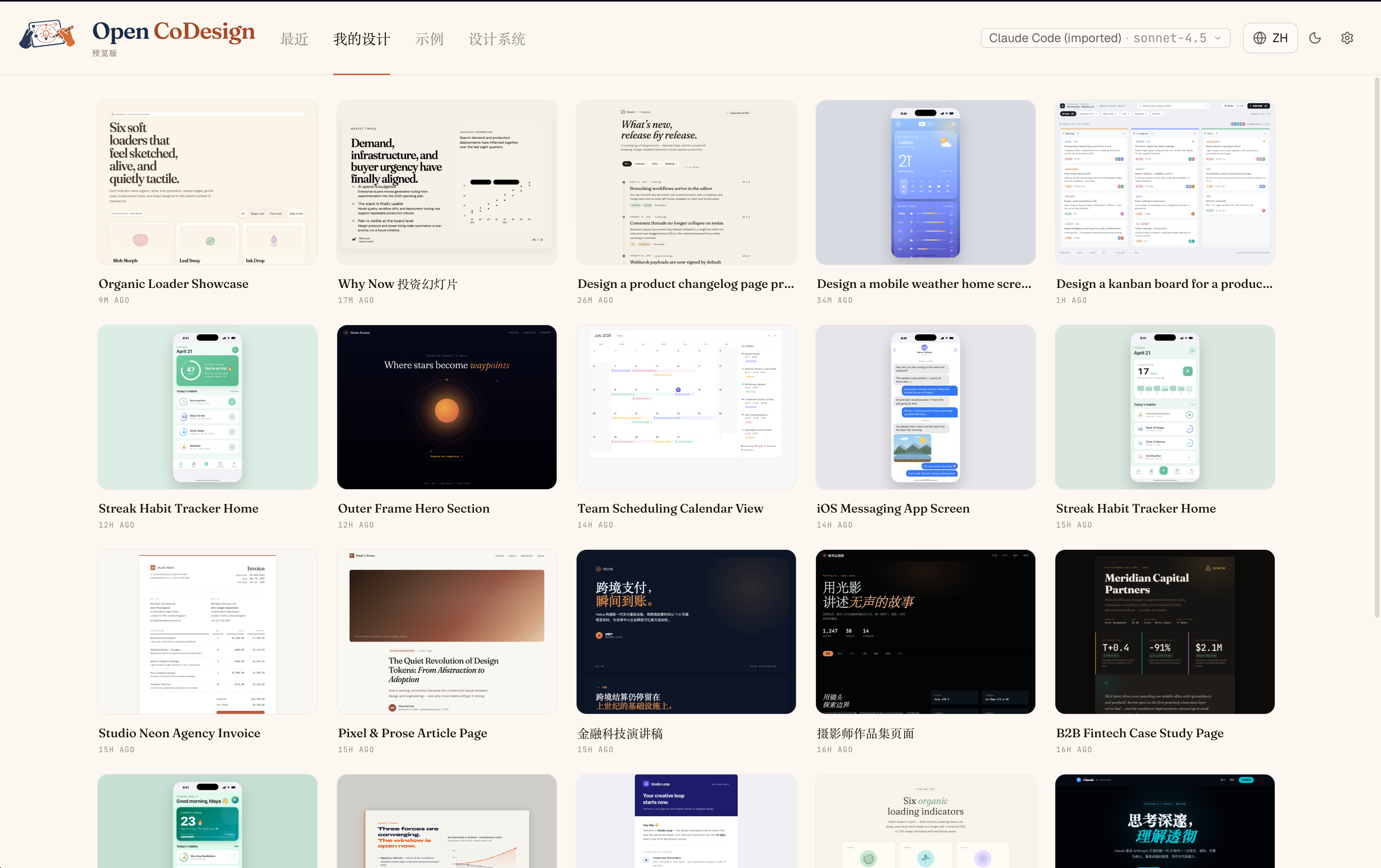
Every iteration, kept. |
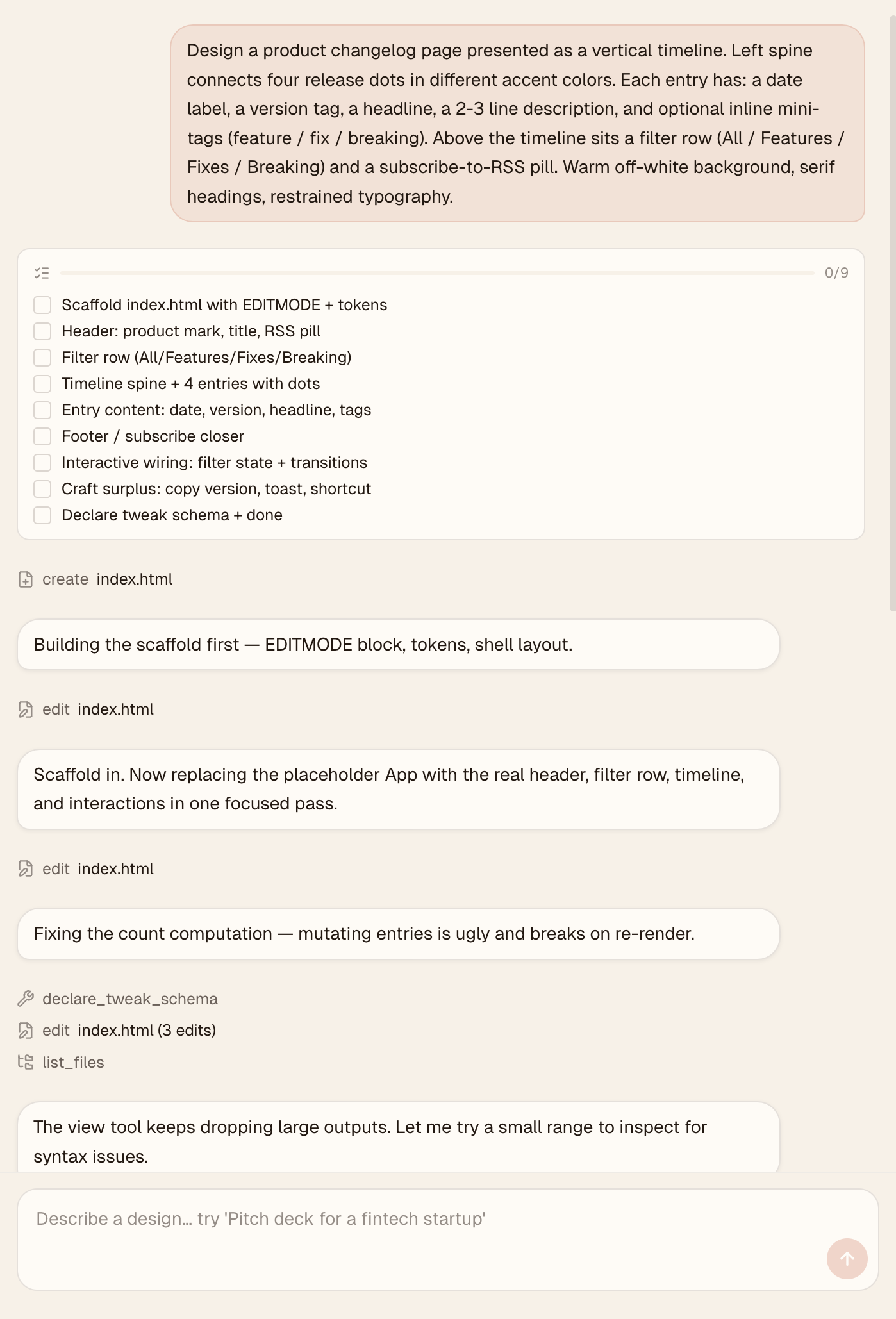
Watch the agent work. |
Quickstart
Time to first artifact: about 3 minutes
Requires: one API key, ChatGPT subscription sign-in, or local Ollama
Runs on: macOS 12+ (Monterey or later), Windows 10+, Linux (glibc ≥ 2.31)
1. Install
Package manager (recommended):
# macOS
brew install --cask opencoworkai/tap/open-codesign

# Windows — Scoop
scoop bucket add opencoworkai https://github.com/OpenCoworkAI/scoop-bucket
scoop install opencoworkai/open-codesign
Or direct download from the v0.2.0 GitHub Release:
| Platform | File |
|---|---|
| macOS (Apple Silicon) | open-codesign-*-arm64.dmg |
| macOS (Intel) | open-codesign-*-x64.dmg |
| Windows (x64) | open-codesign-*-x64-setup.exe |
| Windows (ARM64) | open-codesign-*-arm64-setup.exe |
| Linux (x64, AppImage) | open-codesign-*-x64.AppImage |
| Linux (x64, Debian/Ubuntu) | open-codesign-*-x64.deb |
| Linux (x64, Fedora/RHEL) | open-codesign-*-x64.rpm |
Each release ships with SHA256SUMS.txt and a CycloneDX SBOM (*-sbom.cdx.json) so you can verify what you downloaded.
More package managers
| Manager | Command | Status |
|---|---|---|
| Homebrew Cask (macOS) | brew install --cask opencoworkai/tap/open-codesign | 🟢 Live |
| Scoop (Windows) | scoop bucket add opencoworkai https://github.com/OpenCoworkAI/scoop-bucket && scoop install opencoworkai/open-codesign | 🟢 Live |
| winget (Windows) | winget install OpenCoworkAI.OpenCoDesign | 🟡 PR submitted; waiting for Microsoft review |
| Flathub (Linux) | flatpak install flathub ai.opencowork.codesign | ⏸ Deferred; needs signed build + AppStream metadata |
| Snap (Linux) | snap install --dangerous open-codesign-*.snap | 🟡 Attached to releases best-effort; Snap Store publish not yet wired |
After each stable tag push, CI syncs SHAs back into packaging/ and publishes downstream Homebrew/Scoop updates when the repo secrets are configured. The first winget submission is in review; once Microsoft accepts the package, future winget bumps can be automated from the release workflow. Every packaging/*/README.md documents its own channel.
Unsigned installer note: installers are not notarized or Authenticode-signed yet. On macOS Sequoia 15+ right-click → Open no longer bypasses Gatekeeper, and "Open Anyway" in System Settings often fails. Reliable one-liner:
xattr -cr "/Applications/Open CoDesign.app"Then double-click normally. (Older 0.1.x builds are installed as
/Applications/open-codesign.app.) On Windows: SmartScreen → More info → Run anyway.Want a verified build? Compile from source — see CONTRIBUTING.md.
2. Add a provider
On first launch, Open CoDesign opens the Settings page. Pick the path that matches how you already use models:
- ChatGPT subscription — sign in with ChatGPT to use Codex models without pasting an API key.
- API key — paste Anthropic (
sk-ant-...), OpenAI (sk-...), Google Gemini, OpenRouter, SiliconFlow, DeepSeek, or another supported provider key. - Local / keyless — use Ollama or an IP-allowlisted OpenAI-compatible gateway.
Credentials stay in ~/.config/open-codesign/config.toml and the ChatGPT OAuth token store under the app config directory. Nothing leaves your machine unless your chosen model route requires it.
3. Type your first prompt
Pick one of fifteen built-in demos — landing page, dashboard, pitch slide, pricing, mobile app, chat UI, event calendar, blog article, receipt/invoice, portfolio, settings panel, and more — or describe your own. A sandboxed prototype appears in seconds.
Bring your stack
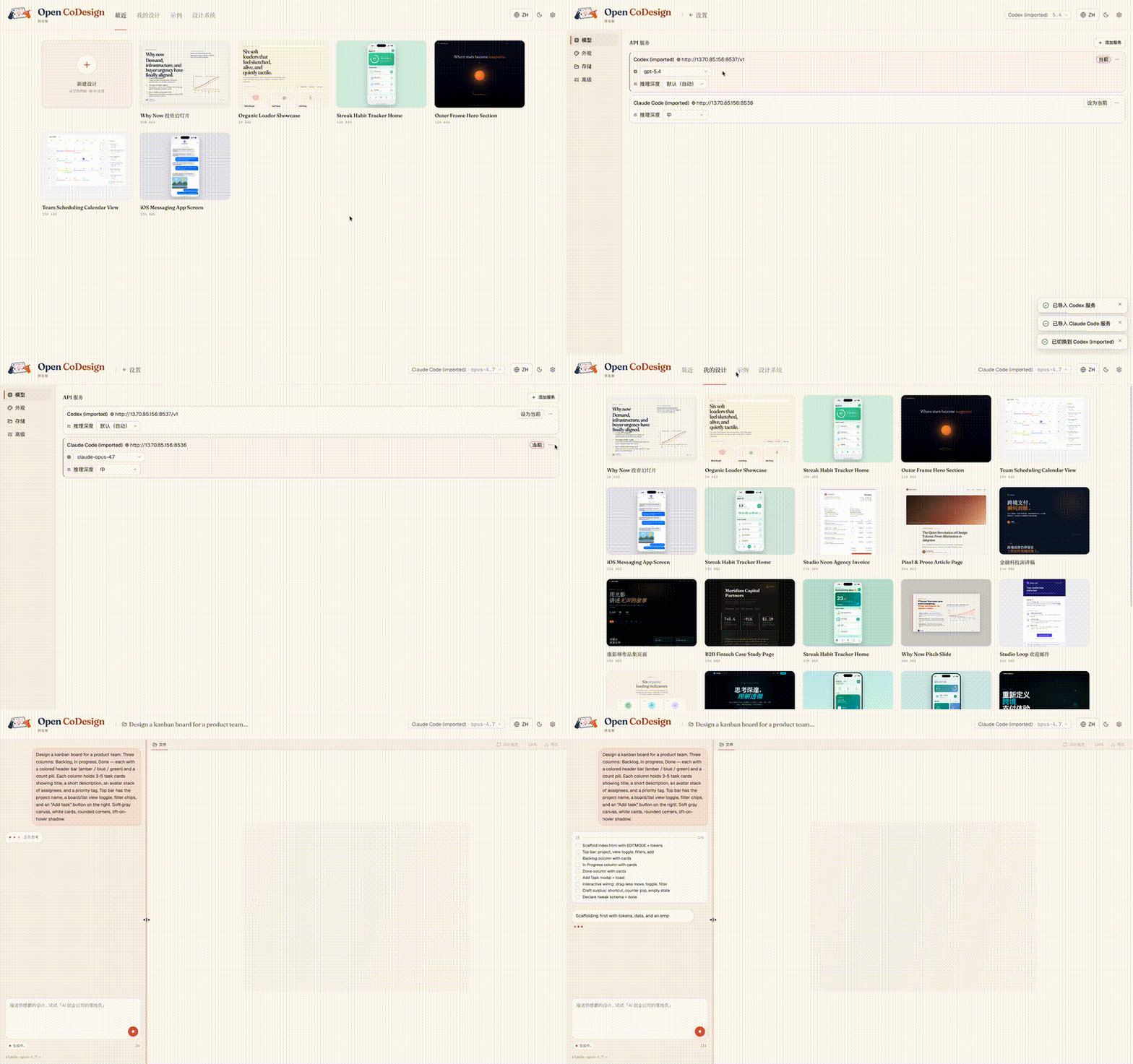
Already using Claude Code or Codex? API-key provider configs import in one click, with no copy-paste and no need to re-enter settings. If you use Codex through ChatGPT subscription login, sign in directly from Settings:
Built-in taste
Generic AI tools tend to produce generic output. Open CoDesign ships with twelve built-in design skill modules — slide decks, dashboards, landing pages, SVG charts, glassmorphism, editorial typography, heroes, pricing, footers, chat UIs, data tables, and calendars — plus a built-in taste layer that steers the model toward considered typography, purposeful whitespace, and meaningful color.
Every skill is available in every generation. Before the model writes a line of CSS, it selects the skills that fit the brief and reasons through layout intent, design-system coherence, and contrast, bringing higher-quality design behavior to whichever model you choose.
Add a SKILL.md to any project to teach the model your own taste.
What you get
Models and providers
- Unified provider model — Anthropic, OpenAI, Gemini, DeepSeek, OpenRouter, SiliconFlow, local Ollama, or any OpenAI-compatible relay; keyless (IP-allowlisted) proxies supported
- One-click import and sign-in — bring Claude Code / Codex API-key provider configs across, or sign in with ChatGPT subscription for Codex models
- Dynamic model picker — every provider exposes its real model catalogue, not a hardcoded shortlist
Generation and editing
- Prompt → HTML or JSX/React component prototype, rendered in a sandboxed iframe (vendored React 18 + Babel on-device)
- Fifteen built-in demos + twelve design skill modules — ready-to-edit starting points for common design briefs
- Live agent panel — watch tool calls stream in real time as the model edits files
- AI image generation — opt-in bitmap assets for heroes, product shots, backgrounds, and illustrations via OpenAI, OpenRouter, or signed-in ChatGPT subscription
- AI-generated sliders — the model emits the parameters worth tweaking (color, spacing, font)
- Comment mode — click any element in the preview to drop a pin, leave a note, and let the model rewrite only that region
- Generation cancellation — stop mid-stream without losing prior turns
Preview and workflow
- Phone / tablet / desktop preview — true responsive frames, switch with one click
- Files panel — inspect multi-file artifacts (HTML, CSS, JS) before export
- Instant design switching — the last five designs keep their preview iframes alive, so Hub ↔ Workspace and sidebar navigation stay zero-delay
- Connection diagnostic panel — one-click test for any provider, with actionable errors
- Per-generation token counter — see exactly how many tokens each run cost in the sidebar
- Settings with four tabs — Models, Appearance, Storage, and Advanced
- Light + dark themes, EN + 简体中文 UI with live toggle
Export and packaging
- Five export formats — HTML (inlined CSS), PDF (local Chrome), PPTX, ZIP, Markdown
- GitHub Release pipeline — unsigned DMG (macOS), EXE (Windows), AppImage (Linux). Code-signing lands in v0.5 along with opt-in auto-update
Roadmap
Current release: v0.2.0. The current release theme is Agentic Design.
Now — v0.2.0 shipped
v0.2 turns Open CoDesign from a one-shot generator into a local design agent with a real workspace:
- Design as session — every design is a pi session with JSONL history and a workspace folder on disk
- Permissioned agent loop — pi built-ins for read, write, edit, bash, grep, find, and ls, gated by Open CoDesign's permission UI
- Design tools on demand —
ask,scaffold,skill,preview,gen_image,tweaks,todos, anddone DESIGN.mdas shared memory — brand tokens and design-system decisions become editable files, not model memory- v0.1 migration path — existing SQLite designs migrate into workspaces and session history
Previous — v0.1.4
- AI image generation — opt-in bitmap assets through OpenAI image models or OpenRouter image models
- ChatGPT Plus / Codex subscription login — one-click OAuth for users who do not want to paste an API key
- CLIProxyAPI one-click import — auto-detect a running local proxy and bring it into Settings
- API config hardening — clearer relay diagnostics for timeouts, SSE truncation, missing
/models, and incompatible Messages APIs
Later — v0.2.x and beyond
- Renderer polish for the new
ask,preview, tweaks, and process-management surfaces - Cost transparency — pre-generation estimate + weekly budget (per-generation token count already shipped)
- Version snapshots + side-by-side diff
- Three-style parallel exploration
- Codebase → design system (token extraction)
- Code-signing (Apple ID + Authenticode) + opt-in auto-update — v0.5
- Figma layer export — post-1.0
Have a different priority in mind? Open an issue or 👍 an existing one — we do read them.
Star History
Built on
- Electron + React 19 + Vite 6 + Tailwind v4
@mariozechner/pi-aiandpi-coding-agent(model/provider and agent-loop primitives)electron-builder
Reporting issues
Found a bug or have a feature request?
- Search existing issues first.
- Generate a diagnostics bundle — Settings → Storage → Export diagnostics (API keys and prompts are redacted automatically).
- Open a new issue using our bug report or feature request template.
- For security vulnerabilities, see SECURITY.md.
More from OpenCoworkAI
If you like Open CoDesign, you may also want to check out our earlier project, Open Cowork, an open-source AI agent desktop app for Windows and macOS with one-click install, multi-model support, sandbox isolation, and built-in skills.
Community
Open CoDesign first launched on the LINUX DO community — thanks to everyone there for the early feedback and discussion.
- GitHub Discussions — share your designs in Show & Tell, ask questions in Q&A, and propose features in Ideas.
- LINUX DO — Chinese-speaking discussion, use tips, and feedback (primary community).
- GitHub Issues — bug reports and reproducible problems.
WeChat group
For Chinese-speaking users, we also keep a WeChat group for product updates, usage questions, and community discussion.
⚠️ The WeChat QR code rotates every 7 days and is currently valid until May 16. If the code has expired, please leave a message in GitHub Issues and we will refresh the image in-repo.
See also the Chinese README: README.zh-CN.md#社群.
Contributing
Read CONTRIBUTING.md. Open an issue before writing code and run pnpm lint && pnpm typecheck && pnpm test before a PR.
License
MIT — fork it, ship it, sell it. Third-party notices remain in NOTICE.
Cite this project
If you reference Open CoDesign in a paper, article, or product comparison, please cite the repository as:
@misc{open_codesign_github,
  author       = {OpenCoworkAI Contributors},
  title        = {Open CoDesign: An Open-Source Desktop AI Design Tool},
  year         = {2026},
  howpublished = {\url{https://github.com/OpenCoworkAI/open-codesign}},
  note         = {GitHub repository}
}
Or the machine-readable CITATION.cff at the repo root.
Videos
Open Design - Open Source Claude Design! Fully Free AI Design System!
WorldofAI · 50K views
OpenCode + Graphify: Stop Wasting Tokens in Opencode, Every Developer Use this
AI Stack Engineer · 43K views
Open Design : An open-source alternative to Claude Design (Anthropic)
Codedigipt · 6K views
What people are saying
“macOS 上从 0.1.x 升级上来的,升级后工作空间内容丢失”
GH↑ 1mx2913↗
“Request for Collaboration Quotation — Hello, We would like to explore a potential collaboration with you. Could you please take a look at the following site? 🔗 github.com/Doloffer-g/guide If you’re interested, could…”
GH↑ 1eunji-a11y↗
“Local A.I Image Generation Models — Greetings, thanks a lot for your work, how about allow using local A.I image generation models (Stable Diffusion, Flux etc), that would align with your design philosophy? is it possibl…”
GH↑ 1cewolf-arch↗
“Spiral detector: auto-pause after N consecutive non-progressive turns — Spiral detector: auto-pause after N consecutive non-progressive turns Why now While dogfooding #225's decompose flow (PR #241), I observed a textboo…”
GH↑ 1HomenShum↗
“Capability-aware multi-provider failover with budget gates — Capability-aware multi-provider failover with budget gates Why now While dogfooding #225's decompose flow on OpenRouter free tier, I hit 4 consecutive `429 Pro…”
GH↑ 1HomenShum↗
You might also like
AI
career ops
Companies use AI to filter candidates. I just gave candidates AI to choose companies. Career-Ops (career-ops.org, also known as careerops) turns any AI coding CLI into a full job search command center. Instead of manually tracking applications in a spreadsheet, you get an AI-powered pipeline that: Career-ops is agentic: Claude Code navigates career pages with Playwright, evaluates fit by reasoning about your CV vs the job description (not keyword matching), and adapts your resume per listing.
AI
CLI Anything
CLI-Anything: Bridging the Gap Between AI Agents and the World's Software 🌐 CLI-Hub: pip install cli-anything-hub then cli-hub install — browse, install, and manage all community-built CLIs. Want to add your own? Open a PR — the hub updates instantly. 🎬 See Demos: Watch AI agents use generated CLIs plus preview, live preview, and trajectory loops to produce real artifacts — CAD builds, 3D scenes, diagrams, gameplay, subtitles, and more.
AI
odysseus
A self-hosted AI workspace -- meant to be the self-hosted version of the UI experience you get from ChatGPT and Claude. But with more jank and fun. Running on your own hardware, with your own data -- local-first, privacy-first, and no trojan. A full, hover-to-play tour lives on the landing page (docs/index.html). Defaults work out of the box: clone, run, then configure models/search/email inside Settings. Only edit .env for deployment-level overrides like APPBIND, APPPORT, AUTHENABLED, DATABASEURL, or a pre-seeded admin password.
AI
ai engineering from scratch
Most AI material teaches in scattered pieces. A paper here, a fine-tuning post there, a flashy agent demo somewhere else. The pieces rarely line up. You ship a chatbot but can't explain its loss curve. You hook a function to an agent but can't say what attention does inside the model that's calling it. This curriculum is the spine. 20 phases, 503 lessons, four languages: Python, TypeScript, Rust, Julia. Linear algebra at one end, autonomous swarms at the other. Every algorithm gets built from raw math first. Backprop. Tokenizer. Attention. Agent loop. By the time PyTorch shows up, you already know what it's doing under the hood. Each lesson runs the same loop: read the problem, derive the math, write the code, run the test, keep the artifact. No five-minute videos, no copy-paste deploys,