
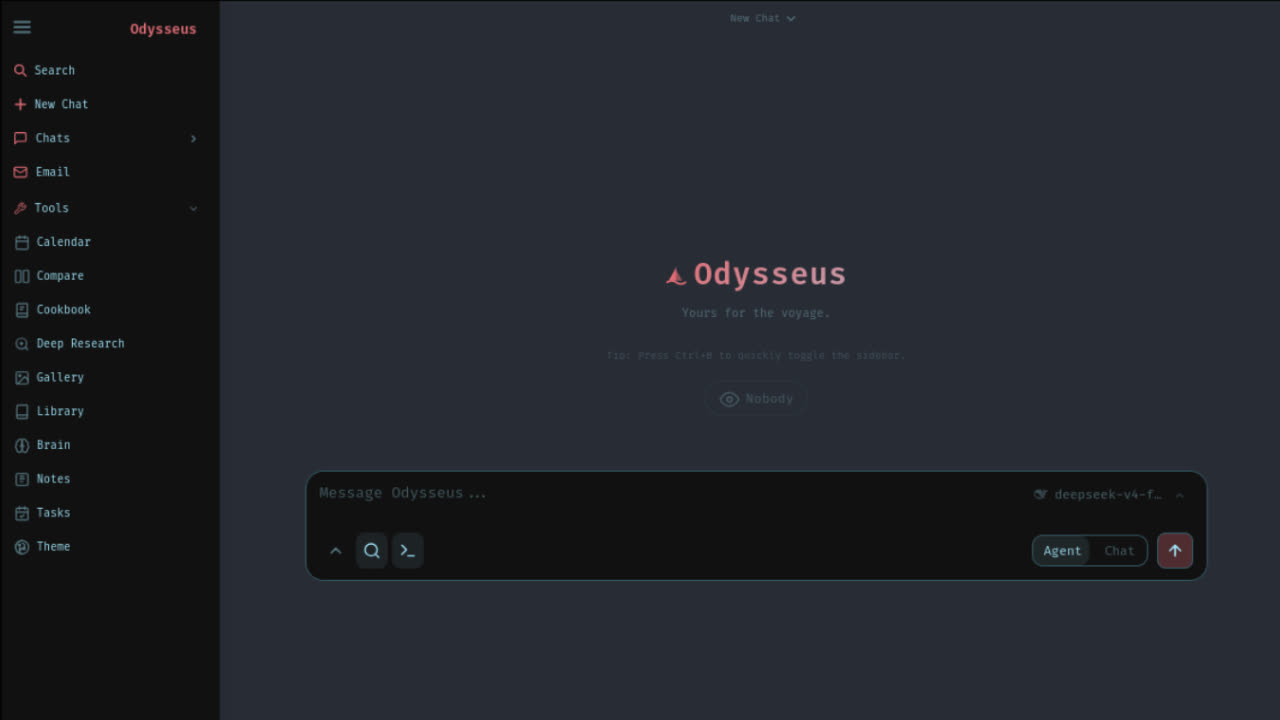
A self-hosted AI workspace -- meant to be the self-hosted version of the UI experience you get from ChatGPT and Claude. But with more jank and fun. Running on your own hardware, with your own data -- local-first, privacy-first, and no trojan. A full, hover-to-play tour lives on the landing page (docs/index.html). Defaults work out of the box: clone, run, then configure models/search/email inside Settings. Only edit .env for deployment-level overrides like APPBIND, APPPORT, AUTHENABLED, DATABASEURL, or a pre-seeded admin password.
Odysseus
───────────────────────────────────────────────
 ⊹ ࣪ ˖ ૮( ˶ᵔ ᵕ ᵔ˶ )っ  Odysseus vers. 1.0
───────────────────────────────────────────────

A self-hosted AI workspace -- meant to be the self-hosted version of the UI experience you get from ChatGPT and Claude. But with more jank and fun. Running on your own hardware, with your own data -- local-first, privacy-first, and no trojan.
Features
- Chat -- chat with any local model or API; adding them is super simple.
vLLM · llama.cpp · Ollama · OpenRouter · OpenAI - Agent -- hand it tools and let it run the whole task itself.
built on opencode · MCP · web · files · shell · skills · memory - Cookbook -- Scans your hardware, recommends models, click to download and serve.. easy!
built on llmfit · VRAM-aware · GGUF / FP8 / AWQ · fit scoring · vLLM / llama.cpp serving - Deep Research -- multi-step runs that gather, read, and synthesize sources into a nice visual report.
adapted from Tongyi DeepResearch - Compare -- a fun tool to compare models side by side. Test completely blind, no bias!
multi-model · blind test · synthesis - Documents -- YOU write the text, AI is there to assist, not the opposite.
multi-tab editor · markdown · HTML · CSV · syntax highlighting · AI edits · suggestions - Memory / Skills -- Persistent memory and skills, your agent evolves over time as it better understands you and your tasks!
ChromaDB · fastembed (ONNX) · vector + keyword retrieval · import/export - Email -- IMAP/SMTP inbox with AI triage built in: urgency reminders, auto-tag, auto-summary, auto-reply drafts, auto-spam.
IMAP · SMTP · per-account routing · CalDAV-aware - Notes & Tasks -- Quick notes with reminders, a todo list, and scheduled tasks the agent can act on.
note pings · checklist · cron-style tasks · ntfy / browser / email channels - Calendar -- Local-first calendar with CalDAV sync to Radicale / Nextcloud / Apple / Fastmail.
CalDAV pull · .ics import/export · per-calendar colors · agent-aware - Works on mobile -- looks and runs great on your phone, not just desktop.
responsive · installable (PWA) · touch gestures - Extras -- more to explore, happy if you give it a go!
image editor · theme editor · file uploads (vision + PDF) · web search · presets · sessions · 2FA
Demo
A full, hover-to-play tour lives on the landing page (docs/index.html).
Screenshots / clips
Chat & Agents

Deep Research

Compare

Documents

Notes & Tasks

Quick Start
Defaults work out of the box: clone, run, then configure models/search/email
inside Settings. Only edit .env for deployment-level overrides like
APP_BIND, APP_PORT, AUTH_ENABLED, DATABASE_URL, or a pre-seeded admin password.
On first setup, Odysseus creates an admin account (admin unless
ODYSSEUS_ADMIN_USER is set) and prints a temporary password in the terminal.
For Docker installs, the same line is in docker compose logs odysseus.
Use that for the first login, then change it in Settings.
Contributing? See CONTRIBUTING.md for setup, testing, and pull request guidelines.
Docker (recommended)
git clone https://github.com/pewdiepie-archdaemon/odysseus.git
cd odysseus
cp .env.example .env       # optional, but recommended for explicit defaults
docker compose up -d --build
Open http://localhost:7000 when the containers are healthy. Docker Compose
binds the web UI to 127.0.0.1 by default. If the port is taken, set
APP_PORT=7001 in .env and recreate the container. Set APP_BIND=0.0.0.0
only when you intentionally want LAN/reverse-proxy access.
Native Linux / macOS
git clone https://github.com/pewdiepie-archdaemon/odysseus.git
cd odysseus
python3 -m venv venv
source venv/bin/activate
pip install -r requirements.txt
python setup.py
python -m uvicorn app:app --host 127.0.0.1 --port 7000
Requirements: Python 3.11+. Cookbook also needs tmux for background model
downloads and serves. The app itself is lightweight; local model serving is the
heavy part and depends on the model, runtime, GPU, and VRAM, so small hosts can
connect to API or remote model servers instead. Use --host 0.0.0.0 only when you intentionally want LAN/reverse-proxy access.
Apple Silicon
Docker on macOS cannot use the Metal GPU. For GPU-accelerated Cookbook on an M-series Mac, run Odysseus natively:
git clone https://github.com/pewdiepie-archdaemon/odysseus.git
cd odysseus
./start-macos.sh
It launches at http://127.0.0.1:7860. To expose it to your phone over a trusted LAN/VPN such as Tailscale, bind all interfaces:
ODYSSEUS_HOST=0.0.0.0 ./start-macos.sh
# then open http://<tailscale-ip>:7860
The script also reads .env at startup, so APP_BIND=0.0.0.0 and APP_PORT
set there are picked up automatically without a command-line override each run.
Keep AUTH_ENABLED=true (the default) before binding outside loopback. Do not
expose this port directly to the public internet. To build a clickable app wrapper:
./build-macos-app.sh
Cookbook, GPU, Ollama, and troubleshooting notes
Docker bundled services. Compose starts Odysseus, ChromaDB, SearXNG, and
ntfy. Odysseus and the bundled service ports bind to 127.0.0.1 by default, so
they are reachable from the host but not exposed to your LAN/public internet
unless you opt in.
Cookbook storage in Docker. Downloads live in ./data/huggingface
(~/.cache/huggingface in the container). Cookbook-installed Python CLIs and
serve engines live in ./data/local (~/.local in the container), so they
survive container recreation.
Remote servers. In Cookbook -> Settings -> Servers, generate the
Odysseus SSH key and add the public key to the remote server's
~/.ssh/authorized_keys. From the host you can also run:
ssh-copy-id -i data/ssh/id_ed25519.pub user@server
Docker GPU overlays. CPU-only users can skip this section. Cookbook can only detect GPUs that Docker exposes to the container — if the host runtime or device passthrough is not configured, Cookbook sees the iGPU, another card, or CPU instead of your intended GPU.
For NVIDIA, scripts/check-docker-gpu.sh diagnoses GPU passthrough and can
optionally install the host runtime or update .env.
# Read-only diagnostic (default — installs nothing, never edits .env):
scripts/check-docker-gpu.sh

# Print OS-specific install commands without running them:
scripts/check-docker-gpu.sh --print-install-commands

# Install NVIDIA Container Toolkit on Ubuntu/Debian (requires sudo):
scripts/check-docker-gpu.sh --install-nvidia-toolkit

# Write COMPOSE_FILE to .env (only when GPU passthrough is confirmed working):
scripts/check-docker-gpu.sh --enable-nvidia-overlay

# Full assisted setup — install toolkit, then enable overlay if passthrough works:
scripts/check-docker-gpu.sh --install-nvidia-toolkit --enable-nvidia-overlay
Safety notes:
- The app never installs host GPU runtime automatically.
- The app never edits
.envautomatically. .envis only modified when--enable-nvidia-overlayis explicitly passed, and only after GPU passthrough succeeds.--yesskips prompts but does not bypass the passthrough gate..env.bak.*backups created by--enable-nvidia-overlayare ignored by Git and the Docker build context.
To enable manually without the script, add this to .env:
COMPOSE_FILE=docker-compose.yml:docker/gpu.nvidia.yml
AMD / ROCm. AMD setup is read-only diagnostic plus manual .env edit. Run:
scripts/check-docker-amd-gpu.sh
Then add the reported values to .env, replacing RENDER_GID with your host's
numeric render group id:
COMPOSE_FILE=docker-compose.yml:docker/gpu.amd.yml
RENDER_GID=989
For NVIDIA/AMD GPU support, also read the comments in the selected overlay file: docker/gpu.nvidia.yml or docker/gpu.amd.yml.
Stack-management UIs (Portainer, Coolify, Dockhand, etc.). These tools
often accept only a single Compose file and do not reliably honor COMPOSE_FILE
or multiple -f overlays. CLI users should keep using the COMPOSE_FILE
overlay workflow above. For stack UIs, point the stack at one of the standalone
files instead, which bundle the base stack plus the GPU settings:
docker-compose.gpu-nvidia.yml— still requires the NVIDIA Container Toolkit on the host.docker-compose.gpu-amd.yml— still requires host ROCm/kfd/DRI setup, thevideo/rendergroup membership, andRENDER_GIDwhen needed.
The base docker-compose.yml plus the docker/gpu.*.yml overlays remain the
source of truth; the standalone files mirror them for single-file deployments.
Verify after enabling either overlay:
docker compose exec odysseus nvidia-smi -L   # NVIDIA
docker compose exec odysseus sh -lc 'test -e /dev/kfd && test -d /dev/dri && ls -l /dev/kfd /dev/dri/renderD*'  # AMD
GPU passthrough ≠ llama.cpp CUDA.
nvidia-smipassing inside the container confirms Docker GPU access, but llama.cpp also needscudartand the CUDA Toolkit at runtime. If Cookbook logs showUnable to find cudart library,Could NOT find CUDAToolkit,CUDA Toolkit not found, or tensors/layers assigned to CPU, that is a Cookbook/llama.cpp build issue — not a Docker passthrough failure. Re-install the serve engine via Cookbook → Dependencies to get a CUDA-enabled build.The same split applies to AMD/ROCm: seeing
/dev/kfdand/dev/driinside the container confirms device passthrough, not ROCm userspace or a ROCm-enabled vLLM/llama.cpp build.rocm-smiandrocminfoare not expected inside the slim Odysseus image.
Ollama with Docker. If Ollama runs on the host, add this endpoint in Settings:
http://host.docker.internal:11434/v1
Ollama must listen outside its own loopback interface:
OLLAMA_HOST=0.0.0.0:11434 ollama serve
This connects Odysseus in Docker to an Ollama server that is already running on
your host machine; it does not start Ollama inside the container.
host.docker.internal is Docker's hostname for the host machine from inside the
container. Cookbook Serve is a separate workflow for serving downloaded
models through Odysseus/llama.cpp, so Windows users with an existing Ollama
install usually only need to add the endpoint in Settings.
Useful checks.
docker compose ps
docker compose logs --tail=120 odysseus
docker compose logs odysseus | grep -E 'ChromaDB|MemoryVectorStore|DEGRADED'
macOS details. start-macos.sh installs Homebrew deps, creates the venv,
runs setup, and starts uvicorn on port 7860 because AirPlay often holds
7000. It uses llama.cpp/Ollama for Metal. vLLM/SGLang are CUDA/ROCm-only and
do not run on macOS. MLX-only models are not served by Odysseus.
Native Windows
One-command launcher (creates the venv, installs deps, runs setup, starts the server; safe to re-run):
git clone https://github.com/pewdiepie-archdaemon/odysseus.git
cd odysseus
powershell -ExecutionPolicy Bypass -File .\launch-windows.ps1
Or do it by hand:
git clone https://github.com/pewdiepie-archdaemon/odysseus.git
cd odysseus
py -3.11 -m venv venv
venv\Scripts\Activate.ps1
pip install -r requirements.txt
python setup.py
python -m uvicorn app:app --host 127.0.0.1 --port 7000
If python points at an older interpreter, use py -3.12 (or another installed
3.11+ version) for the venv step.
Requirements: Python 3.11+. The core app (chat, agent, memory, documents,
email, calendar, deep research) runs fully native. For full Cookbook background
model downloads and the agent shell tool, also install
Git for Windows (provides bash.exe).
Local GPU serving of vLLM/SGLang needs Linux/WSL2; for a local model on Windows,
Ollama is the easiest path — point Odysseus at
http://localhost:11434/v1 in Settings.
Open http://localhost:7000, log in with the generated admin password,
and configure everything else inside Settings.
Troubleshooting & Advanced Setup
chromadb-client conflicts with embedded ChromaDB
If chromadb-client (the lightweight HTTP-only package) is installed alongside the full chromadb package, Odysseus starts but ChromaDB silently falls back to HTTP-only mode and fails.
Fix: uninstall chromadb-client and force-reinstall the full package:
./venv/bin/pip uninstall chromadb-client -y
./venv/bin/pip install --force-reinstall chromadb
HTTPS + LAN/Tailscale exposure
To expose Odysseus on a local network or Tailscale with HTTPS:
- Change the bind address to
0.0.0.0in.env(APP_BIND=0.0.0.0orODYSSEUS_HOST=0.0.0.0). - Generate a locally-trusted cert for your LAN/Tailscale IPs using mkcert:
mkcert -install mkcert -cert-file cert.pem -key-file key.pem 192.168.1.100 tailscale-ip - Run
uvicornwith the generated certs:python -m uvicorn app:app --host 0.0.0.0 --port 7000 --ssl-certfile=cert.pem --ssl-keyfile=key.pem - Install the
mkcertCA on any other device you want to access Odysseus from (e.g., for iOS, email therootCA.pemto yourself, install the profile, and trust it in Certificate Trust Settings).
Optional Dependencies
requirements-optional.txt contains packages that unlock extra features. It is not installed by default.
| Package | Feature unlocked |
|---|---|
faster-whisper | Local speech-to-text (microphone -> text) via the "local" STT provider. |
duckduckgo-search | DuckDuckGo as a search provider option. |
PyMuPDF | PDF page rendering in the side viewer panel and form-filling. (Note: AGPL-3.0) |
markitdown | Office/EPUB document text extraction (converts .docx/.xlsx/.pptx/.xls/.epub to Markdown). |
Security Notes
Odysseus is a self-hosted workspace with powerful local tools: shell access, file uploads, model downloads, web research, email/calendar integrations, and API tokens. Treat it like an admin console.
- Keep
AUTH_ENABLED=truefor any network-accessible deployment. - Keep
LOCALHOST_BYPASS=falseoutside local development. - Use
SECURE_COOKIES=truewhen Odysseus is served through HTTPS by a trusted reverse proxy or private access gateway. - Do not expose it directly to the public internet without HTTPS and a trusted reverse proxy or private access layer.
- Keep
.env,data/,logs/, databases, uploads, generated media, backups, auth/session files, API keys, and model/provider tokens out of Git and private shares. They are ignored by default. - Review
data/auth.jsonafter first boot: disable open signup unless you intentionally want it, make only your own account admin, and keep demo/test accounts non-admin. - Non-admin users do not get shell/Python/file read/write by default, and admin-only routes/tools such as MCP management, API tokens, webhooks, model/cookbook serving, backup/vault, and app settings are admin-gated. Other features are controlled by per-user privileges, so review each user's privileges before exposing a deployment.
- Rotate any API keys or tokens that were ever pasted into a shared chat, demo, screenshot, or log.
- If you enable API tokens or webhooks, create separate tokens per integration and delete unused ones.
- Prefer binding manual development runs to
127.0.0.1; bind to0.0.0.0only when you intentionally want LAN/reverse-proxy access. - Keep ChromaDB, SearXNG, ntfy, Ollama, vLLM, llama.cpp, databases, and raw model/provider APIs internal-only. Expose only the authenticated Odysseus web/API entrypoint through your trusted proxy or private access layer.
- Before publishing a fork, run
git status --shortand confirm no private files from.env,data/,logs/, uploads, backups, or local databases are staged.
Private or proxied deployments
Odysseus serves plain HTTP on its app port. Docker Compose binds Odysseus and the bundled services to 127.0.0.1 by default, so a typical production/private setup is:
- Keep Odysseus on localhost, for example
127.0.0.1:7000. - Terminate HTTPS at a trusted reverse proxy or private access gateway.
- Put the authenticated Odysseus web/API entrypoint behind that layer.
- Keep raw service and model ports internal-only.
Cloudflare Access, Tailscale, Caddy, nginx, and Traefik can all fit this pattern; none are required by Odysseus. If your access layer reaches Odysseus on the same host, proxy to http://127.0.0.1:7000 and keep AUTH_ENABLED=true, LOCALHOST_BYPASS=false, and SECURE_COOKIES=true.
Common internal-only ports from the default docs/compose setup:
| Port | Service |
|---|---|
7000 | Odysseus raw app port |
8080 | SearXNG |
8091 | ntfy |
8100 | ChromaDB host port for manual/compose access |
11434 | Ollama |
8000-8020 | Common local model/provider APIs |
Contributing
Help is welcome. The best entry points are fresh-install testing, provider setup bugs, mobile/editor polish, docs, and small focused refactors. See ROADMAP.md for the current help-wanted list.
Configuration
Most setup is done inside the app with /setup or Settings. Use .env
for deployment-level defaults and secrets you want present before first boot.
Key settings:
| Variable | Default | Description |
|---|---|---|
LLM_HOST | localhost | Your LLM server (e.g. llm-host.local:8000) |
LLM_HOSTS | -- | Comma-separated list for model discovery |
OPENAI_API_KEY | -- | Optional OpenAI key. Prefer adding providers in the app unless pre-seeding. |
SEARXNG_INSTANCE | http://localhost:8080 | SearXNG URL. Docker overrides this to http://searxng:8080. |
SEARXNG_SECRET | generated on first Docker boot | Optional SearXNG cookie/CSRF secret. Leave blank unless you need to pin it. |
APP_BIND | 127.0.0.1 | Docker Compose host bind address for the web UI. Use 0.0.0.0 only for intentional LAN/reverse-proxy access. |
APP_PORT | 7000 | Docker Compose host port for the web UI. |
AUTH_ENABLED | true | Enable/disable login |
LOCALHOST_BYPASS | false | Development-only auth bypass for loopback requests. Keep false for shared/network deployments. |
SECURE_COOKIES | false | Set true when serving Odysseus through HTTPS at a trusted proxy or private access gateway. |
DATABASE_URL | sqlite:///./data/app.db | Database connection string |
CHROMADB_HOST | localhost | ChromaDB host for vector memory. Docker overrides this to chromadb. |
CHROMADB_PORT | 8100 | ChromaDB port for manual host runs. Docker overrides this to 8000. |
EMBEDDING_URL | -- | OpenAI-compatible embeddings endpoint |
Built-in MCP servers (optional setup)
Odysseus auto-registers a few built-in MCP servers at startup. The npx-based ones (currently the browser server, @playwright/mcp) only start when their npm package is already in the local npx cache. If a package isn't cached, that server is skipped with a startup log message explaining what to do, so a fresh install does not block on a multi-minute npm download or hang if Playwright system deps are missing.
To enable the browser MCP (page navigation, screenshots, vision), run once:
npx -y @playwright/mcp@latest --version
That installs @playwright/mcp plus Playwright (~300MB total). Restart Odysseus and the server will register at startup.
Architecture
app.py                   # FastAPI entry point
core/      auth, database, middleware, constants
src/       llm_core, agent_loop, agent_tools, chat_processor, search/
routes/    chat, session, document, memory, model … endpoints
services/  docs, memory, search, hwfit (Cookbook) …
static/    index.html + app.js + style.css + js/ (modular front-end)
docs/      landing page (index.html) + preview clips
Data
All user data lives in data/ (gitignored): app.db (sessions, messages, documents),
memory.json, presets.json, uploads/, personal_docs/, chroma/, settings.json.
Star History
License
MIT -- see LICENSE and ACKNOWLEDGMENTS.md.
                                  |
                                 |||
                                |||||
                  |    |    |   |||||||
                 )_)  )_)  )_)   ~|~
                )___))___))___)\  |
               )____)____)_____)\\|
             _____|____|____|_____\\\__
             \                       /
       ~^~^~~^~^~~^~^~~^~^~~^~^~~^~^~~^~^~~^~^~
               ~^~  all aboard!  ~^~
       ~^~^~~^~^~~^~^~~^~^~~^~^~~^~^~~^~^~~^~^~
What people are saying
“Who can help? — Looking for maintainers / extra hands First, huge thanks to everyone opening PRs, issues, suggestions, testing notes, and bug reports. The amount of help around Odysseus has been genuinely awesom…”
GH↑ 131pewdiepie-archdaemon↗
“What's the appeal for you guys? — I've gotten so much feedback on what's wrong with the code, which is amazing. But I'd love to get feedback on the features/tools, what do you find useful/not?”
GH↑ 14pewdiepie-archdaemon↗
“Graph-Based Memory Layer for Small Models — One thing I've noticed is that Odysseus memory is fundamentally flat. Memories are stored as independent pieces of information, and retrieval is largely based on similarity sea…”
GH↑ 5Amir0234-afk↗
“[Feature] Agent Profiles with Persistent Identity (SOUL.md + Isolated Memory) — Summary Odysseus’s current Character/Persona tab lets you define named system prompts and attach them to a chat session manually. This is u…”
GH↑ 6MathiasOki↗
“Need advice on local models for MCP/tool use and agent workflows — I've been experimenting with local LLMs for coding agents and MCP-based workflows, and I'm struggling to find a model that is not just compatible with to…”
GH↑ 2mdhvdhage↗
“Odysseus AI Explained: What It Is, How It Works, and Who Should Use It - 24-7 Press Release Newswire — 24-7 Press Release Newswire”
NEWS24-7 Press Release Newswire↗
“Groundbreaking new research resolves 3,000-year-old mystery of location of Odysseus' Homeland - University of Aberdeen — University of Aberdeen”
NEWSUniversity of Aberdeen↗
“Did Ancient Greek Hero Odysseus Travel to Ireland? - GreekReporter.com — GreekReporter.com”
NEWSGreekReporter.com↗
You might also like
AI
career ops
Companies use AI to filter candidates. I just gave candidates AI to choose companies. Career-Ops (career-ops.org, also known as careerops) turns any AI coding CLI into a full job search command center. Instead of manually tracking applications in a spreadsheet, you get an AI-powered pipeline that: Career-ops is agentic: Claude Code navigates career pages with Playwright, evaluates fit by reasoning about your CV vs the job description (not keyword matching), and adapts your resume per listing.
AI
CLI Anything
CLI-Anything: Bridging the Gap Between AI Agents and the World's Software 🌐 CLI-Hub: pip install cli-anything-hub then cli-hub install — browse, install, and manage all community-built CLIs. Want to add your own? Open a PR — the hub updates instantly. 🎬 See Demos: Watch AI agents use generated CLIs plus preview, live preview, and trajectory loops to produce real artifacts — CAD builds, 3D scenes, diagrams, gameplay, subtitles, and more.
AI
ai engineering from scratch
Most AI material teaches in scattered pieces. A paper here, a fine-tuning post there, a flashy agent demo somewhere else. The pieces rarely line up. You ship a chatbot but can't explain its loss curve. You hook a function to an agent but can't say what attention does inside the model that's calling it. This curriculum is the spine. 20 phases, 503 lessons, four languages: Python, TypeScript, Rust, Julia. Linear algebra at one end, autonomous swarms at the other. Every algorithm gets built from raw math first. Backprop. Tokenizer. Attention. Agent loop. By the time PyTorch shows up, you already know what it's doing under the hood. Each lesson runs the same loop: read the problem, derive the math, write the code, run the test, keep the artifact. No five-minute videos, no copy-paste deploys,
AI
openclaude
OpenClaude is an open-source coding-agent CLI for cloud and local model providers. Use OpenAI-compatible APIs, Gemini, GitHub Models, Codex OAuth, Codex, Ollama, Atomic Chat, and other supported backends while keeping one terminal-first workflow: prompts, tools, agents, MCP, slash commands, and streaming output. OpenClaude is also mirrored to GitLawb: gitlawb.com/node/repos/z6MkqDnb/openclaude