
One OpenAI-compatible endpoint. Sixteen free LLM providers. ~1.7B tokens per month. Aggregate the free tiers from Google, Groq, Cerebras, SambaNova, NVIDIA, Mistral, OpenRouter, GitHub Models, Cohere, Cloudflare, HuggingFace, Z.ai (Zhipu), Ollama, Kilo, Pollinations, and LLM7 — plus any custom OpenAI-compatible endpoint (llama.cpp, LM Studio, vLLM, local Ollama) — behind a single /v1/chat/completions endpoint. Keys are stored encrypted. A router picks the best available model for Every serious AI lab now offers a free tier — a few million tokens a month, a few thousand requests a day. On its own each tier is a toy. Stacked together, they add up to roughly 1.7 billion tokens per month of working inference capacity, across 100+ models from small-and-fast to reasonably capable.
FreeLLMAPI
One OpenAI-compatible endpoint. Sixteen free LLM providers. ~1.7B tokens per month.
Aggregate the free tiers from Google, Groq, Cerebras, SambaNova, NVIDIA, Mistral, OpenRouter, GitHub Models, Cohere, Cloudflare, HuggingFace, Z.ai (Zhipu), Ollama, Kilo, Pollinations, and LLM7 — plus any custom OpenAI-compatible endpoint (llama.cpp, LM Studio, vLLM, local Ollama) — behind a single /v1/chat/completions endpoint. Keys are stored encrypted. A router picks the best available model for each request, falls over to the next provider when one is rate-limited, and tracks per-key usage so you stay under every free-tier cap.




Contents
- Why this exists
- Supported providers
- Features
- Not yet supported
- Quick start
- Docker
- Using the API
- Screenshots
- How it works
- Limitations
- Contributing
- Terms of Service review
- Disclaimer
Why this exists
Every serious AI lab now offers a free tier — a few million tokens a month, a few thousand requests a day. On its own each tier is a toy. Stacked together, they add up to roughly 1.7 billion tokens per month of working inference capacity, across 100+ models from small-and-fast to reasonably capable.
The problem is that stacking them by hand is painful: sixteen different SDKs, sixteen different rate limits, sixteen places a request can fail. FreeLLMAPI collapses that into one OpenAI-compatible endpoint. Point any OpenAI client library at your local server, and it routes transparently across whichever providers you've added keys for.
Supported providers
Plus a custom provider — point at any OpenAI-compatible endpoint (llama.cpp, LM Studio, vLLM, a local Ollama, or a remote gateway) from the Keys page.
Features
- OpenAI-compatible —
POST /v1/chat/completionsandGET /v1/modelswork with the official OpenAI SDKs and any OpenAI-compatible client (LangChain, LlamaIndex, Continue, Hermes, etc.). Just changebase_url. - Responses API —
POST /v1/responses(the wire format current Codex CLI versions require) is implemented as a translating shim over the same router, with full streaming events and tool calls. - Streaming and non-streaming — Server-Sent Events for
stream: true, JSON response otherwise. Every provider adapter implements both. - Tool calling — OpenAI-style
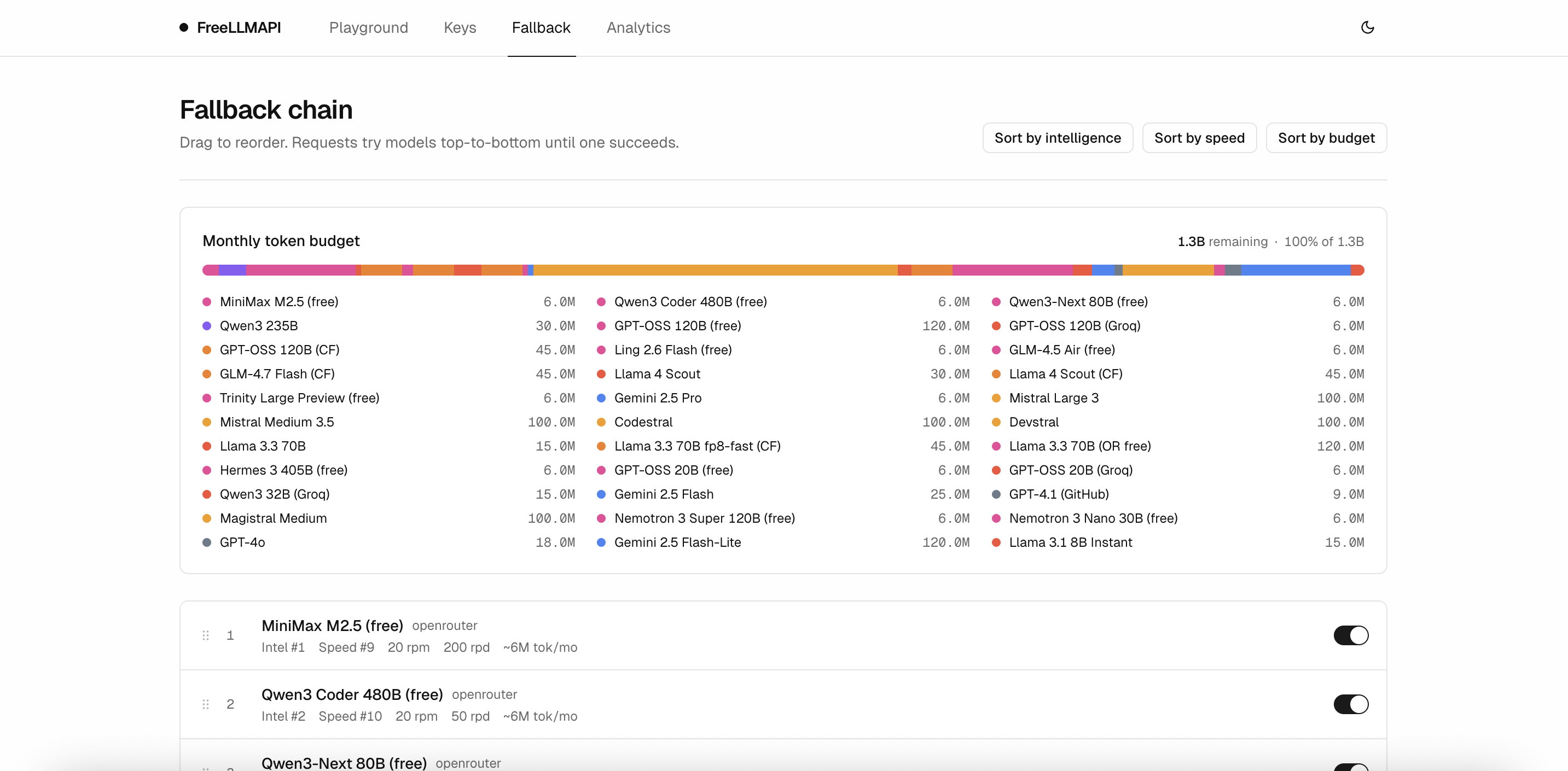
tools/tool_choicerequests are passed through, and assistanttool_calls+toolrole follow-up messages round-trip across providers. - Automatic fallover — If the chosen provider returns a 429, 5xx, or times out, the router skips it, puts the key on a short cooldown, and retries on the next model in your fallback chain (up to 20 attempts).
- Per-key rate tracking — RPM, RPD, TPM, and TPD counters per
(platform, model, key)so the router always picks a key that's under its caps. - Sticky sessions — Multi-turn conversations keep talking to the same model for 30 minutes to avoid the hallucination spike that comes from mid-conversation model switches.
- Encrypted key storage — API keys are encrypted with AES-256-GCM before hitting SQLite; decryption happens in-memory just before a request.
- Unified API key — Clients authenticate to your proxy with a single
freellmapi-…bearer token. You never expose upstream provider keys to your apps. - Dashboard login — The admin UI and all
/api/*routes are gated behind an email + password account (scrypt-hashed, session-token auth), set on first run. The/v1proxy keeps its own unified-key auth for apps. - Health checks — Periodic probes mark keys as
healthy,rate_limited,invalid, orerrorso the router skips dead ones automatically. - Admin dashboard — React + Vite UI to manage keys, reorder the fallback chain, inspect analytics, and run prompts in a playground. Dark mode included.
- Analytics — Per-request logging with latency, token counts, success rate, and per-provider breakdowns.
- Runs anywhere Node 20+ runs — Windows, macOS, Linux servers, or a small ARM SBC (Raspberry Pi included). ~40 MB RSS at idle behind PM2 / systemd / whatever supervisor you prefer.
Not yet supported
The scope is deliberately narrow. If a feature isn't on this list and isn't below, assume it isn't there yet.
- Embeddings (
/v1/embeddings) - Image generation (
/v1/images/*) - Audio / speech (
/v1/audio/*) - Legacy completions (
/v1/completions) — only the chat endpoint is implemented - Moderation (
/v1/moderations) n > 1(multiple completions per request)- Per-user billing / multi-tenant auth — single-user by design
PRs that add any of these are very welcome. See Contributing.
Quick start
Recommended: Docker Compose. It runs the API and dashboard together on port 3001 and persists SQLite in a named volume.
Prerequisites: Docker, Docker Compose, OpenSSL.
git clone https://github.com/tashfeenahmed/freellmapi.git
cd freellmapi

# Generate an encryption key for at-rest key storage
ENCRYPTION_KEY="$(openssl rand -hex 32)"
printf "ENCRYPTION_KEY=%s\nPORT=3001\n" "$ENCRYPTION_KEY" > .env

docker compose up -d
Open http://localhost:3001, add your provider keys on the Keys page, reorder the Fallback Chain to taste, and grab your unified API key from the Keys page header. That unified key is what you point your OpenAI SDK at.
Reaching it from another machine? By default the container is published only on
127.0.0.1, sohttp://<server-ip>:3001won't load from another device (the page just hangs). To expose it on your LAN — e.g. a Raspberry Pi athttp://192.168.1.x:3001— start it withHOST_BIND=0.0.0.0:HOST_BIND=0.0.0.0 docker compose up -dOnly do this on a trusted network: the proxy is single-user and guarded only by the unified API key.
Local development
Prerequisites: Node.js 20+, npm.
git clone https://github.com/tashfeenahmed/freellmapi.git
cd freellmapi
npm install
cp .env.example .env
ENCRYPTION_KEY="$(node -e 'console.log(require("crypto").randomBytes(32).toString("hex"))')"
printf "ENCRYPTION_KEY=%s\nPORT=3001\n" "$ENCRYPTION_KEY" > .env
npm run dev
ENCRYPTION_KEY is required for startup. The server only falls back to a
database-stored development key when DEV_MODE=true and NODE_ENV is not
production; do not use that fallback with real provider keys.
Request analytics are retained for 90 days or 100000 request rows by default,
whichever limit prunes first. Set REQUEST_ANALYTICS_RETENTION_DAYS=0 or
REQUEST_ANALYTICS_MAX_ROWS=0 in .env to disable either retention limit.
Open http://localhost:5173 (the Vite dev UI), add your provider keys on the Keys page, reorder the Fallback Chain to taste, and grab your unified API key from the Keys page header. That unified key is what you point your OpenAI SDK at.
For a production build without Docker:
npm run build
node server/dist/index.js     # server + dashboard both served on :3001
Docker
FreeLLMAPI publishes a single production image that contains the Express server and the built React dashboard:
docker pull ghcr.io/tashfeenahmed/freellmapi:latest # or pin a release, e.g. :v1.2.3
The image is multi-arch (linux/amd64 + linux/arm64, so it runs on a Raspberry Pi). Published tags: latest (default branch), v*.*.* (git release tags), and sha-<commit>.
The included docker-compose.yml is the recommended install path:
docker compose up -d
docker compose logs -f freellmapi
By default the container's port is bound to 127.0.0.1 (localhost only). To reach the dashboard/API from another machine on your network, publish it on all interfaces with HOST_BIND=0.0.0.0 docker compose up -d — only on a trusted LAN, since the proxy is single-user.
SQLite data is stored in the freellmapi-data volume at /app/server/data. Keep the same .env ENCRYPTION_KEY and volume when upgrading, because provider keys are encrypted at rest.
More Docker operations and examples live in docker/README.md.
Using the API
Any OpenAI-compatible client works. Examples:
Python
from openai import OpenAI

client = OpenAI(
    base_url="http://localhost:3001/v1",
    api_key="freellmapi-your-unified-key",
)

resp = client.chat.completions.create(
    model="auto",  # let the router pick; or specify e.g. "gemini-2.5-flash"
    messages=[{"role": "user", "content": "Summarise the fall of Rome in one sentence."}],
)
print(resp.choices[0].message.content)
print("Routed via:", resp.headers.get("x-routed-via"))
curl
curl http://localhost:3001/v1/chat/completions \
  -H "Authorization: Bearer freellmapi-your-unified-key" \
  -H "Content-Type: application/json" \
  -d '{
    "model": "auto",
    "messages": [{"role": "user", "content": "hi"}]
  }'
Streaming
stream = client.chat.completions.create(
    model="auto",
    messages=[{"role": "user", "content": "Stream me a haiku about SQLite."}],
    stream=True,
)
for chunk in stream:
    print(chunk.choices[0].delta.content or "", end="", flush=True)
Tool calling
Pass OpenAI-style tools and tool_choice; the assistant response round-trips back through the proxy exactly like the OpenAI API. Multi-step flows (assistant tool_calls → tool role follow-up → final answer) work across every provider the router can reach.
tools = [{
    "type": "function",
    "function": {
        "name": "get_weather",
        "description": "Get current weather for a city.",
        "parameters": {
            "type": "object",
            "properties": {"city": {"type": "string"}},
            "required": ["city"],
        },
    },
}]

# 1. Model asks for a tool call
first = client.chat.completions.create(
    model="auto",
    messages=[{"role": "user", "content": "What's the weather in Karachi?"}],
    tools=tools,
    tool_choice="required",
)
call = first.choices[0].message.tool_calls[0]

# 2. You execute the tool, feed the result back
final = client.chat.completions.create(
    model="auto",
    messages=[
        {"role": "user", "content": "What's the weather in Karachi?"},
        first.choices[0].message,
        {"role": "tool", "tool_call_id": call.id, "content": '{"temp_c": 32, "cond": "sunny"}'},
    ],
    tools=tools,
)
print(final.choices[0].message.content)
Vision / image input
Send images with the standard OpenAI image_url content blocks (base64 data: URLs or http(s) URLs). When a request contains an image, the router restricts itself to vision-capable models and ignores text-only ones. Vision models are tagged with a Vision badge on the Fallback Chain page; the current set includes Gemini (2.5 / 3.x), Llama 4 Scout/Maverick (Groq, NVIDIA, SambaNova), and GitHub's GPT-4o / GPT-4.1.
resp = client.chat.completions.create(
    model="auto",  # auto-routes to a vision model
    messages=[{
        "role": "user",
        "content": [
            {"type": "text", "text": "What's in this image?"},
            {"type": "image_url", "image_url": {"url": "data:image/png;base64,<...>"}},
        ],
    }],
)
print(resp.choices[0].message.content)
If no vision-capable model is enabled in your Fallback Chain, an image request returns a clear 422 (code: "no_vision_model") rather than silently dropping the image. (Image input on /v1/responses isn't supported yet — use /v1/chat/completions.)
Works with stream=True as well — you'll get delta.tool_calls chunks followed by a finish_reason: "tool_calls" close. Under the hood, OpenAI-compatible providers (Groq, Cerebras, SambaNova, Mistral, OpenRouter, GitHub Models, HuggingFace, Cloudflare, Cohere compat) get the request passed through; Gemini requests get translated into Google's functionDeclarations / functionResponse shape and the response is translated back.
Every response carries an X-Routed-Via: <platform>/<model> header so you can see which provider actually served each call. If a request fell over between providers, you'll also see X-Fallback-Attempts: N.
Screenshots
Keys
Manage provider credentials and grab the unified API key your apps connect with. Each key shows a status dot and when it was last health-checked.

Playground
Send a chat completion through the router and see which provider served it, with the model ID and latency printed right on the message.

Analytics
Request volume, success rate, tokens in and out, average latency, and per-provider breakdowns over 24h / 7d / 30d windows.

How it works
┌──────────────────┐   Bearer freellmapi-…   ┌─────────────────────────┐
│  OpenAI SDK /    │ ──────────────────────▶ │  Express proxy (:3001)  │
│  curl / any      │ ◀────────────────────── │  /v1/chat/completions   │
│  OpenAI client   │      streamed tokens    └────────────┬────────────┘
└──────────────────┘                                      │
                                                          ▼
                             ┌────────────────────────────────────────────────┐
                             │  Router                                        │
                             │   1. Pick highest-priority model that          │
                             │      (a) has a healthy key and                 │
                             │      (b) is under all its rate limits.         │
                             │   2. Decrypt key, call provider SDK.           │
                             │   3. On 429/5xx → cooldown + retry next model. │
                             └────────────────────────────────────────────────┘
                                          │
   ┌──────────────┬────────────┬──────────┴─────────┬─────────────┬──────────┐
   ▼              ▼            ▼                    ▼             ▼          ▼
 Google         Groq        Cerebras           OpenRouter        HF       …10 more
- Router (
server/src/services/router.ts) — picks a model per request. - Rate-limit ledger (
server/src/services/ratelimit.ts) — in-memory RPM/RPD/TPM/TPD counters backed by SQLite, with cooldowns on 429s. - Provider adapters (
server/src/providers/*.ts) — one file per provider, implementing theProviderbase class:chatCompletion()andstreamChatCompletion(). - Health service (
server/src/services/health.ts) — periodic probe keeps key status fresh. - Dashboard (
client/) — React + Vite + shadcn/ui admin surface. - Storage — SQLite (
better-sqlite3) with AES-256-GCM envelope encryption for keys.
Limitations
Stacking free tiers has real trade-offs. Be honest with yourself about them:
- No frontier models. The free-tier catalog tops out around Llama 3.3 70B, GLM-4.5, Qwen 3 Coder, and Gemini 2.5 Pro. You will not get GPT-5 or Claude Opus class reasoning through this. For hard problems, pay for a real API.
- Intelligence degrades as the day progresses. Your top-ranked models (usually Gemini 2.5 Pro, GPT-4o via GitHub Models) have the lowest daily caps. Once they hit their limits, the router falls down your priority chain to smaller/weaker models. Expect the effective intelligence of the endpoint to drop in the late hours of each day — then reset at UTC midnight.
- Latency is highly variable. Cerebras and Groq are extremely fast; others are not. You get whichever one is available.
- Free tiers can change without notice. Providers regularly tighten, loosen, or remove free tiers. When that happens you'll see 429s or auth errors until you update the catalog. Re-seed scripts live in
server/src/scripts/. - No SLA, by definition. If you need reliability, use a paid provider with a contract.
- Local-first. There's no multi-tenant auth. Run this for yourself; don't expose it to the internet.
Contributing
Contributors very welcome! Good first PRs:
- Add a provider — copy
server/src/providers/openai-compat.tsas a template, wire it intoserver/src/providers/index.ts, seed its models inserver/src/db/index.ts, add a test inserver/src/__tests__/providers/. - Add an endpoint — embeddings, images, moderations. The provider base class can grow new methods; adapters declare which they support.
- Improve the router — cost-aware routing (cheapest-healthy-fastest tradeoffs), better latency-weighted priority, regional pinning.
- Dashboard polish — charts on the Analytics page, key rotation UX, batch import of keys from
.env. - Docs — more examples, client library snippets for Go/Rust/etc., a deployment recipe for Docker or Fly.
Development loop:
npm install
npm run dev      # server on :3001, dashboard on :5173, both with HMR
npm test         # server vitest; also runs client tests if the workspace adds them
npm run build    # compile server and dashboard
PRs should include a test, keep the existing test suite green, and match the .editorconfig / tsconfig defaults already in the repo. Issues and discussions are open.
Contributors


Terms of Service review
A self-hosted, single-user, personal-use setup was re-reviewed against each provider's ToS (May 2026). Summary:
| Provider | Verdict | Notes |
|---|---|---|
| Google Gemini | ⚠️ Caution | March 2026 ToS narrows scope to "professional or business purposes, not for consumer use" — a self-hosted developer proxy is still defensible, but the clause is new. |
| Groq | ✅ Likely OK | GroqCloud Services Agreement permits Customer Application integration. |
| Cerebras | ✅ Likely OK | Permitted; explicitly forbids selling/transferring API keys. |
| Mistral | ✅ Likely OK | APIs allowed for personal/internal business use. |
| OpenRouter | ✅ Likely OK | April 2026 ToS sharpens the no-resale / no-competing-service clause; private single-user proxy still fine. |
| SambaNova | ⚠️ Ambiguous | EULA §1.5(c) blocks resale and "service bureau" use; single-user with no third-party access is fine. |
| Cloudflare Workers AI | ⚠️ Ambiguous | No anti-proxy clause; covered by general Self-Serve Subscription Agreement. |
| NVIDIA NIM | ⚠️ Caution | Trial ToS §1.2 / §1.4: "evaluation only, not production." Disabled in default catalog. |
| GitHub Models | ⚠️ Caution | Free tier explicitly scoped to "experimentation" and "prototyping." |
| Cohere | ❌ Avoid | Terms §14 still forbids "personal, family or household purposes." |
| Zhipu (open.bigmodel.cn) | ✅ Likely OK | Personal/non-commercial research carve-out still in the platform docs. |
| Z.ai (api.z.ai) | ⚠️ Caution | New row — Singapore entity (distinct from Zhipu CN). §III.3(l) anti-traffic-redirect clause could plausibly be read against a proxy; no explicit personal-use carve-out. |
| Ollama Cloud | ✅ Likely OK | New row — Free plan permits cloud-model access (1 concurrent, 5-hour session caps). No anti-proxy / anti-resale clauses found. (Integration tracked in #14.) |
Rules of thumb that keep most providers happy: one account per provider, no reselling, no sharing your endpoint with other humans, don't hammer a free tier as a paid production backend. This is informational, not legal advice — read each provider's ToS and make your own call.
Removed since the April 2026 review: Hugging Face, Moonshot, and MiniMax direct integrations were dropped from the catalog (HF — tool-call format issues; Moonshot — moved to paid only; MiniMax — superseded by the OpenRouter minimax/minimax-m2.5:free route).
Disclaimer
This project is for personal experimentation and learning, not production. Free tiers exist so developers can prototype against them; they aren't a stable, supported inference substrate and shouldn't be treated as one. If you build something real on top of FreeLLMAPI, swap in a paid API before you ship. Your relationship with each upstream provider is governed by the terms you accepted when you created your account — those terms still apply when the traffic is proxied through this project, and you're responsible for complying with them.
Star History
License
Videos
I Cancelled Every AI Subscription and Set Up 14 Free AI Models on My PC | FreeLLMAPI Tutorial
AI BrainBox · 10K views
Build AI Agents for FREE: Bypassing Rate Limits with FreeLLMAPI
TechStackPro · 0K views
What people are saying
You might also like
AI
career ops
Companies use AI to filter candidates. I just gave candidates AI to choose companies. Career-Ops (career-ops.org, also known as careerops) turns any AI coding CLI into a full job search command center. Instead of manually tracking applications in a spreadsheet, you get an AI-powered pipeline that: Career-ops is agentic: Claude Code navigates career pages with Playwright, evaluates fit by reasoning about your CV vs the job description (not keyword matching), and adapts your resume per listing.
AI
CLI Anything
CLI-Anything: Bridging the Gap Between AI Agents and the World's Software 🌐 CLI-Hub: pip install cli-anything-hub then cli-hub install — browse, install, and manage all community-built CLIs. Want to add your own? Open a PR — the hub updates instantly. 🎬 See Demos: Watch AI agents use generated CLIs plus preview, live preview, and trajectory loops to produce real artifacts — CAD builds, 3D scenes, diagrams, gameplay, subtitles, and more.
AI
odysseus
A self-hosted AI workspace -- meant to be the self-hosted version of the UI experience you get from ChatGPT and Claude. But with more jank and fun. Running on your own hardware, with your own data -- local-first, privacy-first, and no trojan. A full, hover-to-play tour lives on the landing page (docs/index.html). Defaults work out of the box: clone, run, then configure models/search/email inside Settings. Only edit .env for deployment-level overrides like APPBIND, APPPORT, AUTHENABLED, DATABASEURL, or a pre-seeded admin password.
AI
ai engineering from scratch
Most AI material teaches in scattered pieces. A paper here, a fine-tuning post there, a flashy agent demo somewhere else. The pieces rarely line up. You ship a chatbot but can't explain its loss curve. You hook a function to an agent but can't say what attention does inside the model that's calling it. This curriculum is the spine. 20 phases, 503 lessons, four languages: Python, TypeScript, Rust, Julia. Linear algebra at one end, autonomous swarms at the other. Every algorithm gets built from raw math first. Backprop. Tokenizer. Attention. Agent loop. By the time PyTorch shows up, you already know what it's doing under the hood. Each lesson runs the same loop: read the problem, derive the math, write the code, run the test, keep the artifact. No five-minute videos, no copy-paste deploys,