
fireworks-tech-graph turns natural language descriptions into polished SVG diagrams, then exports them as high-resolution PNG via cairosvg (recommended), with rsvg-convert and puppeteer available as alternatives. It ships with 7 template styles and 1 AI-authored style (Dark Luxury) and deep knowledge of AI/Agent domain patterns (RAG, Agentic Search, Mem0, Multi-Agent, Tool Call flows), plus full s User: "Generate a Mem0 memory architecture diagram, dark style" → Skill classifies: Memory Architecture Diagram, Style 2 → Generates SVG with swim lanes, cylinders, semantic arrows → Exports 1920px PNG → Reports: mem0-architecture.svg / mem0-architecture.png This project is also a proof surface for a broader capability: turning vague AI/devtool workflows into constrained, reusable systems with
fireworks-tech-graph
Stop drawing diagrams by hand. Describe your system in English or Chinese — get publication-ready SVG + PNG technical diagrams in seconds.





Overview
fireworks-tech-graph turns natural language descriptions into polished SVG diagrams, then exports them as high-resolution PNG via cairosvg (recommended), with rsvg-convert and puppeteer available as alternatives. It ships with 7 template styles and 1 AI-authored style (Dark Luxury) and deep knowledge of AI/Agent domain patterns (RAG, Agentic Search, Mem0, Multi-Agent, Tool Call flows), plus full support for all 14 UML diagram types.
User: "Generate a Mem0 memory architecture diagram, dark style"
  → Skill classifies: Memory Architecture Diagram, Style 2
  → Generates SVG with swim lanes, cylinders, semantic arrows
  → Exports 1920px PNG
  → Reports: mem0-architecture.svg / mem0-architecture.png
Work With the Builder
This project is also a proof surface for a broader capability: turning vague AI/devtool workflows into constrained, reusable systems with validation, documentation, export paths, and product-facing polish.
If you are building agent infrastructure, AI IDEs, internal copilots, developer tools, technical documentation systems, or applied AI workflow products, I am open to scoped paid sprints, design-partner work, and founding engineer conversations.
- Founder-facing profile: https://bradzhang.dev/en
- Commercial case study: https://bradzhang.dev/en/case-studies/fireworks-tech-graph
- Work with me: https://bradzhang.dev/en/work-with-me
Showcase
All samples exported at 1920px width (2× retina) via
cairosvg. PNG is lossless and the right choice for technical diagrams — sharp edges, no JPEG compression artifacts on text/lines.
Style 1 — Flat Icon (default)
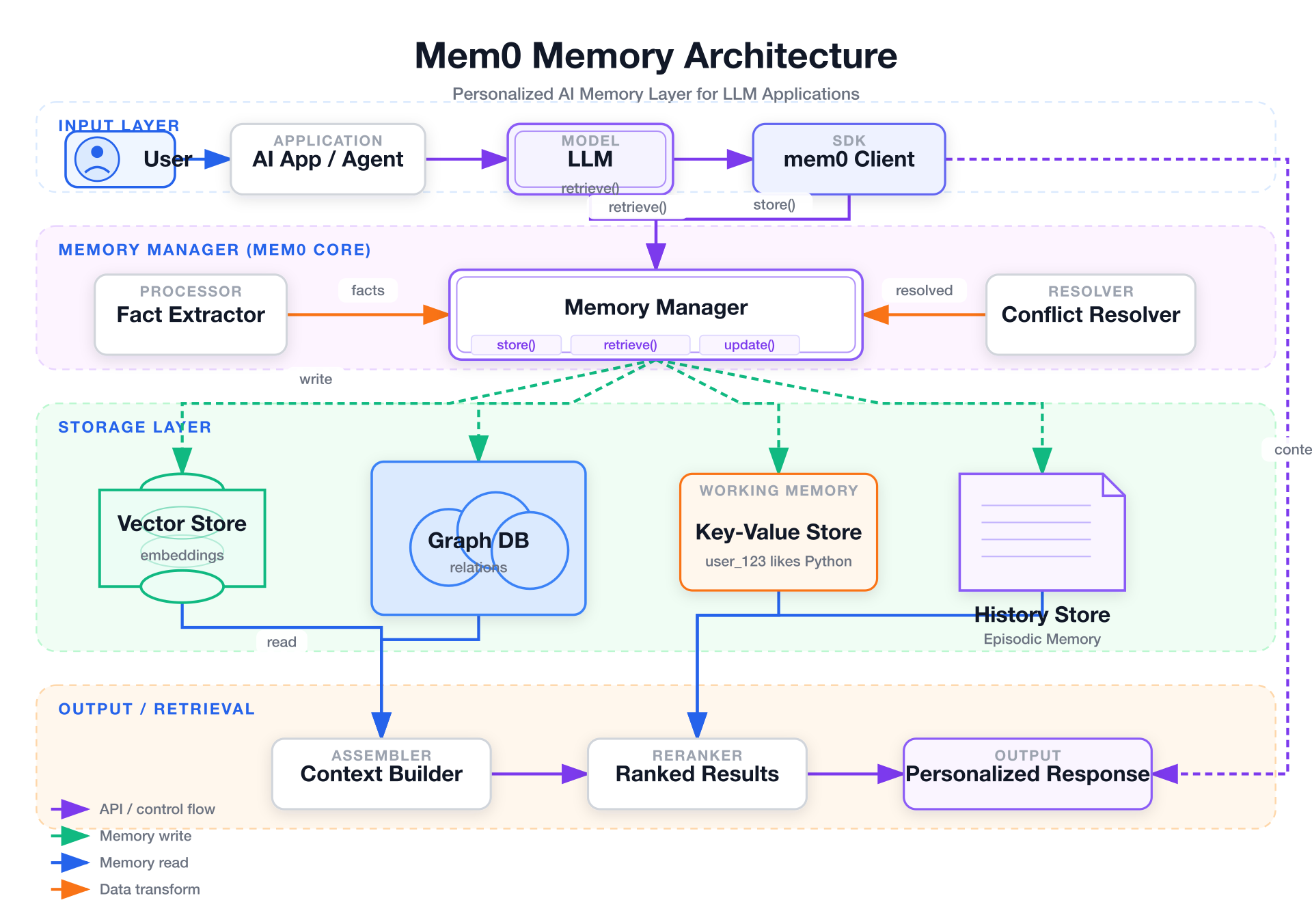
Mem0 Memory Architecture — white background, semantic arrows, layered memory system

Style 2 — Dark Terminal
Tool Call Flow — dark background, neon accents, monospace font

Style 3 — Blueprint
Microservices Architecture — deep blue background, grid lines, cyan strokes

Style 4 — Notion Clean
Agent Memory Types — minimal white, single accent color

Style 5 — Glassmorphism
Multi-Agent Collaboration — dark gradient background, frosted glass cards

Style 6 — Claude Official
System Architecture — warm cream background (#f8f6f3), Anthropic brand colors, clean professional aesthetic

Style 7 — OpenAI Official
API Integration Flow — pure white background, OpenAI brand palette, modern minimalist design

Style 8 — Dark Luxury (AI-authored)
Sopify Adaptive Workflow Engine — deep black background, champagne gold accents, serif titles, six-bucket color wheel

Stable Prompt Recipes
Use prompts like these when you want the model to stay close to the repo's strongest regression-tested outputs:
Style 1 — Flat Icon
Draw a Mem0 memory architecture diagram in style 1 (Flat Icon).
Use four horizontal sections: Input Layer, Memory Manager, Storage Layer, Output / Retrieval.
Include User, AI App / Agent, LLM, mem0 Client, Memory Manager, Vector Store, Graph DB, Key-Value Store, History Store, Context Builder, Ranked Results, Personalized Response.
Use semantic arrows for read, write, control, and data flow. Keep the layout clean and product-doc friendly.
Style 2 — Dark Terminal
Draw a tool call flow diagram in style 2 (Dark Terminal).
Show User query, Retrieve chunks, Generate answer, Knowledge base, Agent, Terminal, Source documents, and Grounded answer.
Use terminal chrome, neon accents, monospace typography, and semantic arrows for retrieval, synthesis, and embedding update.
Style 3 — Blueprint
Draw a microservices architecture diagram in style 3 (Blueprint).
Create numbered engineering sections like 01 // EDGE, 02 // APPLICATION SERVICES, 03 // DATA + EVENT INFRA, 04 // OBSERVABILITY.
Include Client Apps, API Gateway, Auth / Policy, three services, Event Router, Postgres, Redis Cache, Warehouse, and Metrics / Traces.
Use blueprint grid, cyan strokes, and a bottom-right title block.
Style 4 — Notion Clean
Draw an agent memory types diagram in style 4 (Notion Clean).
Compare Sensory Memory, Working Memory, Episodic Memory, Semantic Memory, and Procedural Memory around a central Agent core.
Use a minimal white layout, neutral borders, one accent color for arrows, and short storage tags for each memory type.
Style 5 — Glassmorphism
Draw a multi-agent collaboration diagram in style 5 (Glassmorphism).
Use three sections: Mission Control, Specialist Agents, and Synthesis.
Include User brief, Coordinator Agent, Research Agent, Coding Agent, Review Agent, Shared Memory, Synthesis Engine, and Final response.
Use frosted cards, soft glow, and semantic arrows for delegation, shared memory writes, and synthesis output.
Style 6 — Claude Official
Draw a system architecture diagram in style 6 (Claude Official).
Use left-side layer labels: Interface Layer, Core Layer, Foundation Layer.
Include Client Surface, Gateway, Task Planner, Model Runtime, Policy Guardrails, Memory Store, Tool Runtime, Observability, and Registry.
Use warm cream background, restrained brand-like palette, generous whitespace, and a bottom-right legend.
Style 7 — OpenAI Official
Draw an API integration flow diagram in style 7 (OpenAI Official).
Use three sections: Entry, Model + Tools, and Delivery.
Include Application, OpenAI SDK Layer, Prompt Builder, Model Runtime, Tool Calls, Response Formatter, Observability, and Release Control.
Keep the look minimal, white, precise, and modern with clean green-accented arrows.
Style 8 — Dark Luxury (AI-authored)
Style 8 is not a template-driven style. The AI reads
references/style-8-dark-luxury.mdand hand-crafts the SVG directly.
Draw a system architecture diagram in style 8 (Dark Luxury).
Use a deep black background (#0a0a0a), champagne gold (#d4a574) for titles and cluster labels,
and spread node colors across the full color wheel: emerald, violet, sky blue, rose, amber, cool-gray.
Apply Georgia serif only for the main title and section labels (≥11px); use sans-serif for all node text and arrow labels.
Features
- 8 visual styles — 7 template-driven (Flat Icon to OpenAI Official) + 1 AI-authored (Dark Luxury)
- Executable style system — style guides are encoded into the generator, not only documented in markdown
- 14 diagram types — Full UML support (Class, Component, Deployment, Package, Composite Structure, Object, Use Case, Activity, State Machine, Sequence, Communication, Timing, Interaction Overview, ER Diagram) plus AI/Agent domain diagrams
- AI/Agent domain patterns — RAG, Agentic Search, Mem0, Multi-Agent, Tool Call, and more built-in
- Semantic shape vocabulary — LLM = double-border rect, Agent = hexagon, Vector Store = ringed cylinder
- Semantic arrow system — color + dash pattern encode meaning (write vs read vs async vs loop)
- Product icons — 40+ products with brand colors: OpenAI, Anthropic, Pinecone, Weaviate, Kafka, PostgreSQL…
- Swim lane grouping — automatic layer labeling for complex architectures
- SVG + PNG output — SVG for editing, 1920px PNG for embedding
- Renderer-friendly — pure inline SVG, no external font fetching; renders cleanly in cairosvg, rsvg-convert, and headless Chrome
Installation
npx skills add yizhiyanhua-ai/fireworks-tech-graph
This skill is installed from the GitHub repository. The npm package page is the public package/distribution page:
https://www.npmjs.com/package/@yizhiyanhua-ai/fireworks-tech-graph
Do not use the npm package name with skills add, because the CLI resolves install sources as GitHub/local paths.
Update
npx skills add yizhiyanhua-ai/fireworks-tech-graph --force -g -y
Re-run add --force to pull the latest version of this skill.
Or clone directly:
git clone https://github.com/yizhiyanhua-ai/fireworks-tech-graph.git ~/.claude/skills/fireworks-tech-graph
Requirements
Pick one PNG renderer (cairosvg recommended):
# Recommended: cairosvg (best CSS support)
pip install cairosvg

# Fallback: rsvg-convert (system package; may drop CSS / <foreignObject>)
brew install librsvg                   # macOS
sudo apt install librsvg2-bin          # Ubuntu/Debian

# Highest fidelity: puppeteer (real Chromium; heavy)
npm install puppeteer

# Verify (any one is enough)
python3 -c "import cairosvg; print(cairosvg.__version__)"
rsvg-convert --version
| Renderer | Quality | Install Cost | Use When |
|---|---|---|---|
| cairosvg | ✅ Good | Single pip install | Default — best balance |
| rsvg-convert | ⚠️ Fair | System package | No Python available, simple flat diagrams |
| puppeteer | ✅✅ Best | Node + ~150MB Chromium | Browser-generated SVG (D3, Mermaid) or pixel-perfect required |
Why Not Mermaid or draw.io?
| Mermaid | draw.io | fireworks-tech-graph | |
|---|---|---|---|
| Natural language input | ✗ | ✗ | ✅ |
| AI/Agent domain patterns | ✗ | ✗ | ✅ |
| Multiple visual styles | ✗ | manual | ✅ 5 built-in |
| High-res PNG export | ✗ | manual | ✅ auto 1920px |
| Semantic arrow colors | ✗ | manual | ✅ auto |
| No online tool needed | ✅ | ✗ | ✅ |
Mermaid is great for quick inline diagrams in markdown. draw.io is great for manual polishing. fireworks-tech-graph is optimized for describing a system and getting a polished diagram immediately, without writing DSL syntax or clicking around a GUI.
Usage
Trigger phrases
The skill auto-triggers on:
generate diagram / draw diagram / create chart / visualize
architecture diagram / flowchart / sequence diagram / data flow
Basic usage
Draw a RAG pipeline flowchart
Generate an Agentic Search architecture diagram
Specify style
Draw a microservices architecture diagram, style 2 (dark terminal)
Draw a multi-agent collaboration diagram --style glassmorphism
Specify output path
Generate a Mem0 architecture diagram, output to ~/Desktop/
Create a tool call flow diagram --output /tmp/diagrams/
Example Prompts by Scenario
AI/Agent Systems
Compare Agentic RAG vs standard RAG in a feature matrix, Notion clean style
→ Comparison matrix: RAG vs Agentic RAG, covering retrieval strategy, agent loop, tool use
Generate a Mem0 memory architecture diagram with vector store, graph DB, KV store, and memory manager
→ Memory Architecture with swim lanes: Input → Memory Manager → Storage tiers → Retrieval
Draw a Multi-Agent diagram: Orchestrator dispatches 3 SubAgents (search / compute / code execution), results aggregated
→ Agent Architecture with hexagons, tool layers, and result aggregation
Visualize the Tool Call execution flow: LLM → Tool Selector → Execution → Parser → back to LLM
→ Flowchart with decision loop showing tool invocation cycle
Draw the 5 agent memory types: Sensory, Working, Episodic, Semantic, Procedural
→ Mind map or layered architecture showing memory tiers from sensory to procedural
Infrastructure & Cloud
Draw a microservices architecture: Client → API Gateway → [User Service / Order Service / Payment Service] → PostgreSQL + Redis
→ Architecture diagram with horizontal layers, swim lanes per service cluster
Generate a data pipeline diagram: Kafka → Spark processing → write to S3 → Athena query
→ Data flow diagram with labeled arrows (stream / batch / query)
Draw a Kubernetes deployment: Ingress → Service → [Pod × 3] → ConfigMap + PersistentVolume
→ Architecture with dashed containers per namespace, solid arrows for traffic flow
API & Sequence Flows
Draw an OAuth2 authorization code flow sequence diagram: User → Client → Auth Server → Resource Server
→ Sequence diagram with vertical lifelines and activation boxes
Draw the ChatGPT Plugin call sequence diagram
→ Sequence: User → ChatGPT → Plugin Manifest → API → Response chain
Decision & Process Flows
Draw a pre-launch QA flowchart for an AI app: Code Review → Security Scan → Performance Test → Manual Approval → Deploy
→ Flowchart with diamond decision nodes and parallel branches
Generate a feature comparison matrix: RAG vs Fine-tuning vs Prompt Engineering
→ Comparison matrix with checked/unchecked cells across cost, latency, accuracy, flexibility
Concept Maps
Visualize the LLM application tech stack: from foundation model to SDK to app framework to deployment
→ Layered architecture or mind map from model layer to product layer
Draw an AI Agent capability map: Perception / Memory / Reasoning / Action / Learning
→ Mind map with central "AI Agent" node and 5 radial branches
Styles
| # | Name | Background | Font | Best For |
|---|---|---|---|---|
| 1 | Flat Icon (default) | #ffffff | Helvetica | Blogs, slides, docs |
| 2 | Dark Terminal | #0f0f1a | SF Mono / Fira Code | GitHub README, dev articles |
| 3 | Blueprint | #0a1628 | Courier New | Architecture docs, engineering |
| 4 | Notion Clean | #ffffff | system-ui | Notion, Confluence, wikis |
| 5 | Glassmorphism | #0d1117 gradient | Inter | Product sites, keynotes |
| 6 | Claude Official | #f8f6f3 | system-ui | Anthropic-style diagrams, warm aesthetic |
| 7 | OpenAI Official | #ffffff | system-ui | OpenAI-style diagrams, clean modern look |
Each style has a dedicated reference file in references/ with exact color tokens, SVG patterns, and templates.
The generator also consumes style-aware structure fields such as containers, semantic nodes[].kind, arrows[].flow, and explicit port anchors so sample-grade layouts can be reproduced more consistently.
Useful high-leverage fields for style-specific polish:
style_overridesto nudge title alignment or palette tokens without forking a full stylecontainers[].header_prefix/containers[].header_textfor blueprint-style numbered section headers such as01 // EDGEcontainers[].side_labelfor Claude-style left layer labelswindow_controls,meta_left,meta_center,meta_rightfor terminal / document chromeblueprint_title_blockfor engineering title boxes in style 3
Style Selection Guide
For UML Diagrams:
- Class/Component/Package: Style 1 (Flat Icon) or Style 4 (Notion Clean) — clear structure, easy to read
- Sequence/Timing: Style 2 (Dark Terminal) — monospace fonts help with alignment
- State Machine/Activity: Style 3 (Blueprint) — engineering aesthetic fits process flows
- Use Case/Interview: Style 1 (Flat Icon) — colorful, accessible
For AI/Agent Diagrams:
- RAG/Agentic Search: Style 2 (Dark Terminal) or Style 5 (Glassmorphism) — tech-forward aesthetic
- Memory Architecture: Style 3 (Blueprint) — emphasizes layered storage tiers
- Multi-Agent: Style 5 (Glassmorphism) — frosted cards distinguish agent boundaries
For Documentation:
- Internal docs: Style 4 (Notion Clean) — minimal, wiki-friendly
- Blog posts: Style 1 (Flat Icon) — colorful, engaging
- GitHub README: Style 2 (Dark Terminal) — matches dark theme
- Presentations: Style 5 (Glassmorphism) or Style 6 (Claude Official) — polished
Brand-Specific:
- Anthropic/Claude projects: Style 6 (Claude Official) — warm cream background, brand colors
- OpenAI projects: Style 7 (OpenAI Official) — clean white, OpenAI palette
Diagram Types
| Type | Description | Key Layout Rule |
|---|---|---|
| Architecture | Services, components, cloud infra | Horizontal layers top→bottom |
| Data Flow | What data moves where | Label every arrow with data type |
| Flowchart | Decisions, process steps | Diamond = decision, top→bottom |
| Agent Architecture | LLM + tools + memory | 5-layer model: Input/Agent/Memory/Tool/Output |
| Memory Architecture | Mem0, MemGPT-style | Separate read/write paths, memory tiers |
| Sequence | API call chains, time-ordered | Vertical lifelines, horizontal messages |
| Comparison | Feature matrix, side-by-side | Column = system, row = attribute |
| Mind Map | Concept maps, radial | Central node, bezier branches |
UML Diagram Support (14 Types)
| UML Type | Description | Best Style |
|---|---|---|
| Class Diagram | Classes, attributes, methods, relationships | Style 1, 4 |
| Component Diagram | Software components and dependencies | Style 1, 3 |
| Deployment Diagram | Hardware nodes and software deployment | Style 3 |
| Package Diagram | Package organization and dependencies | Style 1, 4 |
| Composite Structure | Internal structure of classes/components | Style 1, 3 |
| Object Diagram | Object instances and relationships | Style 1, 4 |
| Use Case Diagram | Actors, use cases, system boundaries | Style 1 |
| Activity Diagram | Workflows, parallel processes | Style 3 |
| State Machine | State transitions and events | Style 2, 3 |
| Sequence Diagram | Message exchanges over time | Style 2 |
| Communication Diagram | Object interactions and messages | Style 1, 2 |
| Timing Diagram | State changes over time | Style 2 |
| Interaction Overview | High-level interaction flow | Style 1, 2 |
| ER Diagram | Entity-relationship data models | Style 1, 3 |
AI/Agent Domain Patterns
Built-in pattern knowledge:
RAG Pipeline         → Query → Embed → VectorSearch → Retrieve → LLM → Response
Agentic RAG          → adds Agent loop + Tool use
Agentic Search       → Query → Planner → [Search/Calc/Code] → Synthesizer
Mem0 Memory Layer    → Input → Memory Manager → [VectorDB + GraphDB] → Context
Agent Memory Types   → Sensory → Working → Episodic → Semantic → Procedural
Multi-Agent          → Orchestrator → [SubAgent×N] → Aggregator → Output
Tool Call Flow       → LLM → Tool Selector → Execution → Parser → LLM (loop)
Shape Vocabulary
Shapes encode semantic meaning consistently across all styles:
| Concept | Shape |
|---|---|
| User / Human | Circle + body |
| LLM / Model | Rounded rect, double border, ⚡ |
| Agent / Orchestrator | Hexagon |
| Memory (short-term) | Dashed-border rounded rect |
| Memory (long-term) | Solid cylinder |
| Vector Store | Cylinder with inner rings |
| Graph DB | 3-circle cluster |
| Tool / Function | Rect with ⚙ |
| API / Gateway | Hexagon (single border) |
| Queue / Stream | Horizontal pipe/tube |
| Document / File | Folded-corner rect |
| Browser / UI | Rect with 3-dot titlebar |
| Decision | Diamond |
| External Service | Dashed-border rect |
Arrow Semantics
| Flow Type | Stroke | Dash | Meaning |
|---|---|---|---|
| Primary data flow | 2px solid | — | Main request/response |
| Control / trigger | 1.5px solid | — | System A triggers B |
| Memory read | 1.5px solid | — | Retrieve from store |
| Memory write | 1.5px | 5,3 | Write/store operation |
| Async / event | 1.5px | 4,2 | Non-blocking |
| Feedback / loop | 1.5px curved | — | Iterative reasoning |
File Structure
fireworks-tech-graph/
├── SKILL.md                      # Main skill — diagram types, layout rules, shape vocab
├── README.md                     # This file (English)
├── README.zh.md                  # Chinese version
├── references/
│   ├── style-1-flat-icon.md      # White background, colored accents
│   ├── style-2-dark-terminal.md  # Dark bg, neon accents, monospace
│   ├── style-3-blueprint.md      # Blueprint grid, cyan lines
│   ├── style-4-notion-clean.md   # Minimal, white, single arrow color
│   ├── style-5-glassmorphism.md  # Dark gradient, frosted glass cards
│   ├── style-6-claude-official.md # Warm cream background, Anthropic brand
│   ├── style-7-openai.md      # Clean white, OpenAI brand palette
│   └── icons.md                  # 40+ product icons + semantic shapes
├── agents/
│   └── openai.yaml              # Agent metadata for compatible runtimes
├── fixtures/
│   ├── mem0-style1.json         # Style 1 regression fixture
│   ├── tool-call-style2.json    # Style 2 regression fixture
│   └── ...                      # Additional sample-grade fixtures per style
├── scripts/
│   ├── generate-diagram.sh       # Validate SVG + export PNG
│   ├── generate-from-template.py # Create starter SVGs from templates
│   ├── validate-svg.sh           # Validate SVG syntax
│   └── test-all-styles.sh        # Batch test all styles
├── assets/
│   └── samples/                  # Showcase diagram PNGs
├── templates/
│   ├── architecture.svg         # Architecture starter template
│   ├── data-flow.svg            # Data-flow starter template
│   └── ...                      # Additional diagram templates
└── agentloop-core.svg           # Included sample SVG
Product Icon Coverage
AI/ML: OpenAI, Anthropic/Claude, Google Gemini, Meta LLaMA, Mistral, Cohere, Groq, Hugging Face
AI Frameworks: Mem0, LangChain, LlamaIndex, LangGraph, CrewAI, AutoGen, DSPy, Haystack
Vector DBs: Pinecone, Weaviate, Qdrant, Chroma, Milvus, pgvector, Faiss
Databases: PostgreSQL, MySQL, MongoDB, Redis, Elasticsearch, Neo4j, Cassandra
Messaging: Kafka, RabbitMQ, NATS, Pulsar
Cloud: AWS, GCP, Azure, Cloudflare, Vercel, Docker, Kubernetes
Observability: Grafana, Prometheus, Datadog, LangSmith, Langfuse, Arize
Troubleshooting
| Symptom | Cause | Fix |
|---|---|---|
| PNG is blank or all-black | @import url() in SVG — neither cairosvg nor rsvg-convert can fetch external fonts | Remove @import, use system font stack |
| PNG not generated | No renderer installed | pip install cairosvg (recommended), or brew install librsvg / apt install librsvg2-bin |
| Borders or text missing in PNG | Using rsvg-convert on SVG with CSS / <foreignObject> | Switch to cairosvg (pip install cairosvg) — much better CSS support |
| Diagram cut off at bottom | ViewBox height too short | Increase height in viewBox="0 0 960 <height>" |
| Text overflowing boxes | Labels too long | Add text-anchor="middle" + <clipPath> or shorten label |
| Icons not rendering | External CDN URL | Use inline SVG paths from references/icons.md |
| Browser-generated SVG renders incorrectly | cairosvg / rsvg can't replay all CSS/JS-injected styles | Use the puppeteer script in SKILL.md for 100% fidelity |
License
MIT © 2025 fireworks-tech-graph contributors
Videos
Creating Fireworks with EfflectsLab Pro - 4th of July Tutorial
TubeTape · 22K views
3D Android Robot Graphic Design Tutorial Adobe Fireworks
Adam Khoury · 14K views
Tutorial: Adobe Fireworks CS5 for Beginners Lesson 1
GetFollowers2Day · 1K views
You might also like
AI
career ops
Companies use AI to filter candidates. I just gave candidates AI to choose companies. Career-Ops (career-ops.org, also known as careerops) turns any AI coding CLI into a full job search command center. Instead of manually tracking applications in a spreadsheet, you get an AI-powered pipeline that: Career-ops is agentic: Claude Code navigates career pages with Playwright, evaluates fit by reasoning about your CV vs the job description (not keyword matching), and adapts your resume per listing.
AI
CLI Anything
CLI-Anything: Bridging the Gap Between AI Agents and the World's Software 🌐 CLI-Hub: pip install cli-anything-hub then cli-hub install — browse, install, and manage all community-built CLIs. Want to add your own? Open a PR — the hub updates instantly. 🎬 See Demos: Watch AI agents use generated CLIs plus preview, live preview, and trajectory loops to produce real artifacts — CAD builds, 3D scenes, diagrams, gameplay, subtitles, and more.
AI
odysseus
A self-hosted AI workspace -- meant to be the self-hosted version of the UI experience you get from ChatGPT and Claude. But with more jank and fun. Running on your own hardware, with your own data -- local-first, privacy-first, and no trojan. A full, hover-to-play tour lives on the landing page (docs/index.html). Defaults work out of the box: clone, run, then configure models/search/email inside Settings. Only edit .env for deployment-level overrides like APPBIND, APPPORT, AUTHENABLED, DATABASEURL, or a pre-seeded admin password.
AI
ai engineering from scratch
Most AI material teaches in scattered pieces. A paper here, a fine-tuning post there, a flashy agent demo somewhere else. The pieces rarely line up. You ship a chatbot but can't explain its loss curve. You hook a function to an agent but can't say what attention does inside the model that's calling it. This curriculum is the spine. 20 phases, 503 lessons, four languages: Python, TypeScript, Rust, Julia. Linear algebra at one end, autonomous swarms at the other. Every algorithm gets built from raw math first. Backprop. Tokenizer. Attention. Agent loop. By the time PyTorch shows up, you already know what it's doing under the hood. Each lesson runs the same loop: read the problem, derive the math, write the code, run the test, keep the artifact. No five-minute videos, no copy-paste deploys,