
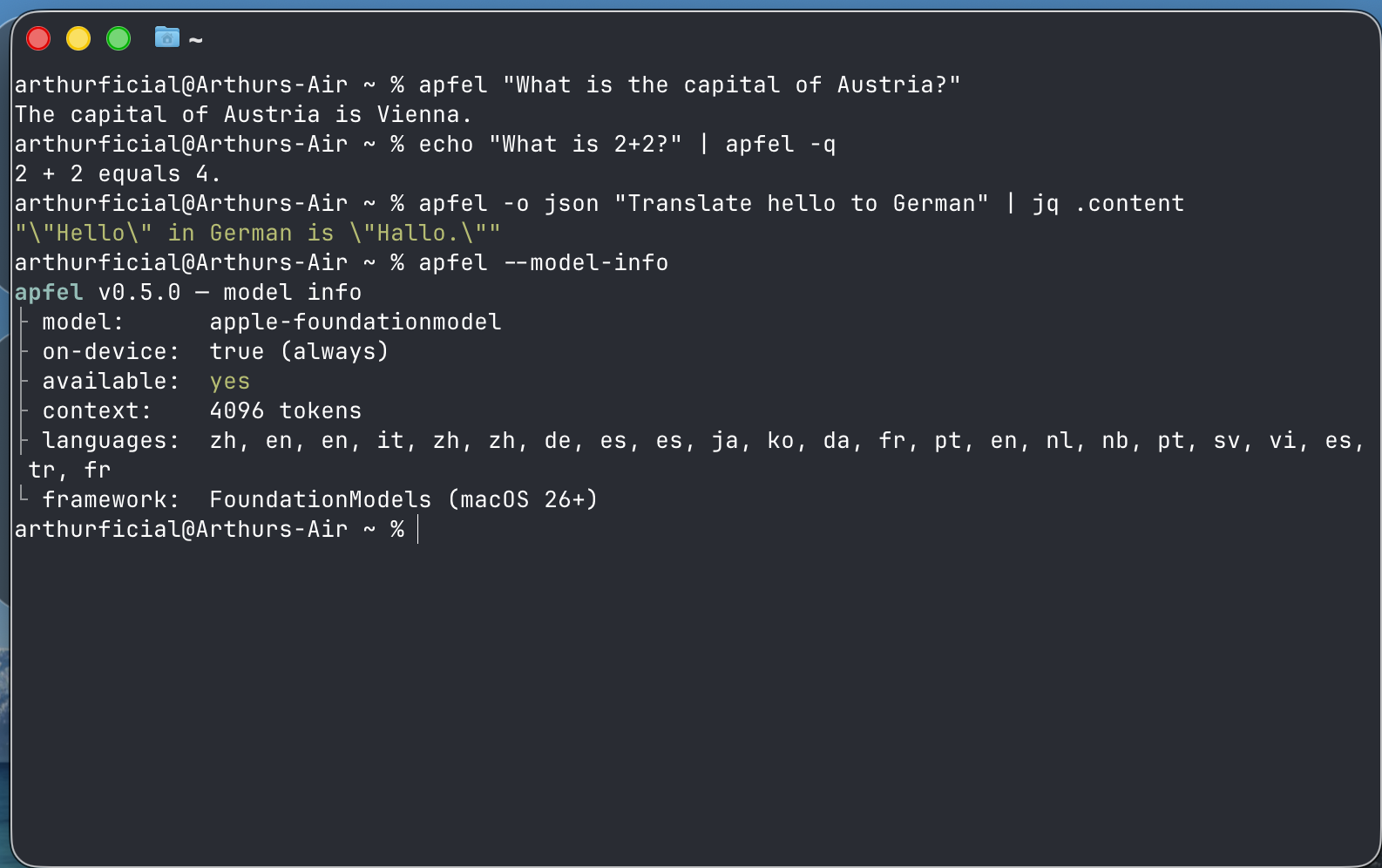
Apple Silicon Macs ship a built-in LLM via Apple FoundationModels. apfel exposes it as a UNIX tool and a local OpenAI-compatible server. 100% on-device. No API keys, no cloud. Tool calling works in all contexts. 4096-token context. macOS 26 Tahoe+, Apple Silicon (M1+), Apple Intelligence enabled.
apfel
The free AI already on your Mac.








Apple Silicon Macs ship a built-in LLM via Apple FoundationModels. apfel exposes it as a UNIX tool and a local OpenAI-compatible server. 100% on-device. No API keys, no cloud.
| Mode | Command | What you get |
|---|---|---|
| UNIX tool | apfel "prompt" / echo "text" | apfel | Pipe-friendly answers, file attachments, JSON output, exit codes |
| OpenAI-compatible server | apfel --serve | Drop-in local http://localhost:11434/v1 backend for OpenAI SDKs |
apfel --chat - interactive REPL.
Tool calling works in all contexts. 4096-token context.

Requirements & Install
macOS 26 Tahoe+, Apple Silicon (M1+), Apple Intelligence enabled.
brew install apfel
Update:
brew upgrade apfel
Build from source (Command Line Tools with macOS 26.4 SDK / Swift 6.3, no Xcode):
git clone https://github.com/Arthur-Ficial/apfel.git && cd apfel && make install
Nix, same-day tap, Mint, mise, troubleshooting: docs/install.md.
Quick Start
UNIX tool
Quote prompts with ! in single quotes (zsh/bash history expansion): apfel 'Hello, Mac!'.
# Single prompt
apfel "What is the capital of Austria?"

# Permissive mode - reduces guardrail false positives for creative/long prompts
apfel --permissive "Write a dramatic opening for a thriller novel"

# Stream output
apfel --stream "Write a haiku about code"

# Pipe input
echo "Summarize: $(cat README.md)" | apfel

# Attach file content to prompt
apfel -f README.md "Summarize this project"

# Attach multiple files
apfel -f old.swift -f new.swift "What changed between these two files?"

# Combine files with piped input
git diff HEAD~1 | apfel -f CONVENTIONS.md "Review this diff against our conventions"

# JSON output for scripting
apfel -o json "Translate to German: hello" | jq .content

# System prompt
apfel -s "You are a pirate" "What is recursion?"

# System prompt from file
apfel --system-file persona.txt "Explain TCP/IP"

# Quiet mode for shell scripts
result=$(apfel -q "Capital of France? One word.")
OpenAI-compatible server
apfel --serve                              # foreground
brew services start apfel                  # background (like Ollama)
brew services stop apfel
APFEL_TOKEN=$(uuidgen) APFEL_MCP=/path/to/tools.py brew services start apfel
curl http://localhost:11434/v1/chat/completions \
  -H "Content-Type: application/json" \
  -d '{"model":"apple-foundationmodel","messages":[{"role":"user","content":"Hello"}]}'
from openai import OpenAI
client = OpenAI(base_url="http://localhost:11434/v1", api_key="unused")
resp = client.chat.completions.create(
    model="apple-foundationmodel",
    messages=[{"role": "user", "content": "What is 1+1?"}],
)
print(resp.choices[0].message.content)
Background service details: docs/background-service.md.
Quick testing chat
apfel --chat is a small REPL for testing prompts or MCP servers. For a GUI chat app, see apfel-chat.
apfel --chat
apfel --chat -s "You are a helpful coding assistant"
apfel --chat --mcp ./mcp/calculator/server.py      # chat with MCP tools
apfel --chat --debug                                # debug output to stderr
Ctrl-C exits. Context is trimmed automatically (docs/context-strategies.md).
Demos
Real-world shell scripts that wrap apfel. They are bundled inside the binary, so you can write them out wherever you installed apfel from (homebrew-core, the tap, or source) - no repo clone needed:
apfel demos ./apfel-demos
That writes every demo (executable) into ./apfel-demos, plus a README.md describing each. Re-run after brew upgrade apfel to refresh them. The same scripts also live in demo/ in this repo.
cmd - natural language to shell command:
demo/cmd "find all .log files modified today"
# $ find . -name "*.log" -type f -mtime -1

demo/cmd -x "show disk usage sorted by size"   # -x = execute after confirm
demo/cmd -c "list open ports"                   # -c = copy to clipboard
Shell function version - add to your .zshrc and use cmd from anywhere:
# cmd - natural language to shell command (apfel). Add to .zshrc:
cmd(){ local x c r a; while [[ $1 == -* ]]; do case $1 in -x)x=1;shift;; -c)c=1;shift;; *)break;; esac; done; r=$(apfel -q -s 'Output only a shell command.' "$*" | sed '/^```/d;/^#/d;s/\x1b\[[0-9;]*[a-zA-Z]//g;s/^[[:space:]]*//;/^$/d' | head -1); [[ $r ]] || { echo "no command generated"; return 1; }; printf '\e[32m$\e[0m %s\n' "$r"; [[ $c ]] && printf %s "$r" | pbcopy && echo "(copied)"; [[ $x ]] && { printf 'Run? [y/N] '; read -r a; [[ $a == y ]] && eval "$r"; }; return 0; }
cmd find all swift files larger than 1MB     # shows: $ find . -name "*.swift" -size +1M
cmd -c show disk usage sorted by size        # shows command + copies to clipboard
cmd -x what process is using port 3000       # shows command + asks to run it
cmd list all git branches merged into main
cmd count lines of code by language
oneliner - complex pipe chains from plain English:
demo/oneliner "sum the third column of a CSV"
# $ awk -F',' '{sum += $3} END {print sum}' file.csv

demo/oneliner "count unique IPs in access.log"
# $ awk '{print $1}' access.log | sort | uniq -c | sort -rn
mac-narrator - your Mac's inner monologue:
demo/mac-narrator              # one-shot: what's happening right now?
demo/mac-narrator --watch      # continuous narration every 60s
Also in demo/:
- wtd - "what's this directory?" instant project orientation
- explain - explain a command, error, or code snippet
- naming - naming suggestions for functions, variables, files
- port - what's using this port?
- gitsum - summarize recent git activity
Longer walkthroughs: docs/demos.md.
MCP Tool Support
Attach Model Context Protocol servers with --mcp. apfel discovers, invokes, and returns.
apfel --mcp ./mcp/calculator/server.py "What is 15 times 27?"
mcp: ./mcp/calculator/server.py - add, subtract, multiply, divide, sqrt, power    ← stderr
tool: multiply({"a": 15, "b": 27}) = 405                                          ← stderr
15 times 27 is 405.                                                                ← stdout
Use -q to suppress tool info.
apfel --mcp ./server_a.py --mcp ./server_b.py "Use both tools"
apfel --serve --mcp ./mcp/calculator/server.py
apfel --chat --mcp ./mcp/calculator/server.py
Ships with a calculator at mcp/calculator/ (docs/mcp-calculator.md).
Remote MCP servers (Streamable HTTP, MCP spec 2025-03-26):
apfel --mcp https://mcp.example.com/v1 "what tools do you have?"

# bearer token - prefer env var (flag is visible in ps aux)
APFEL_MCP_TOKEN=mytoken apfel --mcp https://mcp.example.com/v1 "..."

# mixed local + remote
apfel --mcp /path/to/local.py --mcp https://remote.example.com/v1 "..."
Security: prefer
APFEL_MCP_TOKENover--mcp-token(ps aux). apfel refuses bearer tokens over plaintexthttp://.
apfel-run: optional config layer
apfel itself has no config file - flags + env vars, like any UNIX tool. If you want a TOML config (many MCPs, profiles, team configs in git), apfel-run is an MIT wrapper that adds one via execve drop-in.
brew install Arthur-Ficial/tap/apfel-run
apfel-run config init                 # starter ~/.config/apfel/config.toml
alias apfel=apfel-run                 # optional, every apfel flag still works
OpenAI API Compatibility
Base URL: http://localhost:11434/v1
| Feature | Status | Notes |
|---|---|---|
POST /v1/chat/completions | Supported | Streaming + non-streaming |
GET /v1/models | Supported | Returns apple-foundationmodel |
GET /health | Supported | Model availability, context window, languages |
GET /v1/logs, /v1/logs/stats | Debug only | Requires --debug |
| Tool calling | Supported | Native ToolDefinition + JSON detection. See docs/tool-calling-guide.md |
response_format: json_object | Supported | System-prompt injection; markdown fences stripped from output |
response_format: json_schema | Supported | Guaranteed schema-conforming output via FoundationModels DynamicGenerationSchema; works with stream: true |
temperature, top_p, max_tokens, seed | Supported | Mapped to GenerationOptions. top_p is nucleus sampling; temperature: 0 maps to greedy (deterministic). Omitting max_tokens uses the remaining context window (drop-in OpenAI semantics) - see Default response cap |
stream: true | Supported | SSE; final usage chunk only when stream_options: {"include_usage": true} (per OpenAI spec) |
finish_reason | Supported | stop, tool_calls, length |
| Context strategies | Supported | x_context_strategy, x_context_max_turns, x_context_output_reserve extension fields |
| CORS | Supported | Enable with --cors |
POST /v1/completions | 501 | Legacy text completions not supported |
POST /v1/embeddings | 501 | Embeddings not available on-device |
logprobs=true, n>1, stop, presence_penalty, frequency_penalty | 400 | Rejected explicitly. n=1 and logprobs=false are accepted as no-ops |
| Multi-modal (images) | 400 | Rejected with clear error |
Authorization header | Supported | Required when --token is set. See docs/server-security.md |
Full API spec: openai/openai-openapi.
Default response cap (max_tokens)
When max_tokens is omitted, CLI and OpenAI-compatible server behave identically: the value flows through as nil and the model uses whatever room is left in the 4096-token context window. This is drop-in OpenAI semantics - no arbitrary fallback constant.
The on-device model has a 4096-token context window that holds input and output combined. If generation runs into the ceiling, the response ends cleanly with finish_reason: "length" and the partial content is returned (server: HTTP 200; CLI: exit 0 with a stderr warning). Pass max_tokens explicitly when you want a tighter latency budget or a known cap for your client.
Examples
# Omitted: uses remaining window, finish_reason: "stop" or "length"
curl -sS http://localhost:11434/v1/chat/completions \
  -H "Content-Type: application/json" \
  -d '{"model":"apple-foundationmodel",
       "messages":[{"role":"user","content":"Reply SKIP, MOVE, or RENAME."}]}'

# Explicit cap (recommended for tight latency budgets)
curl -sS http://localhost:11434/v1/chat/completions \
  -H "Content-Type: application/json" \
  -d '{"model":"apple-foundationmodel","max_tokens":128,
       "messages":[{"role":"user","content":"Summarise: ..."}]}'
Picking a value
| Use case | max_tokens |
|---|---|
| Single-word / classification reply | 16 - 32 |
| One-line instruction | 64 - 128 |
| Short paragraph | 256 - 512 |
| Long paragraph / structured JSON | 1024 - 2048 |
| As long as the context window allows | omit it |
Keep input_tokens + max_tokens comfortably below 4096. If the prompt itself exceeds the window, generation cannot start and the request fails with [context overflow] (HTTP 400 / CLI exit 4). The validator rejects non-positive values (max_tokens <= 0).
CLI parity
CLI and server share one rule: omitted = use remaining window. No constant to drift. Override with --max-tokens N or APFEL_MAX_TOKENS=N.
apfel "Reply SKIP."                    # uses remaining window
apfel --max-tokens 64 "Reply SKIP."    # explicit cap
APFEL_MAX_TOKENS=2048 apfel "..."      # via env var
Permissive guardrails for the server
apfel --serve --permissive makes the server use Apple's .permissiveContentTransformations guardrails for every request the process handles. Same flag, same semantics as the CLI's --permissive (docs/PERMISSIVE.md). There is no per-request override - the server operator decides for the whole process.
apfel --serve --permissive # every request uses permissive guardrails
Limitations
| Constraint | Detail |
|---|---|
| Context window | 4096 tokens (input + output combined) |
| Platform | macOS 26+, Apple Silicon only |
| Model | One model (apple-foundationmodel, ~3B params on-device), not configurable |
| Guardrails | Apple's safety system may block benign prompts. --permissive reduces false positives (docs/PERMISSIVE.md) |
| Speed | On-device, not cloud-scale - a few seconds per response |
| No embeddings / vision | Not available on-device |
| Training data / knowledge cutoff | Apple has not published a precise cutoff for the on-device model. When pushed to name one, the model confabulates a different date each sample (e.g. "October 2023", "April 2023"). Treat all model self-reports about its own training as unreliable. |
| No current date or real-time awareness | The model does not know today's date and has no network/clock access. If asked, it will either refuse or invent a date. Inject the current date via system prompt when arithmetic depends on it (see workaround below). |
Workaround for date-dependent prompts - inject the current date as a system message:
apfel -s "Today is $(date '+%B %d, %Y')." "Write a one-line release note dated today."
apfel --chat -s "Today is $(date '+%B %d, %Y'). You are a helpful assistant."
Note: even with an injected date the 3B model can still hallucinate (especially when asked directly about its own training cutoff). The injection helps generative prompts that use the date; it does not override the model's self-report reflex.
Background: #158.
Reference Docs
Guides to use apfel from Python, Node.js, Ruby, PHP, Bash/curl, Zsh, AppleScript, Swift, Perl, AWK - see docs/guides/index.md. Empirically tested; runnable proof at apfel-guides-lab.
- docs/install.md - install, troubleshooting, and Apple Intelligence setup
- docs/cli-reference.md - every flag, exit code, and environment variable
- docs/background-service.md -
brew servicesand launchd usage - docs/openai-api-compatibility.md -
/v1/*support matrix in depth - docs/server-security.md - origin checks, CORS, tokens, and
--footgun - docs/context-strategies.md - chat trimming strategies
- docs/mcp-calculator.md - local and remote MCP usage
- docs/tool-calling-guide.md - detailed tool-calling behavior
- docs/integrations.md - third-party tool integrations (opencode, etc.)
- docs/local-setup-with-vs-code.md - local review with apfel + a second edit/apply model in VS Code
- docs/demos.md - longer walkthroughs of the shell demos
- docs/EXAMPLES.md - 50+ real prompts with unedited output
- docs/swift-library.md -
ApfelCoreSwift Package for downstream developers - docs/coreai-impact.md - why apfel runs on FoundationModels, not Apple's new Core AI (the Core ML successor)
Architecture
CLI (single/stream/chat) ──┐
                           ├─→ FoundationModels.SystemLanguageModel
HTTP Server (/v1/*) ───────┘   (100% on-device, zero network)
                                ContextManager → Transcript API
                                SchemaConverter → native ToolDefinitions
                                TokenCounter → real token counts (SDK 26.4)
Swift 6.3 strict concurrency. Three targets: ApfelCore (pure logic, unit-testable, also available as a Swift Package product - see docs/swift-library.md), apfel (CLI + server), and apfel-tests (pure Swift runner, no XCTest).
Build & Test
make test                                # release build + all unit/integration tests
make preflight                           # full release qualification
make install                             # build release + install to /usr/local/bin
make build                               # build release only
make version                             # print current version
make release                             # patch release
make release TYPE=minor                  # minor release
make release TYPE=major                  # major release
swift build                              # quick debug build (no version bump)
swift run apfel-tests                    # unit tests
python3 -m pytest Tests/integration/ -v  # integration tests
apfel --benchmark -o json                # performance report
.version is the single source of truth. Only make release bumps versions. Local builds do not change the version.
The apfel tree
Projects built on apfel. Each ships as its own repo + Homebrew formula.
| Project | What it does | Install |
|---|---|---|
| apfel | The root. On-device FoundationModels CLI + OpenAI-compatible server. | brew install apfel |
| apfel-chat | macOS chat client: streaming markdown, speech I/O, Apple Vision image analysis. | brew install Arthur-Ficial/tap/apfel-chat |
| apfel-clip | Menu-bar AI actions on the clipboard: summarize, translate, rewrite. | brew install Arthur-Ficial/tap/apfel-clip |
| apfel-quick | Instant AI overlay: press a key, ask, answer, dismiss. | brew install Arthur-Ficial/tap/apfel-quick |
| apfelpad | Formula notepad - on-device AI as an inline cell function. | brew install Arthur-Ficial/tap/apfelpad |
| apfel-mcp | Token-budget-optimized MCPs for the 4096 window: url-fetch, ddg-search, search-and-fetch. | brew install Arthur-Ficial/tap/apfel-mcp |
| apfel-gui | SwiftUI debug inspector: request timeline, MCP protocol viewer, TTS/STT. | brew install Arthur-Ficial/tap/apfel-gui |
| apfel-run | UNIX wrapper adding a persistent MCP registry + TOML config on top of apfel. | brew install Arthur-Ficial/tap/apfel-run |
| apfel-tag | On-device content tagging CLI: pipe text in, get tags/topics/emotions out. | brew install Arthur-Ficial/tap/apfel-tag |
| apfel-server-kit | Swift package for ecosystem tools: discover, spawn, and stream from a local apfel --serve. | Swift Package |
Community Projects
Built something on top of apfel? Open an issue and it can be added here.
| Project | What it does | Links |
|---|---|---|
| apfelclaw by @julianYaman | Local AI agent that reads files, calendar, mail, and Mac status via read-only tools | github - site |
| fruit-chat by @bhaskarvilles | Browser-based chat UI that talks to apfel --serve over the OpenAI-compatible API | github |
| local-claude by @lucaspwo | Claude Code wrapper that swaps in apfel as a local backend via a small Anthropic-OpenAI proxy | github |
| apfeller by @hasit | App manager for local shell apps built around apfel | github - site - catalog |
| apfel-for-raycast by @eggsy | Raycast command bar extension: ask, translate, explain files and directories, conversation history, custom system prompts. On-device via apfel CLI. | store - github |
Contributing
Issues and PRs welcome on any Arthur-Ficial/apfel* repo.
#agentswelcome - AI agent PRs are fine. Read the repo's CLAUDE.md, run the tests, credit the tool in a Co-Authored-By trailer. Same bar as humans: clean code, passing tests, honest limits. Most agent-friendly entry point: apfel-mcp (contribution rules).
License
What people are saying
“Github: https://github.com/Arthur-Ficial/apfel”
HN↑ 743franze↗
“Show HN: Apfel - Apple Intelligence from the Command Line”
HN↑ 5franze↗
“Strudel is a small cli tool which uses Apple's on-device LLM to write commit messages for you. To give it a try install it and run it in a git repo with changes: $ git add . $ strudel Shoutout to https://github.com/Arthu…”
HN↑ 4Mechse↗
“Apfel CLI – use your free Apple Intelligence on your Mac your way”
HN↑ 3franze↗
“i am more excited about the ondevice foundation model update that is coming https://developer.apple.com/documentation/updates/foundation... (not much info yet) but i maintain https://github.com/Arthur-Ficial/apfel so i m…”
HNfranze↗
“Dona L. Yarman Obituary June 16, 2026 - Apfel Funeral Home and Cremation Services — Apfel Funeral Home and Cremation Services”
NEWSApfel Funeral Home and Cremation Services↗
“Dona L. Yarman Obituary (2026) - Grand Island, NE - Apfel Funeral Home - Grand Island - Legacy | Obituary Search — Legacy | Obituary Search”
NEWSLegacy | Obituary Search↗
“Mary Catherine Apfel Obituary February 14, 2026 - Czaplewski Family Funeral Homes & Crematory — Czaplewski Family Funeral Homes & Crematory”
NEWSCzaplewski Family Funeral Homes & Crematory↗
You might also like
AI
career ops
Companies use AI to filter candidates. I just gave candidates AI to choose companies. Career-Ops (career-ops.org, also known as careerops) turns any AI coding CLI into a full job search command center. Instead of manually tracking applications in a spreadsheet, you get an AI-powered pipeline that: Career-ops is agentic: Claude Code navigates career pages with Playwright, evaluates fit by reasoning about your CV vs the job description (not keyword matching), and adapts your resume per listing.
AI
CLI Anything
CLI-Anything: Bridging the Gap Between AI Agents and the World's Software 🌐 CLI-Hub: pip install cli-anything-hub then cli-hub install — browse, install, and manage all community-built CLIs. Want to add your own? Open a PR — the hub updates instantly. 🎬 See Demos: Watch AI agents use generated CLIs plus preview, live preview, and trajectory loops to produce real artifacts — CAD builds, 3D scenes, diagrams, gameplay, subtitles, and more.
AI
odysseus
A self-hosted AI workspace -- meant to be the self-hosted version of the UI experience you get from ChatGPT and Claude. But with more jank and fun. Running on your own hardware, with your own data -- local-first, privacy-first, and no trojan. A full, hover-to-play tour lives on the landing page (docs/index.html). Defaults work out of the box: clone, run, then configure models/search/email inside Settings. Only edit .env for deployment-level overrides like APPBIND, APPPORT, AUTHENABLED, DATABASEURL, or a pre-seeded admin password.
AI
ai engineering from scratch
Most AI material teaches in scattered pieces. A paper here, a fine-tuning post there, a flashy agent demo somewhere else. The pieces rarely line up. You ship a chatbot but can't explain its loss curve. You hook a function to an agent but can't say what attention does inside the model that's calling it. This curriculum is the spine. 20 phases, 503 lessons, four languages: Python, TypeScript, Rust, Julia. Linear algebra at one end, autonomous swarms at the other. Every algorithm gets built from raw math first. Backprop. Tokenizer. Attention. Agent loop. By the time PyTorch shows up, you already know what it's doing under the hood. Each lesson runs the same loop: read the problem, derive the math, write the code, run the test, keep the artifact. No five-minute videos, no copy-paste deploys,