
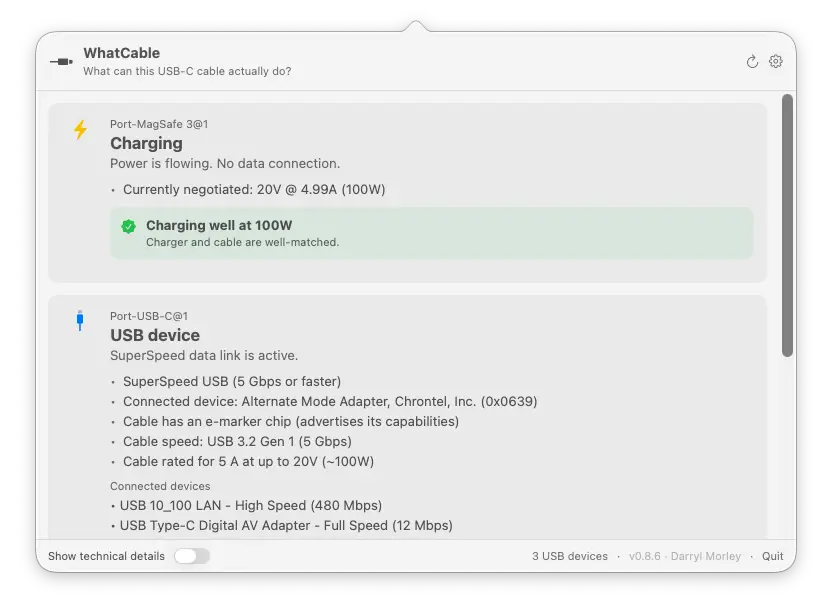
Website: whatcable.uk (overview, screenshots, and CLI docs) A small macOS menu bar app that tells you, in plain English, what each USB-C cable plugged into your Mac can actually do, and why your Mac might be charging slowly. USB-C hides a lot under one connector. Anything from a USB 2.0 charge-only cable to a 240W / 40 Gbps Thunderbolt 4 cable, all looking identical in your drawer. macOS already exposes the relevant info via IOKit; WhatCable surfaces it as a friendly menu bar popover.
WhatCable
What can this USB-C cable actually do?
Website: whatcable.uk (overview, screenshots, and CLI docs)
A small macOS menu bar app that tells you, in plain English, what each USB-C cable plugged into your Mac can actually do, and why your Mac might be charging slowly.
USB-C hides a lot under one connector. Anything from a USB 2.0 charge-only cable to a 240W / 40 Gbps Thunderbolt 4 cable, all looking identical in your drawer. macOS already exposes the relevant info via IOKit; WhatCable surfaces it as a friendly menu bar popover.






What it shows
Per port, in plain English:
- At-a-glance headline: Thunderbolt / USB4, USB device, Display connected, Charging only, Slow USB / charge-only cable, Nothing connected
- Charging diagnostic: when something's plugged in, a banner identifies the bottleneck:
- "Cable is limiting charging speed" (cable rated below the charger)
- "Charging at 30W (charger can do up to 96W)" (Mac is asking for less, e.g. battery near full)
- "Charging well at 96W" (everything matches)
- "Battery full, not charging" (plugged in, battery full, so the Mac isn't drawing power)
- Data-speed diagnostic: a plain-English verdict on what's limiting the link, the Mac port, the cable, or the device. For example "Cable is limiting data speed", "Device runs at 10 Gbps, this is the fastest it supports, not a cable problem", or "Running slower than expected" when the link came up degraded. Shown inline, in the CLI, and in JSON.
- Cable e-marker info: the cable's actual speed (USB 2.0, 5 / 10 / 20 / 40 / 80 Gbps), current rating (3 A / 5 A up to 60W / 100W / 240W), and the chip's vendor
- Cable trust signals: an orange card appears when the e-marker reports values that look unusual against the USB-PD spec, like a zero vendor ID, a reserved bit pattern in the speed / current / cable-latency fields, or a VID that isn't in USB-IF's published list. Wording is hedged on purpose: a flag means "this looks unusual," not "this cable is fake."
- Charger PDO list: every voltage profile the charger advertises (5V / 9V / 12V / 15V / 20V…) with the currently negotiated profile highlighted in real time
- Connected device identity: vendor name and product type, decoded from the PD Discover Identity response
- Attached USB devices: storage, hubs, and peripherals listed under the physical port they're plugged into, with their negotiated speed
- Thunderbolt fabric: when a Thunderbolt / USB4 link is active, shows per-lane speed, generation (TB3, TB4, TB5), and the full switch topology for multi-hop connections through docks
- Cable identification: if the cable's e-marker fingerprint matches a known cable in the bundled database, the brand and model are shown alongside the raw specs
- Active transports: USB 2 / USB 3 / Thunderbolt / DisplayPort
- Desktop widget: small, medium, and large WidgetKit widgets showing live cable status on your desktop
- ⌥-click the menu bar icon (or flip the toggle in Settings) to reveal the underlying IOKit properties for engineers
Click the gear icon in the popover header to open Settings, where you can:
- Hide empty ports
- Launch at login
- Run as a regular Dock app instead of a menu bar icon
- Adjust the font size
- Show technical details (the same raw IOKit data that ⌥-click reveals)
- Switch language (English, Armenian, Brazilian Portuguese, Dutch, French, German, Hindi, Italian, Japanese, Korean, Latvian, Norwegian, Polish, Russian, Simplified Chinese, Spanish, Traditional Chinese, Turkish, Ukrainian, or follow your system default)
- Get notifications when cables are connected or disconnected
- Contribute anonymised port and power diagnostics to improve hardware coverage (opt-in, manual)
Right-click the menu bar icon for Refresh, a Keep window open toggle (handy for screenshots and demos), Settings…, Contribute Diagnostic Data…, Check for Updates…, About, WhatCable on GitHub, and Quit.
WhatCable Pro
WhatCable is free and open source. If you find it useful, you can support the project by picking up WhatCable Pro, which unlocks extra features:
- Live power metering and PD contract inspection
- Power Monitor with a live system power-input graph
- Negotiation Diagnostics: the full per-connection breakdown, what the Mac port, cable, and device each support vs what was negotiated, side by side with the weak link highlighted, plus an e-marker vs Thunderbolt-controller cross-check
- Display Diagnostics: reads your monitor's live display mode straight from macOS and compares it against what the DisplayPort link is carrying, so a screen stuck below its top resolution or refresh has an explanation. Shows the true resolution even on 5K and 6K displays, confirms full quality when a screen reaches its top mode via compression (DSC), and names any HDMI or DisplayPort adapter in the chain
- Port health counters and cable resistance estimation
- Terminal dashboard: a live full-screen view of every port, power, and Thunderbolt for the SSH and tmux crowd. Three screens (Overview, Negotiation, Power), Tab to switch, with a plain cable-health verdict per port. Run
whatcable --dashboard - Pin diagrams and liquid detection status
- Pro screens open inside the app, with an optional detach into their own window
- Works even on Macs that don't expose live per-port metering
One-time purchase, works on up to 2 Macs. See whatcable.uk/pro for details.

Install
Visit whatcable.uk for an overview and screenshots, or install directly below.
Download the latest WhatCable.zip from the Releases page, unzip, and drag WhatCable.app to /Applications.
The app is signed with a Developer ID and notarised by Apple, so there are no Gatekeeper warnings.
It's not on the Mac App Store on purpose: App Sandbox blocks the low-level IOKit reads WhatCable depends on, so it ships signed and notarised outside the store instead.
Requires macOS 14 (Sonoma) or later, Apple Silicon only. On Intel Macs, the USB-C ports are driven by Intel Titan Ridge / JHL9580 Thunderbolt 3 controllers, and the USB-PD state and cable e-marker data WhatCable depends on are not exposed through any public IOKit accessor.
Note: The manual install gives you the menu bar app only. The
whatcableCLI is bundled inside the.appand is not on your PATH by default. If you want to use it from the shell, see the Command-line interface section below for the one-line symlink. Or install via Homebrew, which sets up the CLI automatically.
Homebrew
brew install --cask darrylmorley/whatcable/whatcable
This installs the menu bar app and symlinks the whatcable CLI into your PATH.
Homebrew, CLI only (no menu bar app)
If you don't want the menu bar app, install just the command-line tool:
brew install darrylmorley/whatcable/whatcable-cli
Same signed and notarised binary, packaged on its own. Useful in terminal-only or scripting environments. Pick one of the two Homebrew installs (both ship the same whatcable binary).
Homebrew 6 may warn about untrusted third-party taps on first install. If an existing install starts complaining about an untrusted tap, run brew trust darrylmorley/whatcable or see https://docs.brew.sh/Tap-Trust for details.
Command-line interface
A whatcable binary ships alongside the menu bar app, driven by the same diagnostic engine:
$ whatcable

USB-C Port 1
  ✓ Charging well at 96W
  Cable: 5A, 100W, USB4 40 Gbps
  Charger: 5V / 9V / 15V / 20V PDOs

USB-C Port 2
  ! Cable is limiting charging speed
  Cable: 3A, 60W, USB 2.0
  Device: External SSD, USB 10 Gbps
Flags:
whatcable                # human-readable summary of every port
whatcable --json         # structured JSON, pipe into jq
whatcable --watch        # stream updates as cables come and go (Ctrl+C to exit)
whatcable --raw          # include underlying IOKit properties
whatcable --report       # open a pre-filled GitHub issue for the connected cable
whatcable --test-kit     # run diagnostic probes and submit anonymised data
whatcable --desktop      # launch the GUI app in Dock mode
whatcable --popover      # launch the GUI app in menu bar mode
whatcable --version
whatcable --help
Pro from the command line:
whatcable --monitor                        # Pro: live power telemetry (Ctrl+C to exit)
whatcable --monitor-json                   # Pro: live power telemetry as newline-delimited JSON
whatcable --dashboard                      # Pro: full-screen TUI dashboard (Tab cycles screens, q quits)
whatcable --activate XXXX-XXXX-XXXX-XXXX   # validate and store a Pro licence
whatcable --licence                        # show current licence status
whatcable --deactivate                     # remove the stored licence
whatcable --pro                            # show Pro features, open purchase page
The CLI prints a one-line Pro hint at the end of plain text output for unlicensed users. Run whatcable --silence-pro-hints to hide it (or --show-pro-hints to bring it back). Suppressed automatically when output is piped, redirected, or used with --json.
If you installed the .app manually rather than via Homebrew, the CLI lives at WhatCable.app/Contents/Helpers/whatcable. Symlink it into your PATH if you want it on the shell:
ln -s /Applications/WhatCable.app/Contents/Helpers/whatcable /usr/local/bin/whatcable
The Homebrew install does this for you automatically.
How it works
WhatCable reads four families of IOKit services. No entitlements, no private APIs, no helper daemons:
| Service | What it gives us |
|---|---|
AppleHPMInterfaceType10/11/12 (M3-era), AppleTCControllerType10/11 (M1 / M2) | Per-port state: connection, transports, plug orientation, e-marker presence. Type11 is what M2 MacBook Air uses for its MagSafe 3 port. |
IOPortFeaturePowerSource | Full PDO list from the connected source, with the live "winning" PDO |
IOPortTransportComponentCCUSBPDSOP, ...SOPp, ...SOPpp | PD Discover Identity VDOs from the port partner (SOP), the cable's near-end e-marker (SOP'), and the far-end e-marker (SOP'') if present |
| XHCI controller subtree | Each connected USB device is paired to its physical port via the XHCI port node's UsbIOPort registry path, falling back to a bus-index derived from the controller's locationID upper byte and the port's hpm SPMI ancestor on machines that don't expose UsbIOPort. |
Cable speed and power decoding follow the USB Power Delivery spec (aligned to USB-PD R3.2 V1.2, March 2026). Vendor names come from a bundled SQLite database (whatcable.db) that merges USB-IF's published vendor list, the community usb.ids list, and a curated set of cable fingerprints reported by users.
Build from source
swift build                  # compile everything
swift run WhatCable          # run the menu bar app (dev mode, no widget or bundle structure)
swift run whatcable-cli      # run the CLI
swift test                   # run the test suite
Requires Swift 5.9+ (Xcode 15+). Note: swift run WhatCable launches a working dev build but without the widget extension or proper .app bundle. For a distributable build, use the build scripts below.
Build a distributable .app
./scripts/smoke-test.sh
Builds, signs, notarises (if configured), and smoke-tests the app. Produces dist/WhatCable.app and dist/WhatCable.zip. Safe to run on any branch, any time. Does not touch the Homebrew tap.
Modes:
| Configuration | Result |
|---|---|
No .env | Ad-hoc signed. Works locally; Gatekeeper warns on other Macs. |
.env with DEVELOPER_ID | Developer ID signed + hardened runtime. |
.env with DEVELOPER_ID + NOTARY_PROFILE | Full notarisation + stapled ticket. Gatekeeper-clean for everyone. |
Cutting a release:
# write release-notes/v<version>.md first, then:
./scripts/release.sh <version>
The wrapper does the whole pipeline: bumps the version, runs build-app.sh
(which builds, signs, notarises, smoke-tests, and bumps the local cask),
tags and pushes the commit, creates the GitHub release with the notes
file, verifies the uploaded asset's sha matches the local zip, copies the
notes into the tap, and pushes the tap. Use --dry-run first to validate
state. Requires gh (auth'd) and the env vars from .env.example.
One-time setup for full notarisation:
# 1. Find your signing identity
security find-identity -v -p codesigning

# 2. Store notarytool credentials in the keychain
xcrun notarytool store-credentials "WhatCable-notary" \
    --apple-id "you@example.com" \
    --team-id "ABCDE12345" \
    --password "<app-specific-password>"   # generate at appleid.apple.com

# 3. Create your .env from the template
cp .env.example .env
# ...and fill in DEVELOPER_ID
Caveats
- Cable e-marker info only appears for cables that carry one. Most USB-C cables under 60 W are unmarked. Any Thunderbolt / USB4 cable, any 5 A / 100 W+ cable, and most quality data cables will be e-marked.
- Some cables only reveal their e-marker once something is plugged in at the other end. The chip in the cable's plug runs off VCONN (a small power rail your Mac feeds into the cable) and only answers when the host issues a "Discover Identity" message. With nothing attached, some Macs read the e-marker straight away, others wait until they see a real partner to negotiate with. If a cable shows up as basic when bare, plug a charger, dock, or device into the far end and check again.
- WhatCable reads from the Mac's USB-C port, the connected device or charger, and the cable itself. It cross-checks what each part of the chain reports, so if a cable claims high specs but the negotiated result is lower, you'll see where the mismatch is. That said, software cannot verify what's physically inside the jacket. If a cable's e-marker chip claims 240W / 40 Gbps but the wiring can't deliver, the chip is lying, not WhatCable. The trust-signals card flags a small set of internal-consistency tells (zero VID, reserved bit patterns in the Cable VDO, a VID not in the USB-IF list). These are common in budget cables and don't necessarily mean anything is wrong. They're informational, not a verdict.
- Desktop front USB-C ports don't appear. On Apple Silicon desktops (Mac mini, Studio), the front USB-C ports are plain USB behind an internal hub, not full USB-C ports with their own controller like the rear Thunderbolt ports. The Mac exposes no cable, power, or PD data for them, so there's nothing for WhatCable to read. The rear Thunderbolt ports work fully.
- PD spec coverage: the decoder is aligned to USB-PD R3.2 V1.2 (March 2026). Earlier 3.0 / 3.1 cables work fine.
- Vendor name lookup uses a bundled database (thousands of USB-IF entries plus the community usb.ids list). VIDs assigned after the bundled snapshot will show as "Unregistered / unknown" and trip a trust-signal flag until the database is refreshed.
Linux port
@abrauchli built a Rust port for Linux called usbeehive. Install it with cargo install usbeehive. It reads from the kernel's typec sysfs interface rather than IOKit, so it's an independent implementation rather than a fork. It started life as a whatcable crate on crates.io before being renamed to avoid confusion with this repo. He's also working on usbee, a GNOME UI for it (early stage, but the basics work).
Privacy
WhatCable reads USB-C port state directly from IOKit on your Mac. All of that happens locally. Nothing is sent anywhere automatically.
Cable reports: If you use the "Report this cable" button on an e-marked cable, WhatCable builds a pre-filled GitHub issue containing the cable's vendor ID, product ID, and capability flags (VDOs). Your browser opens with that data in the issue form. Nothing is submitted until you click the button in GitHub yourself. Once submitted, the issue is public.
Update checks: WhatCable periodically checks the GitHub Releases API to see if a newer version is available. No personal data or hardware info is included in that request.
Diagnostic data: Settings has an opt-in Contribute Diagnostic Data button. When you press it, WhatCable collects anonymised USB-C port and power IOKit details from your Mac and submits them to help improve hardware coverage. It only runs when you click it; nothing is collected or sent unless you choose to.
Contributing
Issues and PRs welcome. The code is small and tries to stay readable.
Where to start:
| Module | Role |
|---|---|
Sources/WhatCable/ | Main menu bar app UI (SwiftUI popover, settings, notifications) |
Sources/WhatCableCore/ | Shared diagnostic logic, PD bit decoding, text formatting |
Sources/WhatCableDarwinBackend/ | IOKit watchers (port state, PD identity, power sources, USB devices, Thunderbolt fabric) |
Sources/WhatCableAppKit/ | Plugin registry and extension points (hooks for Pro features, CLI commands, menu items) |
Sources/WhatCablePlugins/ | Pro features (power metering, licence, cable and display diagnostics, liquid detection) |
Sources/WhatCableWidget/ | WidgetKit extension (small/medium/large desktop widgets) |
Sources/WhatCableCLI/ | CLI binary, shares Core/Backend/Plugins with the app |
Translations
Read TRANSLATIONS.md first: it covers the terminology policy (technical labels stay in English) and which languages have an active maintainer who reviews changes.
WhatCable uses .lproj/.strings files for localisation. Each module (WhatCable and WhatCableCore) has its own set under Sources/<module>/Resources/<lang>.lproj/Localizable.strings.
To add a new language:
- Copy
en.lproj/Localizable.stringsfrom both modules into a new<lang>.lproj/directory - Translate the values (leave the keys as-is)
- Make sure format specifiers (
%@,%lld,%1$@, etc.) match the English originals exactly - Run
plutil -linton your files to check for syntax errors - If the language has its own plural rules, copy
en.lproj/Localizable.stringsdictin theWhatCablemodule and translate theone/few/many/otherforms - Add the language code to
CFBundleLocalizationsinscripts/smoke-test.sh
The Settings language picker builds itself from the bundled .lproj resources, so a new language appears there automatically once the files are in place.
Diagnostic data
The single most helpful thing you can do is hit Contribute Diagnostic Data in Settings. It runs a short set of C probes that gather anonymised port and power data from your Mac, then submits the results. The whole process takes a few seconds, nothing is sent without your explicit click, and no personal information is included.
More device data means better hardware coverage, fewer edge-case bugs, and more accurate diagnostics for everyone. If you have unusual hardware (docks, hubs, TB5 gear, high-wattage chargers), your report is especially valuable.
Cable reports are also very welcome. If you have an e-marked cable, use the "Report this cable" button in the app (or whatcable --report from the CLI) to submit its fingerprint. These reports build the bundled cable database so WhatCable can show brand and model info for known cables. Every report you submit helps other users identify their cables at a glance.
Credits
Built by Darryl Morley.
Contributors:
- @rolandgroen - option-click technical details, gear menu in popover
- @0x687931 - UI polish, hardware matching, updater hardening, USB-C/MagSafe fix
- @blech - USB device matching for hubs, settings view, Cmd+R refresh shortcut
- @willhsieh - window/Dock mode
- @hobostay - SIGTERM handling, charging threshold fix, installer temp file leak fix
- @JimmFly - localisation infrastructure, Simplified Chinese translation
- @IonBazan - i18n migration to .lproj/.strings, Polish translation, obsolete vendor IDs
- @bovirus - Italian translation
- @Vardan933 - Armenian translation
- @jimmyorz - Traditional Chinese translation
- @dohun0310 - Korean translation
- @shpokas - Latvian translation
- @abrauchli - screenshot fix
- @durul - updater security audit
- @nervous-inhuman - USB device matching and port state bug reports
- @hgschmie - e-marker and Thunderbolt cable documentation that led to e-marker detection
- @joeshaw - dual power source bug report, Thunderbolt data samples
- @jlbyrne-76 - M4 Mac Mini front port e-marker bug report, cable reports
- @stevetrease - M3 and M4 ioreg dumps, TB3 data samples
- @jshier - M3 Ultra Thunderbolt data, AppleSmartBattery dumps
- @NoFr1ends - TB5 hardware confirmation (JHL9580 dock, M5 Pro)
- @iFindProblems - Dock mode bug reports
- @NaiveTomcat - Power Monitor regression and MagSafe PD contract bug reports
- @pandoratactful - active Thunderbolt cable e-marker mismatch report
Sponsors:
Thanks to everyone who has filed cable reports, bug reports, and IOKit dumps. These contributions directly improve the cable database and help WhatCable handle more hardware correctly.
Inspired by every time someone has asked "is this cable any good?".
What people are saying
“USB-C cables can be a mess. One cable charges at 5W, another does 100W and Thunderbolt 4, and they look identical in the drawer. WhatCable sits in your menu bar and reads the cable data your Mac already has access to. Pl…”
HN↑ 566sleepingNomad↗
“[Feature] Is a windows version possible — What's the problem? Windows compatibility What would you like to see? I saw "Cross-platform Swift build now runs on Windows (non-blocking while a Swift 6.0.3 toolchain issue is r…”
GH↑ 5tcpaulh↗
“WhatCable 1.0 – USB-C cable inspector for macOS, now with a TUI”
HN↑ 4sleepingNomad↗
“> https://github.com/darrylmorley/whatcable This was on show hn only yesterday. Probably can't tell you anything about the other end of the cable though. > Is this hard to do or just something normal people never care ab…”
HNnottorp↗
“Wontfix for Intel Macbooks: https://github.com/darrylmorley/whatcable/issues/12 Seems the Intel southbridge isn't known to expose the needed info.”
HNavidiax↗
“Props to @sleepingNomad here, who has done 16 releases in the last 7 hours, incorporating feedback from HN on the fly! * Don't like menubar apps? you you can run it as a normal app * Don't like GUIs? Now you can run it o…”
HNbillyhoffman↗
“WhatCable makes sense of USB-C cable confusion - Houston Chronicle — Houston Chronicle”
NEWSHouston Chronicle↗
“WhatCable tells you what that USB-C cable is good for - Boing Boing — Boing Boing”
NEWSBoing Boing↗
You might also like
Mobile
clicky
Hi there! I'm Farza, the guy that made Clicky. The existing codebase remains open source. Tinker with it, make it yours, start a company out of it, do whatever you want I don't mind. But, for all the new stuff I'm hacking on, gonna keep it private. To get the latest Clicky, you can go here. Go crazy with this repo!! It's an MIT license.
Mobile
boneyard
Pixel-perfect skeleton loading screens, extracted from your real UI. No manual measurement, no hand-tuned placeholders. Works with React, Preact, Vue, Svelte 5, Angular, and React Native. import { Skeleton } from 'boneyard-js/react'
Mobile
mobile ink
Production-grade React Native ink primitives extracted from the MathNotes canvas. @mathnotes/mobile-ink is an iOS-first native drawing engine for React Native apps. It gives you Apple Pencil input, Skia/Metal rendering, stroke serialization, selection, zoom, momentum scrolling, and a continuous notebook surface backed by a fixed native engine pool. Mobile Ink is young, but the goal is serious: make high-quality mobile ink available to every React Native team that needs it. If you try the package, report a bug, improve docs, test it on a real device, suggest an API shape, or think through a native rendering problem with us, thank you. Notes-app canvases are full of sharp edges, and thoughtful feedback from people building real apps is one of
Mobile
xnotes android
A handwriting-first notebook for Android, built for pen and stylus Both channels ship the same signed APK. F-Droid rebuilds from source and verifies it against the GitHub release, so you can switch between them without reinstalling. Requires JDK 17 (the project pins Java 17):