
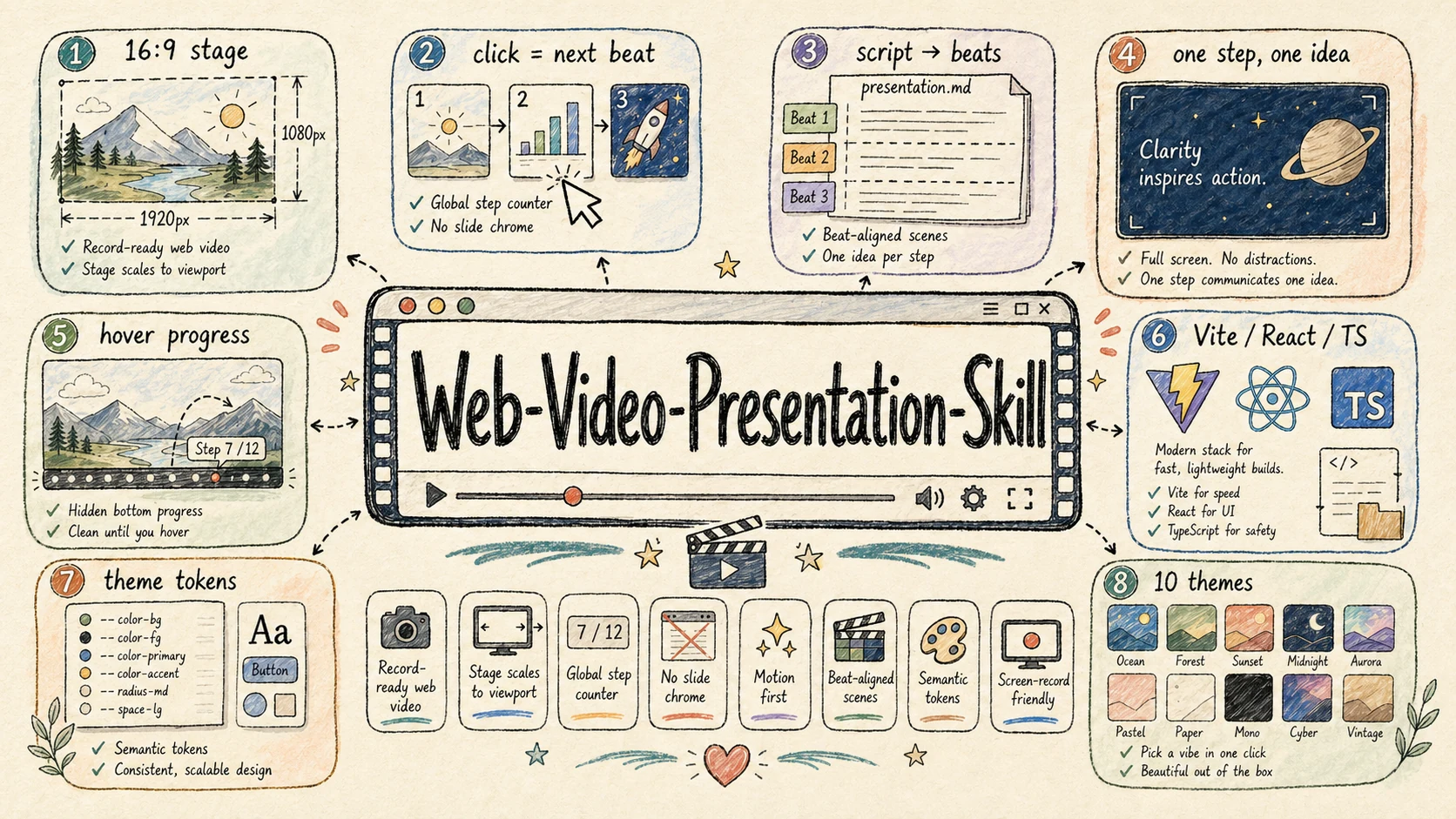
A curated collection of production-ready Agent Skills for Claude Code, Cursor, Codex, and other AI coding agents. Category: Web Video / Presentation Engineering Best for: turning scripts, articles, lessons, product demos, and talks into click-driven 16:9 web presentations that can be screen-recorded as cinematic videos. web-video-presentation builds record-ready Vite + React + TypeScript presentations that behave like video production surfaces. The workflow turns raw articles into narration scripts, maps script beats to full-screen scenes, pauses at required checkpoints, and can optionally synthesize narration audio after the visual outline is approved.
<div align="center">
Option A ·
Option C · Pinned
Garden Skills
A curated collection of production-ready Agent Skills for Claude Code, Cursor, Codex, and other AI coding agents.
<a id="skills-gallery"></a>
<table> <tr> <td width="50%" valign="top"> <a href="#web-video-presentation"><img src="https://cdn.jsdelivr.net/gh/ConardLi/assets@main/imgs/web-video-presentation-skill.webp" alt="Web Video Presentation Skill" width="100%"></a> <br/><a href="#web-video-presentation"><strong>web-video-presentation</strong></a> <br/><sub>Web video / presentation</sub> </td> <td width="50%" valign="top"> <a href="#web-design-engineer"><img src="https://cdn.jsdelivr.net/gh/ConardLi/assets@main/imgs/web-design-skill.webp" alt="Web Design Skill" width="100%"></a> <br/><a href="#web-design-engineer"><strong>web-design-engineer</strong></a> <br/><sub>Design / frontend</sub> </td> </tr> <tr> <td width="50%" valign="top"> <a href="#gpt-image-2"><img src="https://cdn.jsdelivr.net/gh/ConardLi/assets@main/imgs/gpt-image-2-skill.webp" alt="GPT Image 2 Skill" width="100%"></a> <br/><a href="#gpt-image-2"><strong>gpt-image-2</strong></a> <br/><sub>Image generation / prompting</sub> </td> <td width="50%" valign="top"> <a href="#kb-retriever"><img src="https://cdn.jsdelivr.net/gh/ConardLi/assets@main/imgs/kb-retriever-skill.webp" alt="KB Retriever Skill" width="100%"></a> <br/><a href="#kb-retriever"><strong>kb-retriever</strong></a> <br/><sub>Local knowledge retrieval</sub> </td> </tr> </table>


Table of contents
| Install | Use | Contribute |
|---|---|---|
| Install<br>skills CLI (npx)<br>Claude Code plugin marketplace<br>Pinned .zip from Releases<br>Manual copy<br>Git submodule | Compatibility<br>What is a Skill? | Contributing<br>Acknowledgments<br>License |
web-video-presentation
Category: Web Video / Presentation Engineering
Best for: turning scripts, articles, lessons, product demos, and talks into click-driven 16:9 web presentations that can be screen-recorded as cinematic videos.
web-video-presentation builds record-ready Vite + React + TypeScript presentations that behave like video production surfaces. The workflow turns raw articles into narration scripts, maps script beats to full-screen scenes, pauses at required checkpoints, and can optionally synthesize narration audio after the visual outline is approved.
Highlights:
- Fixed 1920×1080 stage that scales to the viewport for stable screen recording
- Click / keyboard driven
(chapter, step)cursor, with one narration beat per visual step - Hard collaboration checkpoints for script, theme, outline, implementation mode, and optional audio
- Hidden hover-only progress controls so the stage stays clean while recording
- Theme-token architecture with 23 built-in themes, each with its own design signature — editorial, terminal, engineering, Swiss International, and more
- Pluggable TTS — provider-agnostic audio runner; ships two built-in providers (MiniMax
mmx-cli+ OpenAI TTS via curl) plus a contract + ready-to-paste snippets for ElevenLabs / edge-tts / Azure / Google Cloud / macOSsay - Scaffolded Vite + React + TypeScript project with reusable stage primitives and recording guidance
<a href="./skills/web-video-presentation/README.md#theme-gallery"><img src="https://cdn.jsdelivr.net/gh/ConardLi/assets@main/imgs/web-video/gallery.webp" alt="Theme gallery — 23 built-in themes for web-video-presentation" /></a>
<sub>↑ All 23 themes at a glance — <a href="./skills/web-video-presentation/README.md#theme-gallery"><b>open the full gallery</b></a> for live 16:9 previews, design signatures, and best-for tags.</sub>
Links: README · SKILL.md · <!-- DOWNLOAD:web-video-presentation:start -->Download v1.2.1 .zip<!-- DOWNLOAD:web-video-presentation:end -->
web-design-engineer
Category: Design / Frontend
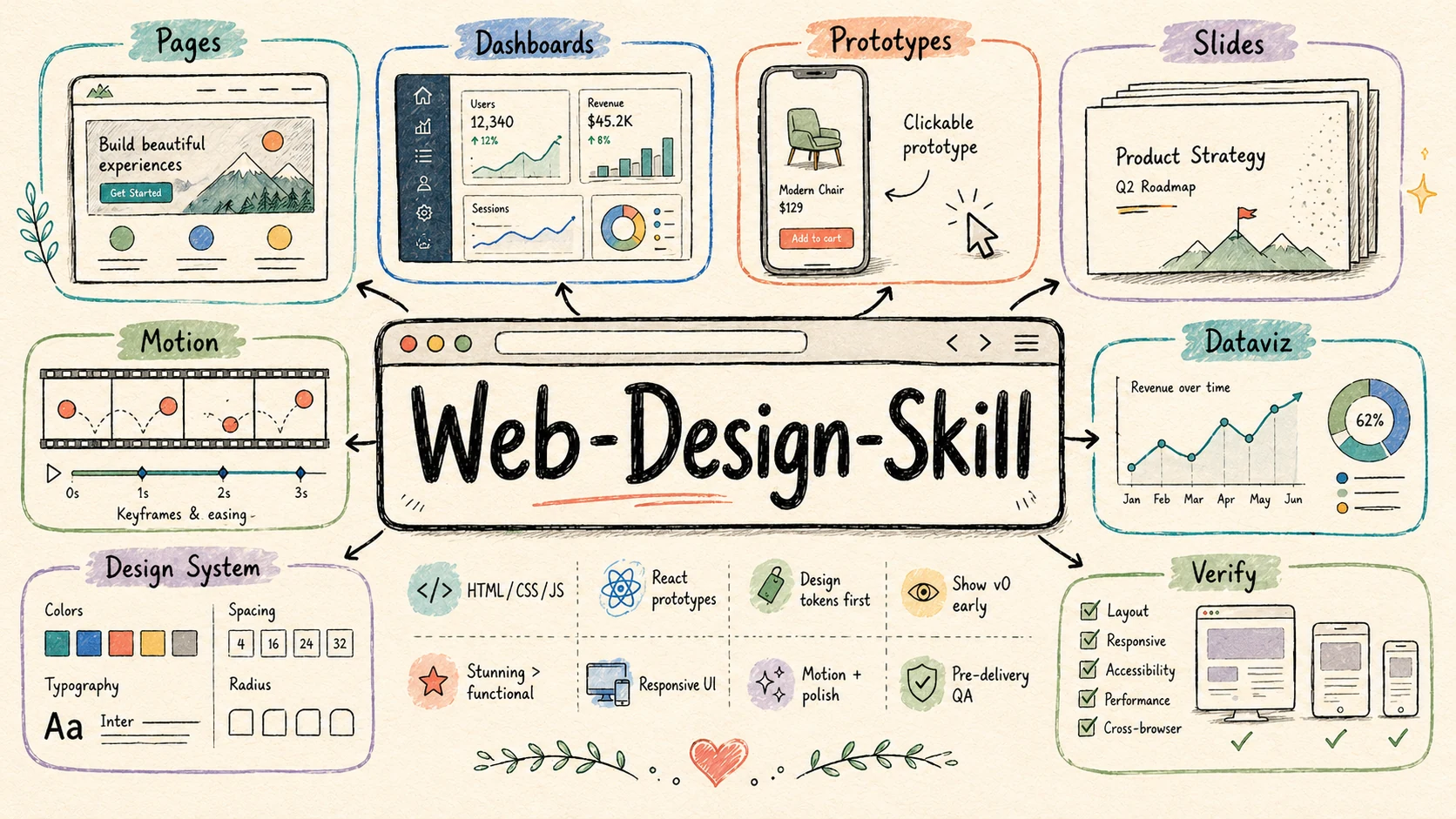
Best for: web pages, landing pages, dashboards, interactive prototypes, HTML slide decks, animations, UI mockups, data visualizations, and design-system explorations.
web-design-engineer turns AI-generated web artifacts from merely functional into polished, deliberate, and visually memorable front-end work. It treats the agent as a design engineer: first understanding product context, then declaring a design system, showing an early v0, building the full experience, and verifying the result.
Highlights:
- Defines a six-step design workflow: requirements → context → design system → v0 → full build → verification
- Pushes beyond generic AI UI patterns with an anti-cliché blocklist and stronger visual judgment
- Ships a Design Direction Advisor (six differentiated schools) + 25 anchored style recipes (Linear / Aesop / Pentagram / Bloomberg / Stripe Press / Mid-Century, etc.) — each recipe carries concrete palette, typography, signature moves, and anti-patterns ready to paste into the design-system declaration
- Covers HTML / CSS / JavaScript / React prototypes, with guidance for responsive layout, motion, and interaction polish
- Includes practical implementation rules for inline React + Babel, CSS tokens,
oklch()color work, container queries, and reduced-motion handling - Ships an advanced patterns reference for device frames, slide engines, animation timelines, dashboards, and other reusable web artifacts
<sub>↑ 12 of 25 anchored recipes — <a href="./skills/web-design-engineer/README.md#style-recipe-gallery"><b>open the full gallery</b></a> for all 25 working artefacts (apothecary pages, trading workstations, magazine covers, Y2K portals, mid-century posters …) with signature moves and best-for tags.</sub>
Links: README · SKILL.md · Website · Demo · <!-- DOWNLOAD:web-design-engineer:start -->Download v1.2.1 .zip<!-- DOWNLOAD:web-design-engineer:end -->
gpt-image-2
Category: Image Generation / Prompt Engineering
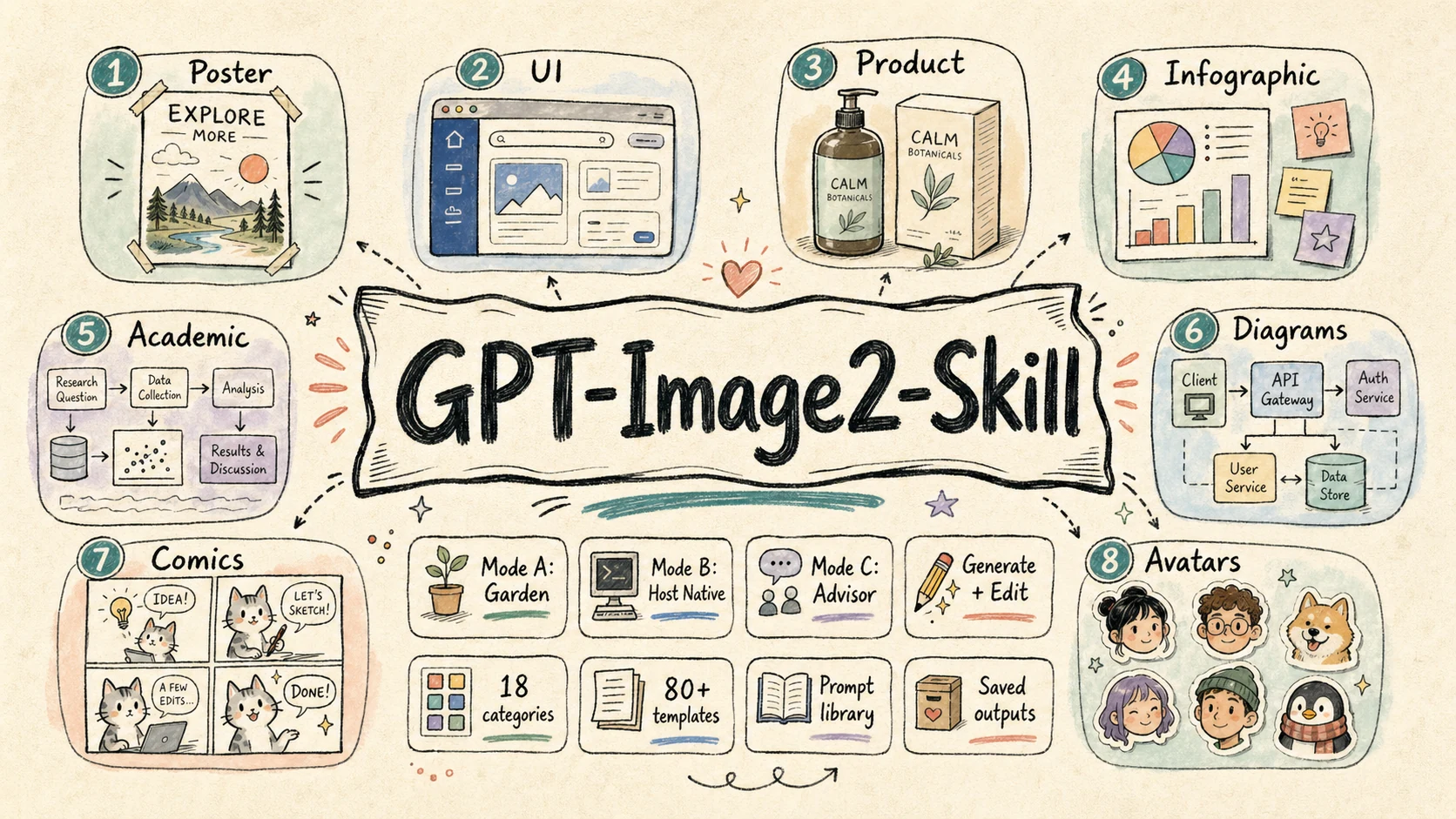
Best for: posters, UI mockups, product visuals, infographics, academic figures, technical diagrams, comics, avatars, storyboards, branding boards, and image-editing workflows.
gpt-image-2 is a focused image-generation skill for GPT Image 2 and OpenAI-compatible image APIs. It is designed to work across different agent environments: fully local Garden generation, host-native image-tool delegation, or prompt-only advisor mode when no image tool is available.
Highlights:
- Supports three runtime modes: Mode A Garden local, Mode B host-native delegation, and Mode C advisor-only prompt writing
- Starts every task with mode detection so the skill does not silently choose the wrong execution path
- Provides 18 visual categories and 79 structured prompt templates under
references/ - Covers both image generation and image editing through dedicated workflows and scripts
- Saves prompts and generated images under
garden-gpt-image-2/in Garden mode for reuse, review, and versioning
Selected live cases
<table> <tr> <td width="25%" align="center"> <a href="https://gpt-image2.mmh1.top/#/case/editing-workflows%2Fbackground-replacement%2F1"><img src="https://cdn.jsdelivr.net/gh/ConardLi/gpt-image-2-101@main/public/case/editing-workflows/background-replacement/1-thumb.webp" alt="Background replacement case" width="100%"></a><br/> <strong><code>background-replacement</code></strong><br/> <sub>Portrait edit with Times Square relighting.</sub> </td> <td width="25%" align="center"> <a href="https://gpt-image2.mmh1.top/#/case/ui-mockups%2Fchat-interface-scene%2F3"><img src="https://cdn.jsdelivr.net/gh/ConardLi/gpt-image-2-101@main/public/case/ui-mockups/chat-interface-scene/3-thumb.webp" alt="AI assistant UI mockup case" width="100%"></a><br/> <strong><code>chat-interface-scene</code></strong><br/> <sub>Claude-style assistant product screenshot.</sub> </td> <td width="25%" align="center"> <a href="https://gpt-image2.mmh1.top/#/case/ui-mockups%2Flive-commerce-ui%2F1"><img src="https://cdn.jsdelivr.net/gh/ConardLi/gpt-image-2-101@main/public/case/ui-mockups/live-commerce-ui/1-thumb.webp" alt="Live commerce UI case" width="100%"></a><br/> <strong><code>live-commerce-ui</code></strong><br/> <sub>Celebrity livestream commerce interface.</sub> </td> <td width="25%" align="center"> <a href="https://gpt-image2.mmh1.top/#/case/ui-mockups%2Fproduct-card-overlay%2F1"><img src="https://cdn.jsdelivr.net/gh/ConardLi/gpt-image-2-101@main/public/case/ui-mockups/product-card-overlay/1-thumb.webp" alt="Product card overlay case" width="100%"></a><br/> <strong><code>product-card-overlay</code></strong><br/> <sub>Skincare landing-page hero.</sub> </td> </tr> <tr> <td width="25%" align="center"> <a href="https://gpt-image2.mmh1.top/#/case/infographics%2Fbento-grid-infographic%2F1"><img src="https://cdn.jsdelivr.net/gh/ConardLi/gpt-image-2-101@main/public/case/infographics/bento-grid-infographic/1-thumb.webp" alt="Bento grid infographic case" width="100%"></a><br/> <strong><code>bento-grid-infographic</code></strong><br/> <sub>High-density iPhone 16 Pro explainer.</sub> </td> <td width="25%" align="center"> <a href="https://gpt-image2.mmh1.top/#/case/technical-diagrams%2Fsystem-architecture%2F1"><img src="https://cdn.jsdelivr.net/gh/ConardLi/gpt-image-2-101@main/public/case/technical-diagrams/system-architecture/1-thumb.webp" alt="System architecture diagram case" width="100%"></a><br/> <strong><code>system-architecture</code></strong><br/> <sub>Multi-tenant AI SaaS production diagram.</sub> </td> <td width="25%" align="center"> <a href="https://gpt-image2.mmh1.top/#/case/slides-and-visual-docs%2Fdense-explainer-slides%2F2"><img src="https://cdn.jsdelivr.net/gh/ConardLi/gpt-image-2-101@main/public/case/slides-and-visual-docs/dense-explainer-slides/2-thumb.webp" alt="Dense explainer slide case" width="100%"></a><br/> <strong><code>dense-explainer-slides</code></strong><br/> <sub>AI Agent mechanism in one page.</sub> </td> <td width="25%" align="center"> <a href="https://gpt-image2.mmh1.top/#/case/maps%2Ffood-map%2F1"><img src="https://cdn.jsdelivr.net/gh/ConardLi/gpt-image-2-101@main/public/case/maps/food-map/1-thumb.webp" alt="Food map case" width="100%"></a><br/> <strong><code>food-map</code></strong><br/> <sub>City-walk editorial food guide.</sub> </td> </tr> <tr> <td width="25%" align="center"> <a href="https://gpt-image2.mmh1.top/#/case/product-visuals%2Fexploded-view-poster%2F2"><img src="https://cdn.jsdelivr.net/gh/ConardLi/gpt-image-2-101@main/public/case/product-visuals/exploded-view-poster/2-thumb.webp" alt="Exploded product poster case" width="100%"></a><br/> <strong><code>exploded-view-poster</code></strong><br/> <sub>Vision Pro 2 optical and compute teardown.</sub> </td> <td width="25%" align="center"> <a href="https://gpt-image2.mmh1.top/#/case/academic-figures%2Fneural-network-architecture%2F2"><img src="https://cdn.jsdelivr.net/gh/ConardLi/gpt-image-2-101@main/public/case/academic-figures/neural-network-architecture/2-thumb.webp" alt="Neural network architecture case" width="100%"></a><br/> <strong><code>neural-network-architecture</code></strong><br/> <sub>ViT-B/16 model figure for papers.</sub> </td> <td width="25%" align="center"> <a href="https://gpt-image2.mmh1.top/#/case/branding-and-packaging%2Fcosmetic-packaging%2F1"><img src="https://cdn.jsdelivr.net/gh/ConardLi/gpt-image-2-101@main/public/case/branding-and-packaging/cosmetic-packaging/1-thumb.webp" alt="Cosmetic packaging case" width="100%"></a><br/> <strong><code>cosmetic-packaging</code></strong><br/> <sub>Premium skincare gift-box composition.</sub> </td> <td width="25%" align="center"> <a href="https://gpt-image2.mmh1.top/#/case/storyboards-and-sequences%2Fanime-key-visual%2F1"><img src="https://cdn.jsdelivr.net/gh/ConardLi/gpt-image-2-101@main/public/case/storyboards-and-sequences/anime-key-visual/1-thumb.webp" alt="Anime key visual case" width="100%"></a><br/> <strong><code>anime-key-visual</code></strong><br/> <sub>Game-launch key art with crop-safe layout.</sub> </td> </tr> </table><sub>↑ 12 selected cases from the 160+ public case library — <a href="./skills/gpt-image-2/README.md#case-gallery"><b>open the skill gallery</b></a> for more templates, or browse the <a href="https://gpt-image2.mmh1.top/#/case">live website</a>.</sub>
Links: README · SKILL.md · Website · <!-- DOWNLOAD:gpt-image-2:start -->Download v1.0.3 .zip<!-- DOWNLOAD:gpt-image-2:end -->
kb-retriever
Category: Retrieval / Local Knowledge Base
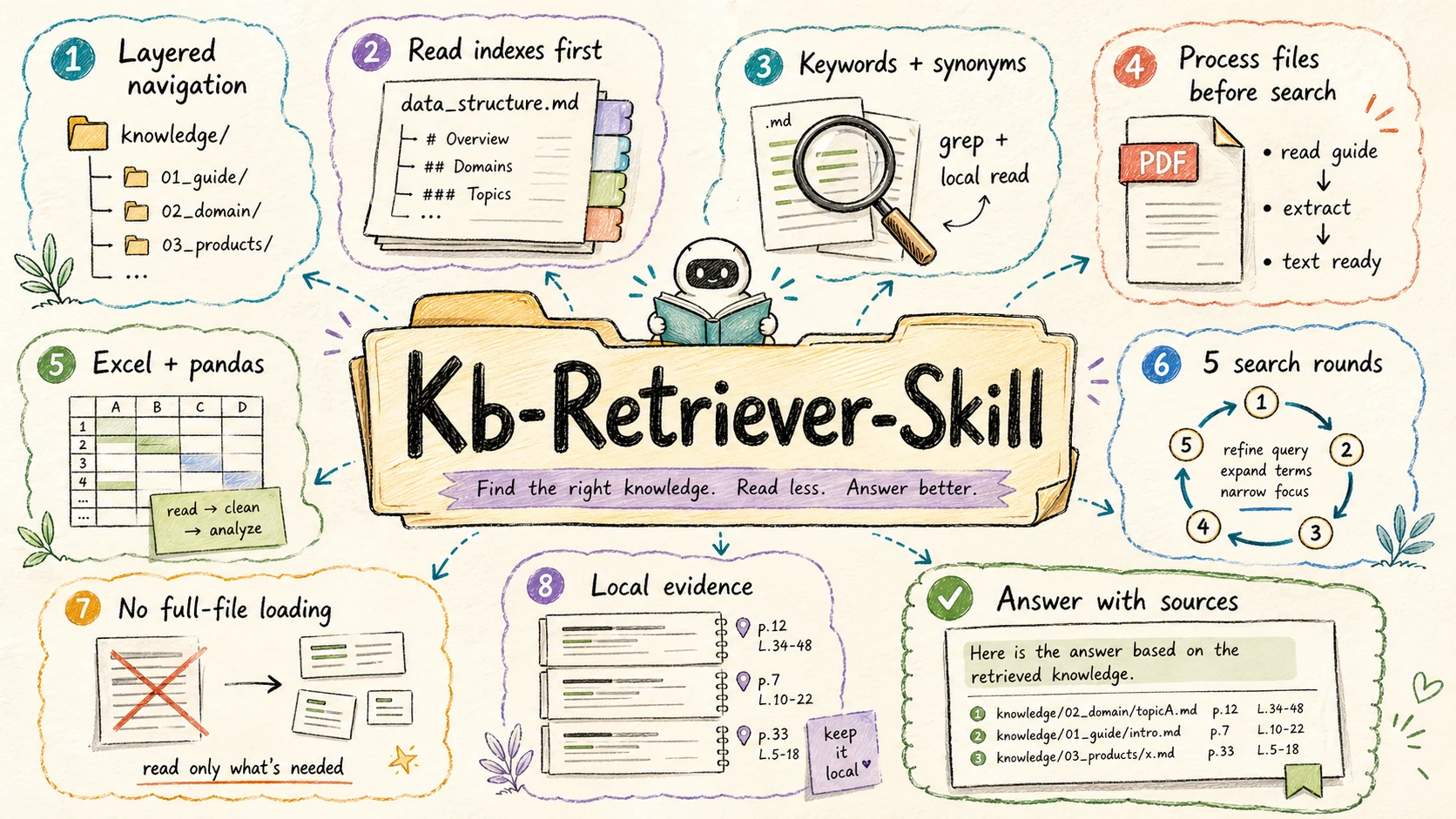
Best for: answering questions from a local knowledge/ directory, searching structured documentation, and extracting evidence from Markdown, text, PDF, and Excel files without flooding the agent context.
kb-retriever is a local knowledge-base retriever built around careful, progressive search. Instead of loading whole files, it navigates hierarchical index files, narrows the candidate set, processes complex file types correctly, and answers with sources.
Highlights:
- Uses layered
data_structure.mdfiles to navigate the knowledge base before searching content - Enforces a learn-before-process rule for PDF and Excel files, using the included reference docs before extraction or analysis
- Combines precise keyword search, local windowed reads, synonyms, and iterative refinement
- Bounds retrieval to at most 5 search rounds so exploration stays controlled
- Includes workflows for
grep,pdftotext,pdfplumber, andpandas, with source-aware answer formatting
Links: README · SKILL.md · <!-- DOWNLOAD:kb-retriever:start -->Download v1.0.0 .zip<!-- DOWNLOAD:kb-retriever:end -->
Install
There are five supported install paths. Pick the one that fits your stack:
| # | Method | Best for | Pinned version? |
|---|---|---|---|
| A | skills CLI (npx skills add) | Any agent, one-line install, pick & choose skills | ✅ via tag URL |
| B | Claude Code plugin marketplace | Claude Code users who want to subscribe to plugin packs | ✅ via marketplace version |
| C | Pinned .zip from GitHub Releases | CI / air-gapped envs / reproducible installs | ✅ ✅ (immutable) |
| D | Manual copy after git clone | Local hacking on the skill itself | ❌ (tracks main) |
| E | Git submodule | Vendored into a larger project, want upstream updates | ✅ via submodule SHA |
Each skill section above also has a
Download v<version> .ziplink in its "Links:" row that points at the current pinned release artifact. Those URLs are auto-rewritten byscripts/release/update-readme.mjson every release, so they always advertise the latest immutable version.
Option A · skills CLI (npx)
The fastest agent-agnostic path. Uses the standard npx skills CLI,
which auto-detects your agent (Claude Code, Cursor, Codex, etc.) and drops the
skill into the right directory.
# Install all four skills (latest)
npx skills add ConardLi/garden-skills

# Install just one skill (latest)
npx skills add ConardLi/garden-skills -s web-design-engineer

# Install globally (~/.skills) instead of per-project (./.skills)
npx skills add ConardLi/garden-skills -s gpt-image-2 --global

# Target a specific agent
npx skills add ConardLi/garden-skills -s kb-retriever -a claude-code
Defaults to the latest commit on
main. That's what you want 95% of the time — the CLI tracks each skill's most recent publishedSKILL.mdstraight from the source tree.
Want a pinned version? (CI / production) Use a tag-scoped tree/ URL —
this points at the exact commit a release was cut from:
# Pin one skill to a specific release
npx skills add ConardLi/garden-skills/tree/web-design-engineer-v1.0.0/skills/web-design-engineer
For each skill, the current pinned .zip URL is also shown inline in its
"Links:" row above (the Download v<version> .zip link).
Useful sub-commands:
npx skills list                 # what's installed
npx skills find web-design      # search registries
npx skills update               # bump everything
npx skills remove kb-retriever  # uninstall
Option B · Claude Code plugin marketplace
If you use Claude Code, you can subscribe to the marketplace and install plugin packs that bundle one or more skills together:
/plugin marketplace add ConardLi/garden-skills
/plugin install presentation-skills@garden-skills
/plugin install web-design-skills@garden-skills
/plugin install knowledge-base-skills@garden-skills
/plugin install image-generation-skills@garden-skills
Plugin packs are declared in .claude-plugin/marketplace.json:
| Plugin pack | Skills included |
|---|---|
| presentation-skills | web-video-presentation |
| web-design-skills | web-design-engineer |
| knowledge-base-skills | kb-retriever |
| image-generation-skills | gpt-image-2 |
Option C · Pinned .zip from Releases
Every formal release publishes an immutable .zip (with a SHA-256 checksum) to
GitHub Releases. Pin to
this from CI, Dockerfiles, or air-gapped installers when you need the exact
bytes to never move under you.
# Replace <skill> and <version> with the version you want.
SKILL=web-design-engineer
VERSION=1.0.0

curl -fsSL -o "${SKILL}.zip" \
  "https://github.com/ConardLi/garden-skills/releases/download/${SKILL}-v${VERSION}/${SKILL}-${VERSION}.zip"

# Verify the checksum (highly recommended for unattended installs)
curl -fsSL -o "${SKILL}.zip.sha256" \
  "https://github.com/ConardLi/garden-skills/releases/download/${SKILL}-v${VERSION}/${SKILL}-${VERSION}.zip.sha256"
shasum -a 256 -c "${SKILL}.zip.sha256"

# Drop the folder into the agent's skills directory
unzip -q "${SKILL}.zip" -d .claude/skills/   # or .agents/skills/, .codex/skills/, ...
A floating "always-latest" URL is also available — useful for one-off installs:
https://github.com/ConardLi/garden-skills/releases/latest/download/<skill>-<version>.zip
Pinned URLs for every skill are listed inline in this README — see the "Download" line under each skill's "Links" entry above. They are kept in sync automatically by the release pipeline.
Option D · Manual copy into your project
Clone the repo and copy the skill folder you want — handy if you want to fork or hack on the skill itself.
git clone https://github.com/ConardLi/garden-skills.git
cp -r garden-skills/skills/web-design-engineer  your-project/.claude/skills/
# Cursor / generic agent:
cp -r garden-skills/skills/web-design-engineer  your-project/.agents/skills/
The agent discovers the skill the next time it scans the workspace.
Option E · Git submodule
For vendoring into a larger project where you want to track upstream updates:
git submodule add https://github.com/ConardLi/garden-skills.git vendor/garden-skills
ln -s ../../vendor/garden-skills/skills/web-design-engineer .claude/skills/web-design-engineer
Pin to a release tag for reproducibility:
cd vendor/garden-skills
git checkout web-design-engineer-v1.0.0
Compatibility
| Agent / Runtime | Skill location | Status |
|---|---|---|
| Claude Code | .claude/skills/<name>/ or via plugin marketplace | ✅ Tested |
| Claude.ai (web) | Settings → Capabilities → Skills | ✅ Tested |
| Cursor | .agents/skills/<name>/ | ✅ Tested |
| Codex CLI | .codex/skills/<name>/ | ✅ Tested |
| Gemini CLI | extension manifest | ✅ Tested |
| OpenCode | .opencode/skills/<name>/ | ✅ Tested |
The
SKILL.mdformat is portable by design — if your agent supports skills, copy the folder into the directory it scans, and it should work. PRs welcome to extend this matrix.
What is a Skill?
A Skill is a self-contained folder the agent can load on-demand. It's
just a SKILL.md (YAML frontmatter + instructions), optionally accompanied
by reference docs, scripts, and assets:
<skill-name>/
├── SKILL.md      ← required: when to use it + how to do it
├── README.md     ← human-facing docs
├── references/   ← optional: extended docs the agent loads on demand
├── scripts/      ← optional: deterministic executable helpers
└── assets/       ← optional: templates, fonts, icons
The agent decides whether to activate the skill from the description line
in the frontmatter — so the description is the contract between you and the
agent. For the full spec, see agentskills.io and
Anthropic's reference repository.
Contributing
Bug reports, new skills, and tooling improvements are all welcome.
The maintainer-facing docs — repository layout, release process, version
rules, CI workflow, troubleshooting — live in
CONTRIBUTING.md (中文).
Read that first if you want to add a skill or cut a release.
Quick orientation:
git clone https://github.com/ConardLi/garden-skills.git
cd garden-skills
npm run list      # show all skills + manifest status
npm run validate  # the same check CI runs on every PR
Acknowledgments
This collection stands on the shoulders of:
- Anthropic for the Agent Skills spec and the
anthropics/skillsreference repository. - Claude Design — the system prompt that inspired
web-design-engineer. The original is preserved indist/prompt/claude-design-system-prompt.mdfor reference. - The broader OSS skill community — see
travisvn/awesome-claude-skillsandobra/superpowersfor further discovery.
License
Videos
Gardening for Beginners Series: Gardening Basics for Beginners
Dig, Plant, Water, Repeat · 362K views
DIY Steps and Stairs in a Sloping Garden! This Gardener's Skills are Impressive!
Beamish · 1678K views
Joe Swift's principles of garden design
BBCGardenerWorldEvents · 137K views
What people are saying
“Updates to gist are getting lost. It accepts them as normal but the next page load for the gist is the previous version. Twitter accounts describe the same sort of problem for git repos. status.github.com reports "We're …”
HN↑ 337donpdonp↗
“Dotfiles.github.com - A guide to dotfiles on GitHub”
HN↑ 122netherland↗
“Garden Notes: April 8, 2026 - MassLive — MassLive”
NEWSMassLive↗
“Do you need a personal garden coach? Here's how to find one in Seattle. - The Seattle Times — The Seattle Times”
NEWSThe Seattle Times↗
“Students Build Garden Beds In Newhallville - New Haven Independent — New Haven Independent”
NEWSNew Haven Independent↗
You might also like
agent
OfficeCLI
Give any AI agent full control over Word, Excel, and PowerPoint — in one line of code. Open-source. Single binary. No Office installation. No dependencies. Works everywhere. Built-in agent-friendly rendering engine — agents can see what they create, no Office required. Render .docx / .xlsx / .pptx to HTML or PNG, closing the render → look → fix loop anywhere the binary runs.
agent
inkos
Open-source AI Agent that autonomously writes, audits, and revises novels — with human review gates that keep you in control. Supports LitRPG, Progression Fantasy, Isekai, Romantasy, Sci-Fi, and more. Continuation, spinoff, fanfic, and style imitation workflows built in. InkOS Studio 2.0 is here! — run inkos to launch the local web workbench. Book management, chapter review & editing, real-time writing progress, market radar, analytics, AI detection, style analysis, genre management, daemon control, truth file editing — everything the CLI does, now visual. InkOS TUI is here! — run inkos tui to launch a full-screen interactive dashboard. Conversational creation, natural-language book operations, slash command autocomplete, themed animations — TUI, Studio, and OpenClaw share the same inter
agent
learn harness engineering
Learn Harness Engineering is a course dedicated to the engineering of AI coding agents. We have deeply studied and synthesized the most advanced Harness Engineering theories and practices in the industry. Our core references include: The repository now includes a PDF build pipeline for the course content. There's a hard truth most people learn the hard way: the strongest model in the world will still fail on real engineering tasks if you don't build a proper environment around it.
agent
hermes web ui
A full-featured desktop app and web dashboard for Hermes Agent. Manage AI chat sessions, monitor usage & costs, configure platform channels, schedule cron jobs, browse skills — all from a clean, responsive web interface. Unified configuration for 8 platforms in one page: hermes-web-ui clear-login-locks --restart