
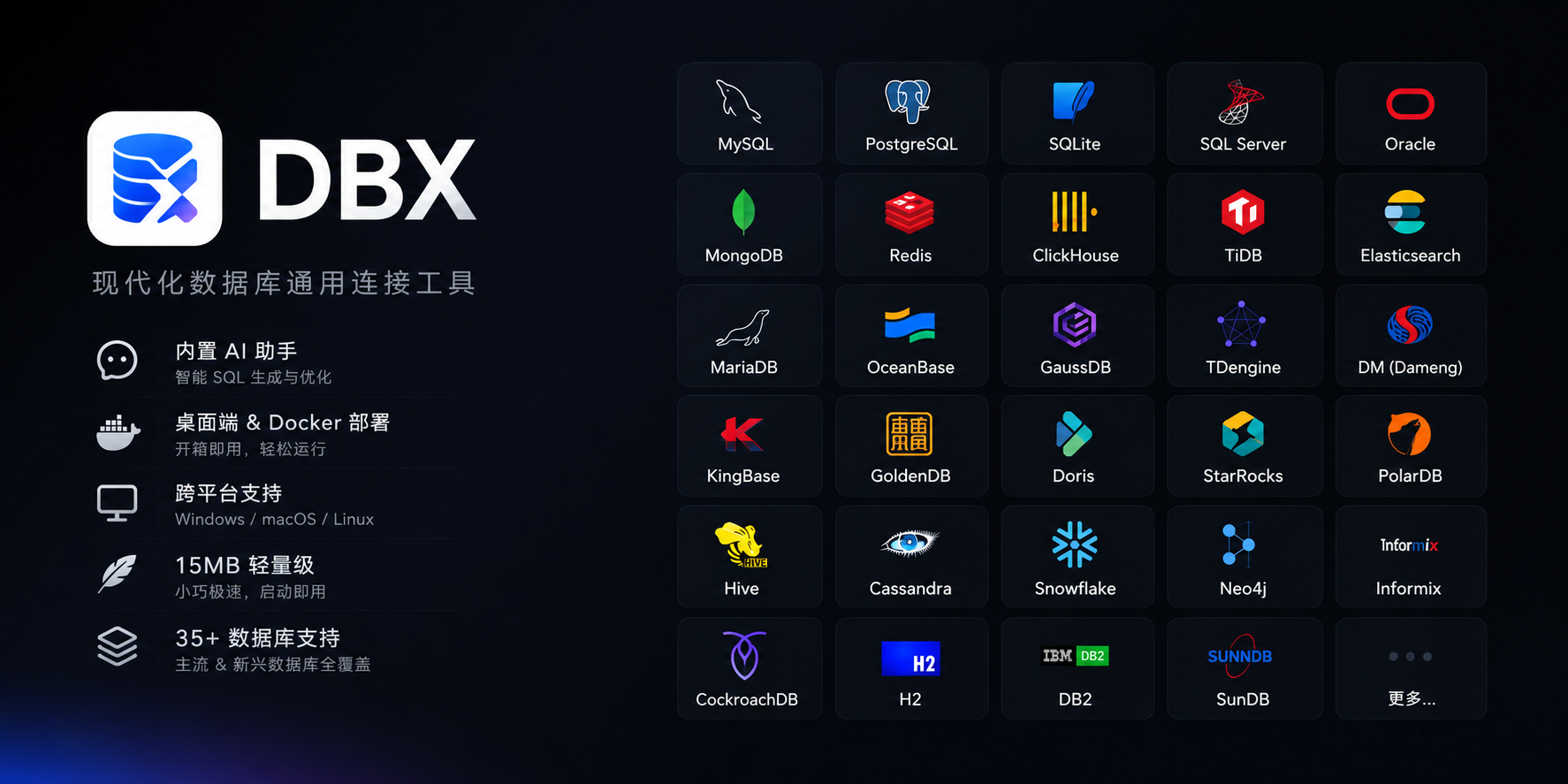
MySQL, PostgreSQL, SQLite, Redis, MongoDB, DuckDB, ClickHouse, SQL Server, Oracle, Elasticsearch, MariaDB, TiDB, OceanBase, openGauss, GaussDB, KWDB, KingBase, Vastbase, GoldenDB, Doris, SelectDB, StarRocks, Manticore Search, Redshift, DM, TDengine, XuguDB, CockroachDB, Access, HighGo, and more. Agent/JDBC-oriented profiles extend DBX to H2, Snowflake, Trino, Hive, DB2, Informix, Neo4j, Cassandra, CodeMirror 6 with SQL syntax highlighting, metadata-aware autocomplete, Cmd+Enter execution, selected SQL execution, SQL formatting, diagnostics, and 9 editor themes. Persistent query history, saved SQL snippets, tab restore, and SQL file execution keep repeat work close at hand.








Why DBX?
🪶 15 MB, zero runtime bloatNo Java JRE. No Python venv. No bundled Chromium. DBX ships as a single small binary — download, install, connect. DBeaver needs Java; TablePlus is macOS-only. DBX runs everywhere with nothing extra. |
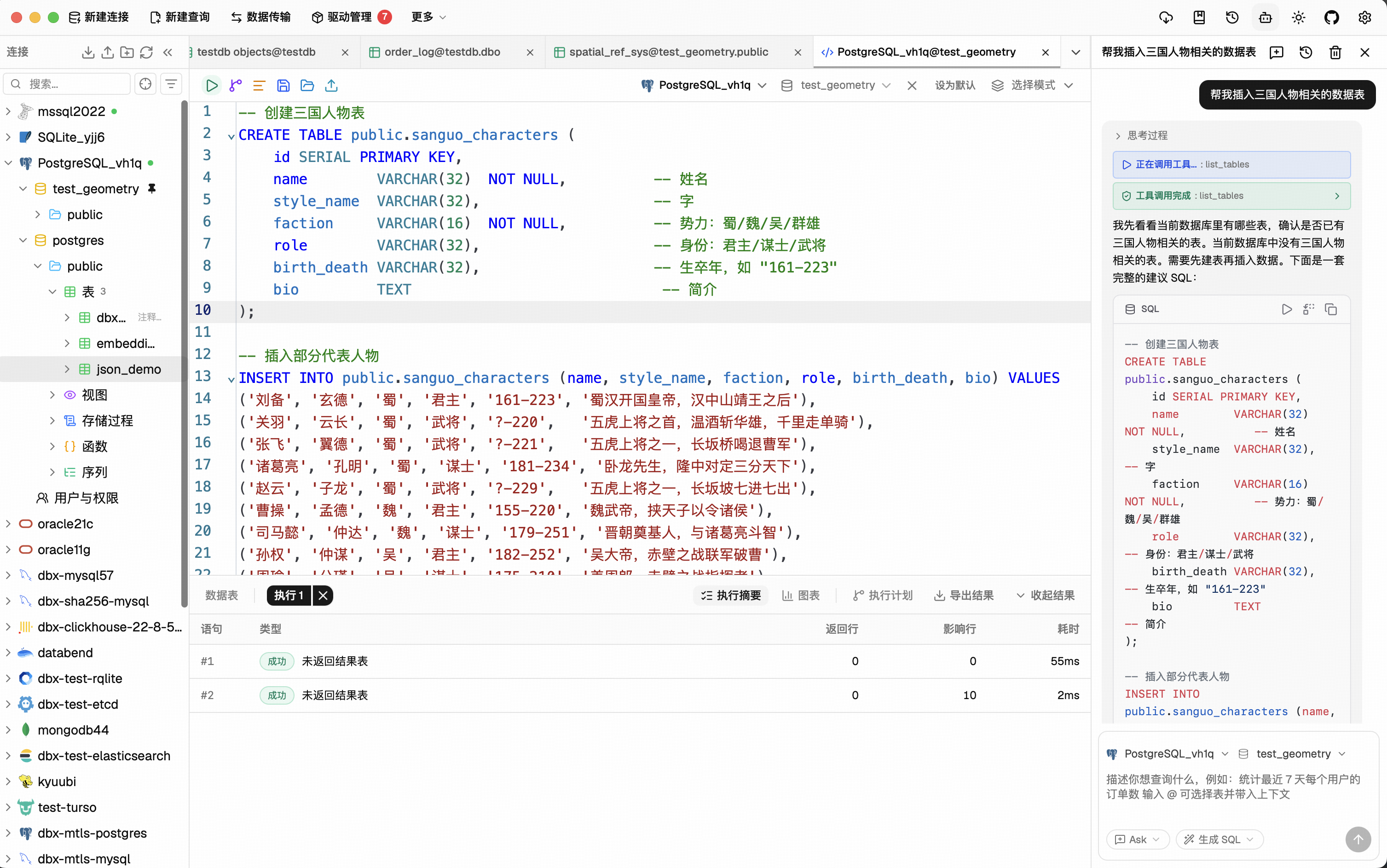
🤖 AI that lives in your editorHighlight a table, describe what you want, get SQL back — no copy-paste between tools. Works with Claude, OpenAI, or local models via Ollama. Built-in safety checks review AI-generated SQL before it runs. |
🔌 MCP: your databases, AI-readyDBX speaks the Model Context Protocol. Claude Code, Cursor, Windsurf, and other AI coding agents can query your databases through connections you already set up. One config, everywhere. |
🌐 Desktop + Docker + WebNative app on macOS, Windows, and Linux. Self-host via Docker for team access. Web version for browser-only environments. Same feature set. Same connections. |
Features
50+ Databases, One Tool
MySQL, PostgreSQL, SQLite, Redis, MongoDB, DuckDB, ClickHouse, SQL Server, Oracle, Elasticsearch, MariaDB, TiDB, OceanBase, openGauss, GaussDB, KWDB, KingBase, Vastbase, GoldenDB, Doris, SelectDB, StarRocks, Manticore Search, Redshift, DM, TDengine, XuguDB, CockroachDB, Access, HighGo, and more. Agent/JDBC-oriented profiles extend DBX to H2, Snowflake, Trino, Hive, DB2, Informix, Neo4j, Cassandra, BigQuery, Kylin, SunDB, and custom JDBC connections. New native and agent-driven drivers also cover Databricks, SAP HANA, Teradata, Vertica, Firebird, Exasol, YashanDB, GBase, Databend, RQLite, Turso, InfluxDB, QuestDB, IoTDB, etcd, IRIS, and more. All in a single ~15 MB app. No bundled Chromium.
Query Editor
CodeMirror 6 with SQL syntax highlighting, metadata-aware autocomplete, Cmd+Enter execution, selected SQL execution, SQL formatting, diagnostics, and 9 editor themes. Persistent query history, saved SQL snippets, tab restore, and SQL file execution keep repeat work close at hand.
AI SQL Assistant
Describe what you want in plain language — get SQL back. DBX can explain queries, optimize SQL, fix errors, and run AI-generated SQL through built-in safety checks. Works with Claude, OpenAI, local models, or any OpenAI-compatible endpoint.
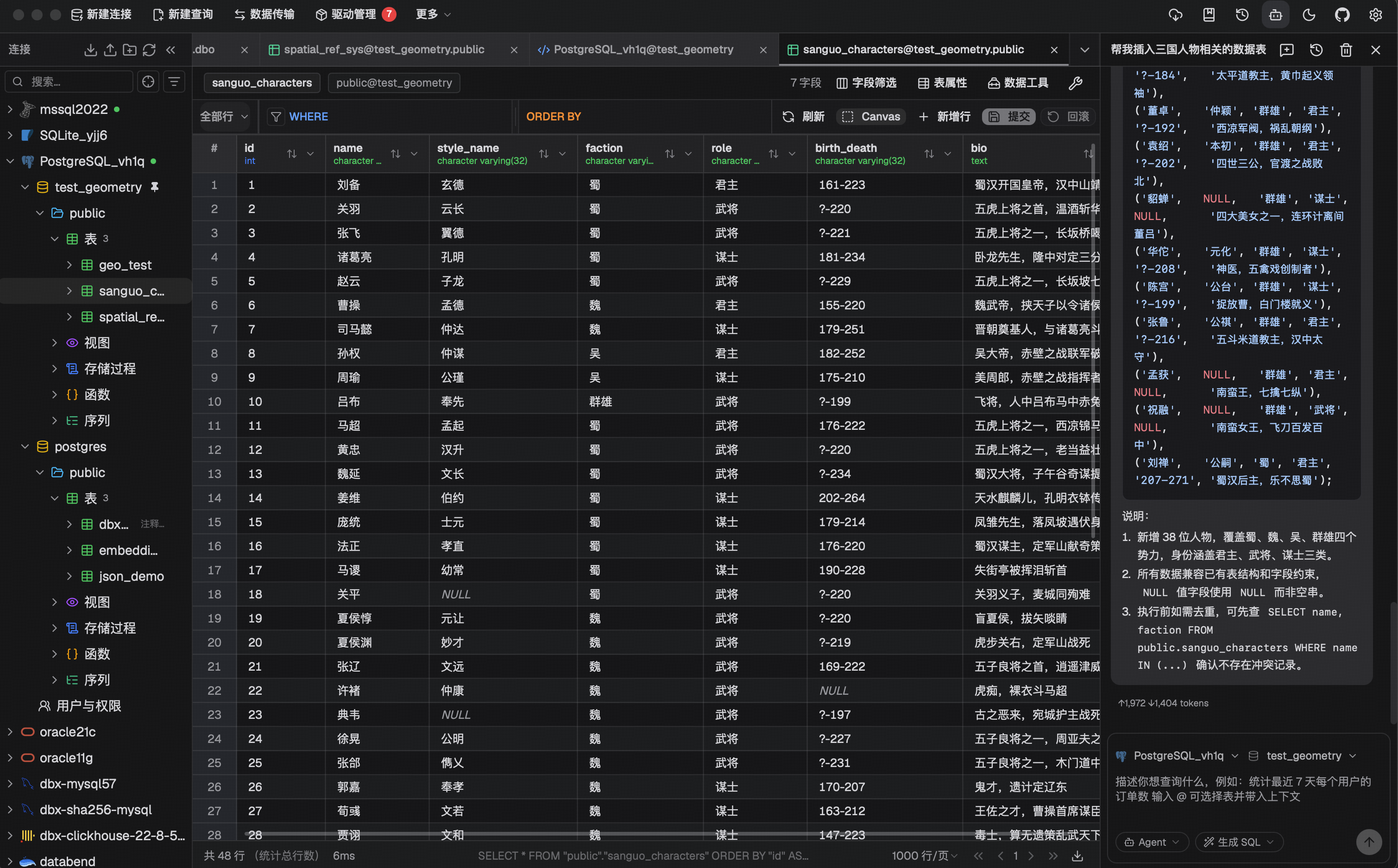
Data Grid
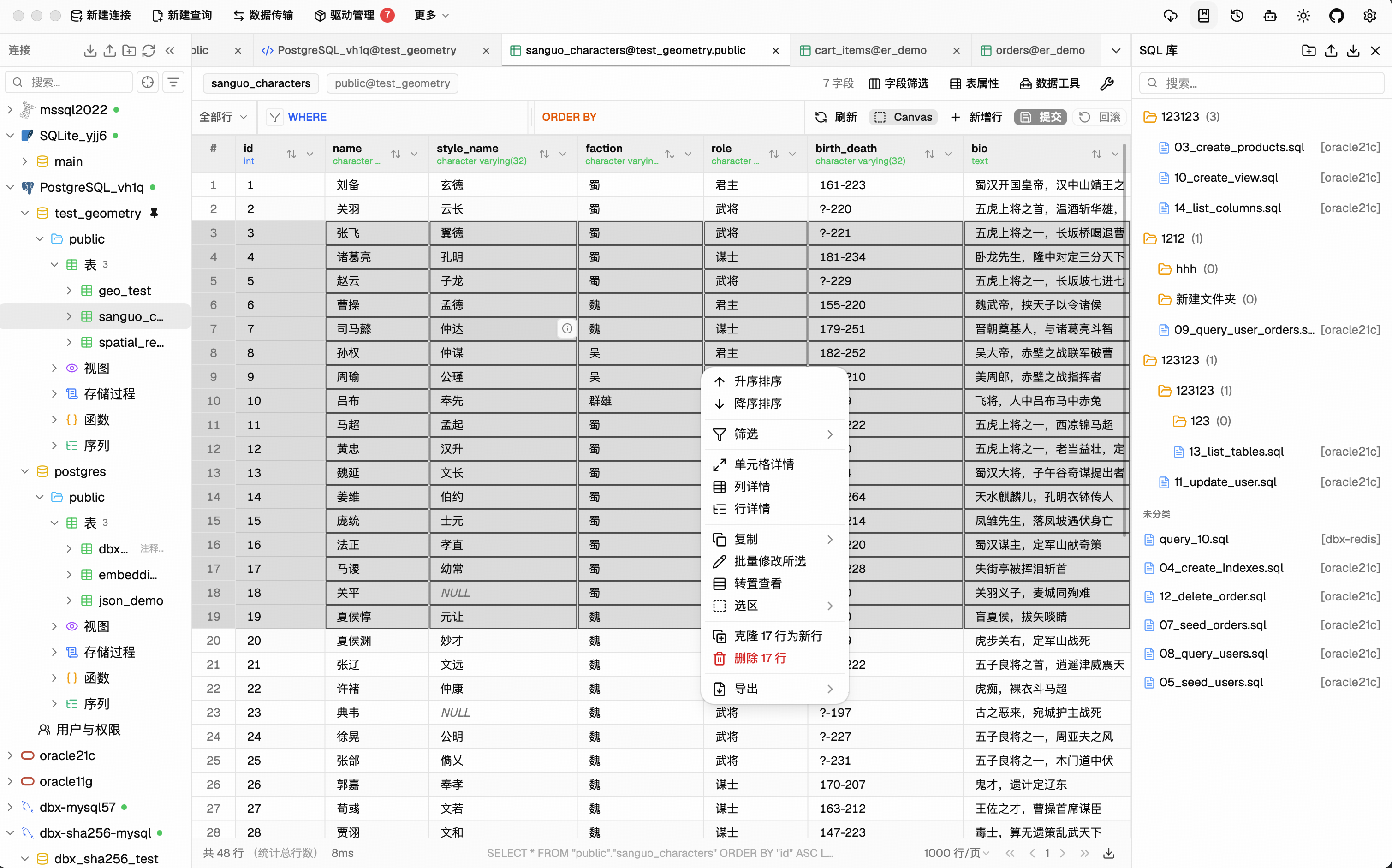
Virtual-scrolled table that handles large result sets. Inline editing, SQL preview before save, WHERE / ORDER BY controls, DataGrip-style filters, LIKE / NOT LIKE context filters, sorting, full-text search, pagination, column resize, auto-fit, row numbers, zebra stripes, and full cell details. Export or copy as CSV, JSON, Markdown, XLSX, or INSERT statements.
Schema Tools
- Schema browser — databases, schemas, tables, columns, indexes, foreign keys, triggers, with sidebar search & pin
- Object browser — grouped procedures, functions, views, and source editing where supported
- Table structure editor — reviewable column and index changes for supported engines
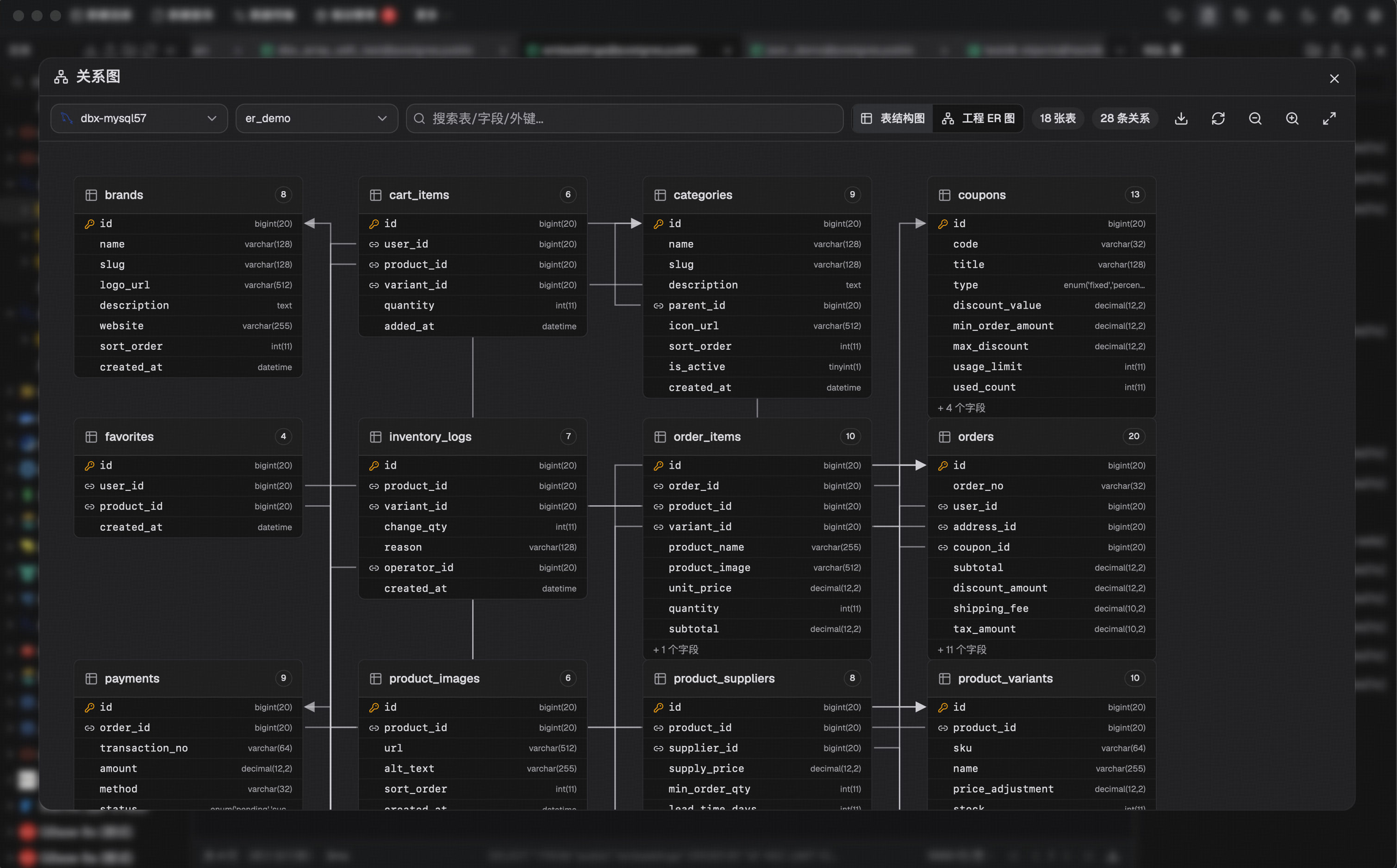
- ER diagram — visualize table relationships
- Schema diff — compare structures across connections
- Explain plan — visual query execution plan
- Field lineage — column-level lineage analysis
- Database search — find objects across large schemas
Data Operations
- Table import — CSV, Excel
- Data transfer — migrate between databases
- Database export — full database dump
- Data compare — compare table data and review synchronization output
- SQL file execution — run
.sqlfiles directly - File preview — drag & drop Parquet, CSV, JSON to preview instantly (powered by DuckDB)
- Connection import — bring connection profiles from DBeaver or Navicat
Specialized Browsers
- Redis — key pattern search, batch key operations, command runner, TTL editing, and all data types (String, Hash, List, Set, ZSet, Stream)
- MongoDB — document CRUD with pagination, Atlas & replica set URL connection
Safety & Connectivity
SSH tunnel (key & password) · database and AI proxy settings · auto-reconnect on connection loss · confirmation dialogs for destructive operations · encrypted config export/import · color-coded connections · driver store and optional JDBC plugin
Polished UI
Dark mode with native title bar sync · 9 editor themes · English, 简体中文 & Español · layout preferences · built-in auto-update
AI Agent Integration (MCP)
DBX provides an MCP server that lets AI coding agents query your databases using connections already configured in DBX.
npx @dbx-app/mcp-server
Add to your .mcp.json:
{
  "mcpServers": {
    "dbx": { "command": "npx", "args": ["-y", "@dbx-app/mcp-server"] }
  }
}
Works with Claude Code, Cursor, Windsurf, and any MCP-compatible agent. Supports listing connections, browsing tables, executing SQL, and opening tables directly in DBX's UI.
DBX also provides a dedicated CLI package for terminal, script, and Codex workflows:
npm install -g @dbx-app/cli
# or via Homebrew
brew tap t8y2/dbx && brew install dbx-cli
dbx connections list --json
dbx query local "select 1" --json
See the MCP server README and CLI README for details.
Install
Download the latest release from the Releases page.
Homebrew (macOS):
brew install --cask dbx
Scoop (Windows):
scoop bucket add dbx https://github.com/t8y2/scoop-bucket
scoop install dbx
Self-Hosted (Docker)
DBX provides a web version that can be deployed via Docker.
docker run -d --name dbx -p 4224:4224 -v dbx-data:/app/data t8y2/dbx
Or with Docker Compose. A ready-to-use example lives at deploy/docker-compose.yml:
services:
  dbx:
    image: t8y2/dbx
    ports:
      - "4224:4224"
    volumes:
      - dbx-data:/app/data
    restart: unless-stopped

volumes:
  dbx-data:
Open http://localhost:4224 in your browser. Multi-arch images (amd64 / arm64) are available.
Getting Started
Prerequisites
System Dependencies
macOS:
No additional dependencies required.
Linux (Ubuntu/Debian):
sudo apt-get install -y libwebkit2gtk-4.1-dev libgtk-3-dev libappindicator3-dev librsvg2-dev patchelf libssl-dev
Windows:
No additional dependencies required.
Development
pnpm install
pnpm dev:tauri
[!TIP] DuckDB compilation takes a while. If you're not working on DuckDB features, skip it to speed up local builds:
# Fast checks (skip DuckDB)
cargo check --no-default-features
cargo test  --no-default-features

# Tauri dev without DuckDB
pnpm tauri dev -- --no-default-features
The
--no-default-featuresflag only affects local development. Release builds (pnpm tauri build) always include DuckDB.
Web version:
pnpm dev:web       # frontend
pnpm dev:backend   # backend
dbx-agents is a separate repository containing JDBC agent driver development projects. For local development, clone it alongside dbx/ under the same workspace directory and open the parent folder in your IDE:
mkdir dbx-workspace && cd dbx-workspace
git clone https://github.com/t8y2/dbx.git
git clone https://github.com/t8y2/dbx-agents.git
# Open dbx-workspace/ in your IDE to work on both projects together
This keeps the two repositories independent (separate git histories) while making it easy to navigate between them during development.
Build
pnpm tauri build
The installer will be in src-tauri/target/release/bundle/.
Tech Stack
| Layer | Technology |
|---|---|
| Framework | Tauri 2 |
| Frontend | Vue 3 + TypeScript |
| UI | shadcn-vue + Tailwind CSS |
| Editor | CodeMirror 6 |
| Backend | Rust + sqlx / tiberius / redis-rs / mongodb |
Community




FAQ
Is DBX free?
Yes. DBX is open source under Apache-2.0. All features are free.Does DBX phone home?
No. DBX does not collect telemetry. The auto-update feature checks GitHub Releases for new versions — you can disable it in settings.Can I use DBX without an internet connection?
Yes. The desktop app works fully offline. For air-gapped driver installs, download offline driver packages from the [Offline Drivers page](https://dbxio.com/en/drivers) on an internet-connected machine, transfer them to the offline machine, then import them in DBX from Settings > Driver Manager. AI features need network access to the model endpoint (or a local model via Ollama).How is DBX different from DBeaver / TablePlus / Beekeeper Studio?
DBX is 15 MB with no runtime dependencies (no Java, no Python). It includes AI and MCP natively — not as plugins. It supports 50+ databases across desktop, Docker, and web from a single codebase.What databases are supported?
MySQL, PostgreSQL, SQLite, Redis, MongoDB, DuckDB, ClickHouse, SQL Server, Oracle, Elasticsearch, MariaDB, TiDB, OceanBase, openGauss, GaussDB, KWDB, KingBase, Vastbase, GoldenDB, Doris, SelectDB, StarRocks, Manticore Search, Redshift, DM, TDengine, XuguDB, CockroachDB, Access, HighGo, and more. Agent/JDBC-oriented profiles extend support to H2, Snowflake, Trino, Hive, DB2, Informix, Neo4j, Cassandra, BigQuery, Kylin, SunDB, Databricks, SAP HANA, Teradata, Vertica, Firebird, Exasol, YashanDB, GBase, Databend, RQLite, Turso, InfluxDB, QuestDB, IoTDB, etcd, IRIS, and custom JDBC connections.How do I report a bug or request a feature?
Open an issue on GitHub Issues.Contributors
Star History
License
What people are saying
“Welcome to dbx Discussions! — 👋 Welcome! We’re using Discussions as a place to connect with other members of our community. We hope that you: * Ask questions you’re wondering about. * Share ideas. * Engage with …”
GH↑ 2t8y2↗
“UI层web性能不足以支撑项目未来发展 — 最近体验了一下项目,整体设计不错,Rust + Vue 的组合也兼顾了开发效率和跨平台能力。 不过作为数据库管理工具,我一直有个疑问:为什么选择 Web UI,而不是尝试全 Rust 的原生 GUI? 数据库客户端和普通后台管理系统其实不太一样。 很多时候用户面对的不是几十条数据,而是: - 百万级甚至千万级表 - 宽表(上百列) - 大结果集滚动浏览 - 高频筛选排序 - 实时刷新监控 -…”
GH↑ 2jazzii36↗
“有计划支持 qdrant milvus 这类向量数据库吗”
GH↑ 1yuchenii↗
“未来是否考虑适配 InfluxDB 这个时序数据库”
GH↑ 1blueiky↗
“文档导入”
GHiakkai↗
“Ask Nathan: Ford's UEV Pickup Update and Is the Aston Martin DBX S as Amazing as it Looks? - TFLcar — TFLcar”
NEWSTFLcar↗
“The 2026 Aston Martin DBX S Is Borderline Absurd: Review - Motor1.com — Motor1.com”
NEWSMotor1.com↗
“Dropbox (DBX) Stock Valuation Check As Flat Revenue And Mixed Returns Leave Signals Split - Yahoo Finance — Yahoo Finance”
NEWSYahoo Finance↗
You might also like
Data
emdash
A full-stack TypeScript CMS built on Astro and Cloudflare. EmDash takes the ideas that made WordPress dominant -- extensibility, admin UX, a plugin ecosystem -- and rebuilds them on serverless, type-safe foundations. Plugins run in sandboxed Worker isolates, solving the fundamental security problem with WordPress's plugin architecture. Or deploy directly to your Cloudflare account: EmDash runs on Cloudflare (D1 + R2 + Workers) or any Node.js server with SQLite. No PHP, no separate hosting tier -- just deploy your Astro site.
Data
osiris
A real-time global intelligence dashboard that aggregates live flight tracking, CCTV networks, earthquake monitoring, conflict zone mapping, and 24/7 news feeds into a single GPU-accelerated interface. Osiris is a production-grade OSINT platform that provides situational awareness across multiple intelligence domains. Built with Next.js 16 and MapLibre GL, every data point is rendered via WebGL for 60fps performance even with thousands of concurrent entities on-screen. Open http://localhost:3000. The image is a multi-stage node:22-alpine standalone build (~220 MB, non-root). The compose file also carries CasaOS app metadata (x-casaos:) for one-click install on CasaOS. See DOCKER.md for the full Docker, CasaOS and API-key guide.
Data
compound engineering plugin
AI skills and agents that make each unit of engineering work easier than the last. Each unit of engineering work should make subsequent units easier -- not harder. Traditional development accumulates technical debt. Every feature adds complexity. Every bug fix leaves behind a little more local knowledge that someone has to rediscover later. The codebase gets larger, the context gets harder to hold, and the next change becomes slower.